AI-Driven Strategy Exploration Workflow
Combining Claude Code, Codex, and similar AI coding agents with AlphaForge as the "brain" lets you autonomously drive idea → implementation → backtest → optimization → validation → live tuning.
Prerequisites
- Audience: intermediate-to-advanced users who already use AI coding agents (Claude Code / Codex). You should be comfortable writing prompts for an agent and understand how slash commands work.
- Requirements: AlphaForge binary v0.5.4+, or the
alpha-trademonorepo dev setup (alpha-forge+alpha-strategies). - Time budget: ~10 min for the initial setup. The exploration loop itself is long-running (hours to overnight) — plan to run it unattended (e.g., overnight) for best results.
- If you want to learn the manual CLI step by step first: read the End-to-End Strategy Workflow before coming back here. This page assumes you want the automated AI exploration path.
- Binary users: complete the "Minimum setup for binary users" section first. Where this page shows monorepo-style commands, you can substitute
alpha-forge(the binary on your PATH) instead.
Minimum setup for binary users
If you installed the binary via the installation guide, you can drive the /explore-strategies flow on this page with just three commands:
# 1. Create any working directory and initialize AlphaForge
mkdir my-strategies && cd my-strategies
alpha-forge system init

# 2. Make subsequent commands pick up this working directory's forge.yaml
#    (add to ~/.zshrc / ~/.bashrc to make it permanent across shell restarts)
export FORGE_CONFIG=$(pwd)/forge.yaml

# 3. Open this directory in Claude Code (or Codex)
claude .       # Claude Code
codex .        # Codex CLI
alpha-forge system init generates the following (v0.5.4+):
| Path | Role |
|---|---|
forge.yaml |
Config (data provider, output paths, etc.) |
data/strategies/, data/results/, data/historical/, etc. |
Strategy / result / data storage |
data/explorer/goals/default/goals.yaml |
Default goal definition for AI exploration (required) |
data/explorer/goals/default/reports/ |
Output directory for /explore-strategies daily reports |
.claude/commands/{explore-strategies,analyze-exploration,grid-tune,tune-live-strategies,update-market-data}.md |
Slash commands for Claude Code |
.agents/skills/.../SKILL.md |
Skills for Codex |
docs/{quick-start,user-guide}.{ja,en}.md |
Bundled documentation |
Edit goals/default/goals.yaml to align the target symbols (exploration.assets) and pass criteria (target_metrics) with your own strategy development direction. Add more goals (e.g., goals/crypto/goals.yaml, goals/fx/goals.yaml) and you can run them in parallel with /explore-strategies --goal <name>.
After that, follow the rest of this page — the Overall Flow section below and Steps 1 through 4 — verbatim. The monorepo-style commands like uv --directory alpha-forge run alpha-forge or op run --env-file=... can simply be read as alpha-forge (or alpha-forge if you have it on your PATH) when using the binary.
Why AI agents × AlphaForge
AlphaForge is designed so that all configuration, strategies, and execution flow through JSON / YAML / CLI. This means:
- AI agents can generate, edit, and validate strategy JSON
- Backtest and optimization results return as structured data an agent can analyze
- Slash commands let you replay the same workflow idempotently
- You can run autonomous overnight exploration without depending on rate limits or human time
The result: humans focus on "directional decisions" and "pass/fail judgment", while exploration and parameter tuning are delegated to the agent.
Manual vs. AI-driven: when to use which
| Goal | Recommended flow |
|---|---|
| Understand every step of AlphaForge | End-to-End Strategy Development Workflow (manual CLI) |
| Quickly explore new indicator × symbol combinations | This page (AI-driven autonomous exploration) |
| Already have a promising strategy and want to fine-tune | Start from Step 3 /grid-tune |
| Monitor drift in live strategies | Step 4 /tune-live-strategies |
Recommended coding agents
A comparison of agents that pair well with alpha-forge as of April 2026:
| Agent | Strengths | Rate / cost (rough) | Slash-command support |
|---|---|---|---|
| Claude Code (recommended) | File-edit precision, long-running tasks, Sonnet/Opus mix | Subscription or API metered | ✅ Native .claude/commands/*.md |
| Codex CLI | Strong baseline, OpenAI models | API metered (e.g., GPT-5) | △ Custom prompts via config |
| Cursor | IDE integration, efficient interactive flow | Subscription | △ Composer / Rules workaround |
| Aider | OSS, multi-model, git integration | Model cost only | △ Manual /<command> aliases |
The rest of this page assumes Claude Code. With other agents, point them at .claude/commands/*.md to reproduce the same flow.
Setting up Claude Code for unattended runs
To run /explore-strategies --runs 0 (or any long continuous run) without stopping for permission prompts, you need to pre-authorize the required operations in Claude Code's allow list. Without this, Claude Code will pause and ask for confirmation every time it encounters an unlisted operation.
Add the following patterns to permissions.allow in .claude/settings.local.json (your personal settings — gitignored):
{
  "permissions": {
    "allow": [
      "Write(alpha-strategies/data/strategies/*.json)",
      "Bash(uv --directory alpha-forge run alpha-forge *)",
      "Bash(FORGE_CONFIG=* uv --directory alpha-forge run alpha-forge *)",
      "Bash(git -C */alpha-strategies add data/)",
      "Bash(git -C */alpha-strategies commit *)",
      "Bash(git -C */alpha-strategies push)",
      "Bash(rm */alpha-strategies/data/strategies/*.json)",
      "Bash(rm */data/strategies/*.json)"
    ]
  }
}
All paths are relative to alpha-trade/ as the working root.
Binary users: read these paths as relative to your working directory
The allow patterns above assume the alpha-trade monorepo (alpha-strategies/data/strategies/*.json, uv --directory alpha-forge run alpha-forge). In the working directory you created under "Minimum setup for binary users" (e.g. my-strategies/), strategy JSON is written to <working-dir>/data/strategies/, and commands invoke the alpha-forge binary on your PATH directly. For the binary, substitute the following patterns:
"Write(data/strategies/*.json)",
"Bash(alpha-forge *)",
"Bash(FORGE_CONFIG=* alpha-forge *)",
"Bash(FORCE_COLOR=1 FORGE_CONFIG=* alpha-forge *)",
"Bash(rm data/strategies/*.json)"
git -C */alpha-strategies ...) only if you keep your working directory under git, adjusting them to your repository path.
| Pattern | What it authorizes |
|---|---|
Write(alpha-strategies/data/strategies/*.json) |
Writing strategy JSON files (one per strategy) |
Bash(uv --directory alpha-forge run alpha-forge *) |
Direct alpha-forge execution |
Bash(FORGE_CONFIG=* uv --directory alpha-forge run alpha-forge *) |
Forge commands with any FORGE_CONFIG (relative or absolute) |
Bash(git -C */alpha-strategies add data/) |
Staging exploration results |
Bash(git -C */alpha-strategies commit *) |
Committing exploration results |
Bash(git -C */alpha-strategies push) |
Pushing to alpha-strategies |
Bash(rm */alpha-strategies/data/strategies/*.json) |
Deleting temp files for failed strategies |
Bash(rm */data/strategies/*.json) |
Same, handling different working directory contexts |
About settings.local.json
settings.local.json is listed in .gitignore and is never shared with teammates. Each developer must configure it individually in their own environment. Do not add these entries to the tracked settings.json.
If you already have a permissions.allow section
Merge the new entries into your existing array — do not overwrite the entire file, or you will lose your existing permissions.
Using 1Password
If you run alpha-forge via op run, add these patterns as well:
"Bash(op run --env-file=alpha-forge/.env.op -- uv --directory alpha-forge run alpha-forge *)",
"Bash(FORCE_COLOR=* FORGE_CONFIG=* op run * uv --directory alpha-forge run alpha-forge explore run *)",
"Bash(FORGE_CONFIG=* op run * uv --directory alpha-forge run alpha-forge strategy *)",
"Bash(FORGE_CONFIG=* op run * uv --directory alpha-forge run alpha-forge data fetch *)",
"Bash(FORGE_CONFIG=* op run * uv --directory alpha-forge run alpha-forge explore *)"
FORCE_COLOR=1 prefix is required
The /explore-strategies skill mandates that alpha-forge backtest run / alpha-forge optimize run / alpha-forge optimize walk-forward / alpha-forge explore run be prefixed with FORCE_COLOR=1 so that progress bars render correctly (alpha-forge issue #410). Because the command line begins with FORCE_COLOR=1, it does not match existing patterns that start with FORGE_CONFIG=... and may trigger a permission prompt that blocks unattended runs. Add the following patterns:
Non-interactive execution (FORGE_NONINTERACTIVE)
alpha-forge's destructive / overwrite operations (strategy delete / strategy purge / optimize run --apply / optimize grid / optimize clean / pine delete / pine clean / explore recommend prune / data tv-mcp cache-clean / self update, etc.) have confirmation prompts. In non-interactive environments such as CI, pipes, and agents (subprocess), these prompts can hang. Epic #1083 established the conventions for non-interactive execution aimed at agent / CI usage.
- Disable all prompts via env var: setting
FORGE_NONINTERACTIVE=1(true/yes/onalso work) or a truthyCIflips all confirmation prompts into non-interactive mode. A non-TTY stdin (pipe / subprocess execution) is treated the same way automatically. - Behavior:
- Destructive operations (delete / overwrite) stop with exit code
2unless--yes/-yis given (no silent hang). Pass--yesto each command, or preview with--dry-run. - Safe "continue?"-style confirmations proceed without prompting.
- Destructive operations (delete / overwrite) stop with exit code
- Commands given
--jsonimmediately return exit code2when confirmation is required and--yesis missing (to avoid hanging while the caller waits for pure JSON on stdout).
| Exit code | Meaning |
|---|---|
0 |
Success (including an explicit user cancel) |
1 |
not found / expected execution failure (use this to stop unattended loops) |
2 |
argument error / missing --yes in non-interactive execution |
When --json is set, stdout contains pure JSON only; decoration, progress, and warnings go to stderr. A not-found under --json emits {error, code, id} to stdout with exit code 1.
# Safely invoking a destructive command from an agent / CI
FORGE_NONINTERACTIVE=1 alpha-forge optimize clean --older-than 30d --yes --json
For the full set of conventions (JSON output, exit codes, and system config), see CLI conventions for agents.
EULA auto-accept is a separate env var
FORGE_NONINTERACTIVE does not auto-accept the first-run EULA prompt. In CI, combine it with FORGE_ACCEPT_EULA=1 (see Getting Started).
Detecting 1Password session expiry early (unattended runs)
For unattended runs (overnight batches, etc.), an expired op session causes every subsequent op run invocation to fail with an authentication error. The /explore-strategies skill runs alpha-forge system auth check op at the start of each loop iteration and stops the loop with exit code 2 when the session is invalid (alpha-forge issue #411).
# Verify session validity
uv --directory alpha-forge run alpha-forge system auth check op
echo "exit: $?"   # 0 = valid, 2 = session expired / op missing / timeout
| Exit code | Meaning | Recommended action |
|---|---|---|
0 |
Session valid | Continue the loop |
2 |
Auth error (expired session, op CLI missing, etc.) | Stop the loop immediately, append a note to <goal_dir>/explored_log.md, and prompt the user to run interactive op signin |
The skill performs this check automatically — no extra configuration is needed. If you build a long-running loop manually, insert the same check at the head of each iteration.
Setting up Codex CLI for unattended runs
To run the same kind of long job with Codex CLI, configure the approval policy and sandbox scope instead of a command-by-command allow list like Claude Code's permissions.allow.
First, add an unattended profile to ~/.codex/config.toml:
Then start codex exec with that profile, pinning the working root and any additional writable directories:
codex exec \
  --profile alforge-labs-unattended \
  --cd /absolute/path/alpha-trade \
  --add-dir /absolute/path/alpha-trade/alpha-strategies \
  "Use the explore-strategies skill to explore the default goal with the equivalent of --runs 0."
Replace /absolute/path/ with your actual path (e.g., /Users/yourname/dev/alpha-trade). If --cd points at the alpha-trade monorepo root, most operations already stay inside the workspace. Add --add-dir when your strategy JSON output lives in a separate worktree or an external alpha-strategies checkout.
| Setting / option | Purpose |
|---|---|
approval_policy = "never" |
Prevent approval prompts during the run; failures are returned to Codex directly |
sandbox_mode = "workspace-write" |
Limit writes to the workspace and explicitly added directories |
--cd /.../alpha-trade |
Fix Codex's working root to the monorepo |
--add-dir /.../alpha-strategies |
Allow writes to a strategy JSON directory outside the working root |
Avoid full bypass by default
--dangerously-bypass-approvals-and-sandbox disables both approvals and sandboxing. Do not use it for normal local exploration unless you are running inside an externally isolated throwaway environment.
Prefetch data first
Codex's workspace-write sandbox may restrict network access depending on your environment. For symbols that need alpha-forge data fetch / alpha-forge data update, run /update-market-data or alpha-forge data fetch <SYMBOL> manually before starting the unattended run.
Overall flow
Prepare: /update-market-data — bring data up to date
  ↓
Choose a starting point (pick one of 3 exploration scenarios)
  ↓
Step 1: /explore-strategies [--goal <name>] [--runs N]
  └─ Auto backtest → optimize → WFT for each symbol × indicator combo
     Pre-filter: Sharpe ≥ 1.0 AND MaxDD ≤ 30%
  ↓
Step 2: /analyze-exploration
  └─ Aggregate all logs; output next recommended candidates to recommendations.yaml
  ↓
Step 3: /grid-tune
  └─ Exhaustive grid search on promising strategies + WFT re-validation
  ↓
Step 4: /tune-live-strategies
  └─ Drift detection and re-tuning for live strategies
Preparation: Fetch historical data
Before starting exploration, make sure the target symbol data is up to date.
# Bulk incremental update of stored data (binary: alpha-forge data update <SYMBOL>)
> /update-market-data
/update-market-data runs alpha-forge data list to find registered symbols and calls alpha-forge data update on each. For brand-new symbols, run alpha-forge data fetch <SYMBOL> manually first.
Three exploration scenarios
AI agent × AlphaForge usage falls into three categories based on what you're starting from.
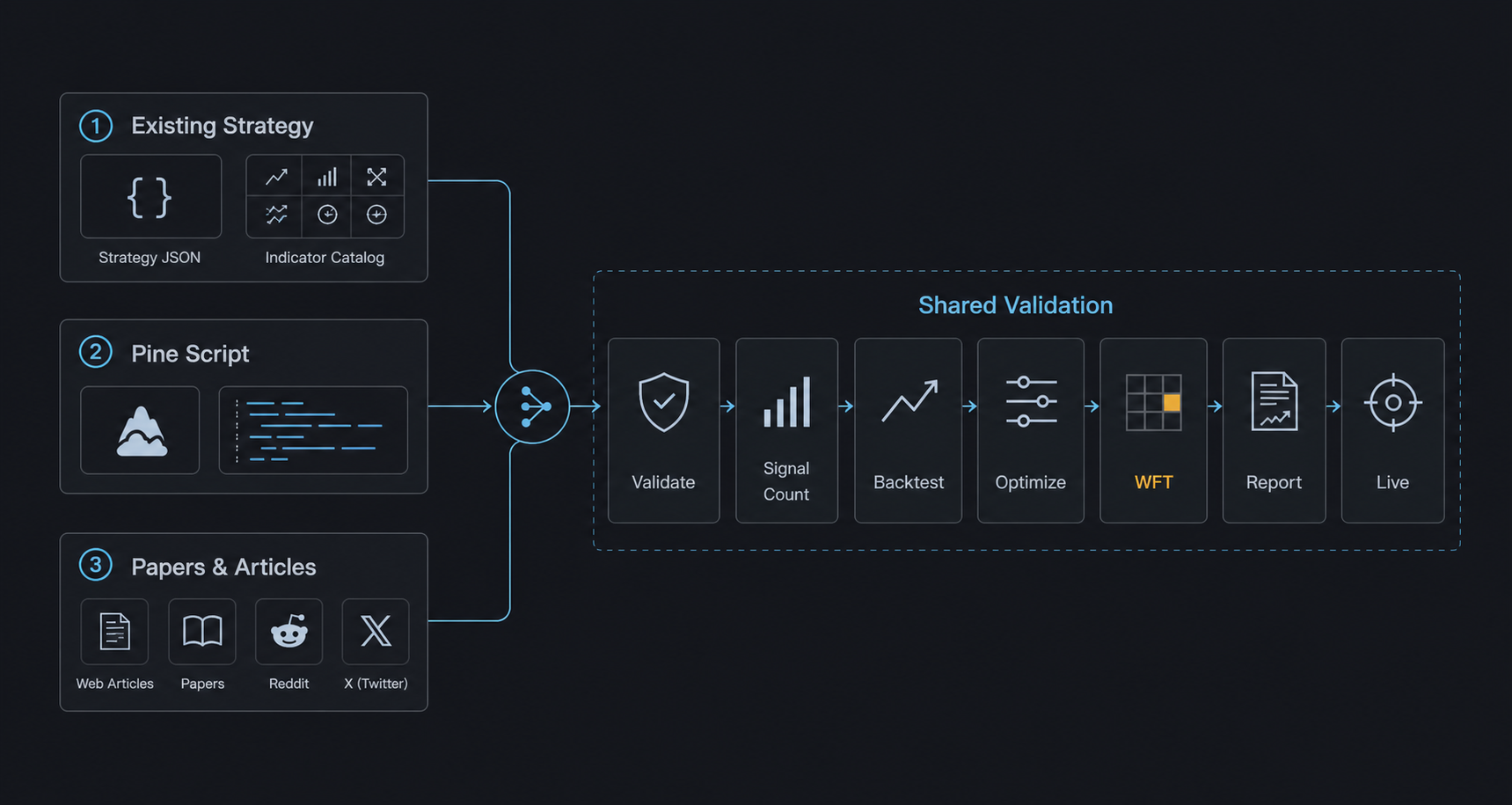
Scenario 1: Combinations from existing strategies / indicators
Starting point: Your existing strategy JSON files and the alpha-forge analyze indicator list catalog.
Typical flow:
- Tell Claude Code: "Take
alpha-forge strategy show hmm_bb_pipeline_v1(a bundled template) as the base and add MACD to create a derivative." - The agent edits the JSON and creates
hmm_bb_pipeline_macd_v1.json alpha-forge strategy validate→alpha-forge strategy save→alpha-forge backtest run- If Sharpe improves, run
alpha-forge optimize runto fine-tune
Tip: With /explore-strategies, you can fully delegate combination selection through reporting to the agent.
Scenario 2: Apply a TradingView Pine Script
Starting point: A public TradingView strategy or indicator (.pine file).
Typical flow:
- Save an interesting Pine Script locally (
tv_<name>.pine) - Import:
alpha-forge pine import tv_<name>.pine --id imported_v1 - Tell the agent: "Reorganize this strategy's
parametersandindicators, and add anoptimizer_config." - The agent reshapes the JSON and surfaces optimization targets
alpha-forge backtest run→alpha-forge optimize runto validate AlphaForge-style- If good, regenerate via
alpha-forge pine generateand verify on TradingView
Tip: Bringing Pine Script logic into JSON form unlocks all of AlphaForge's analysis (optimize, WFT, Monte Carlo).
Scenario 3: Mine forums / papers from the web
Starting point: X (Twitter), Reddit /r/algotrading, SSRN papers, QuantConnect / QuantStart articles.
Typical flow:
- Hand Claude Code a URL or PDF and ask: "Extract the core logic of this strategy into
indicatorsandentry_conditions." - The agent summarizes the article and drafts a strategy JSON
alpha-forge strategy validateto catch logical errors → fixalpha-forge backtest signal-countto verify signal count (conditions not too restrictive)alpha-forge backtest run→ optimize as needed- Compare the article's claimed results vs the actual backtest (often unreproducible)
Tip: Paper strategies often fail to reproduce when "data period", "symbol", or "transaction costs" differ. Letting the agent soberly compare "claimed" vs "real" results acts as a reality filter.
Step 1: Exploration phase (/explore-strategies)
Purpose: Find a strategy meeting target metrics from goals/<goal_name>/goals.yaml (e.g., Sharpe ≥ 1.5) by trying untried indicator × symbol combinations.
Steps (summary)
- Pre-flight: Read
goals/<goal_name>/goals.yaml,goals/<goal_name>/explored_log.md, and existing strategy JSON files; identify untried combinations - Strategy generation: Pick one indicator × symbol combo, generate the strategy JSON, and save under
data/strategies/<name>.json - Register → validate:
alpha-forge strategy save→alpha-forge strategy validatefor logical consistency (rollback on failure) - Data fetch:
alpha-forge data fetch <SYMBOL> --period 5y(only if not already cached) - Run the full pipeline in one command:
alpha-forge explore run <SYMBOL> --strategy <name> --goal <goal_name> --jsonSignal check → backtest → optimize → walk-forward → coverage update → DB registration — all in one step - Record outcome: Read
passed/skip_reasonfrom the output JSON, then append togoals/<goal_name>/explored_log.mdandgoals/<goal_name>/reports/YYYY-MM-DD.md. Whenpassed: falseandcleanup_done: true, strategy JSON and result JSON have already been removed automatically
> /explore-strategies                          # One run (default goal)
> /explore-strategies --goal stocks            # Specify goal
> /explore-strategies --runs 3                 # 3 runs in sequence
> /explore-strategies --goal crypto --runs 0   # Loop until rate limit or all combinations exhausted
Pass/fail criteria
| Phase | Criterion |
|---|---|
| Pre-filter (pre_filter) | Sharpe ≥ 1.0 AND MaxDD ≤ 30% |
| WFT final pass | All-window mean WFT Sharpe ≥ target_metrics.sharpe_ratio in goals/<goal_name>/goals.yaml |
Optional: TradingView MCP attach for passing strategies (issue #582)
When tv_mcp.pine_verify.enabled: true is set in forge.yaml and a TradingView MCP server is running, the /explore-strategies skill automatically runs the following for each passing strategy and writes the TV consistency check plus a chart PNG to goals/<goal_name>/reports/<strategy_id>/ (fail-soft: MCP connection or metrics-fetch failures only emit a warning log and do not change the strategy verdict or coverage registration):
alpha-forge pine verify --check-mode metrics --auto-backtest --mcp-server-flavor vinicius --output reports/<id>/verify.mdalpha-forge journal report --with-chart --symbol <SYM> --interval D --output reports/<id>/journal.md
For goals without an MCP server running (or with tv_mcp.pine_verify.enabled: false), the step is skipped and the existing loop behavior is preserved. See the TradingView Pine integration guide for details.
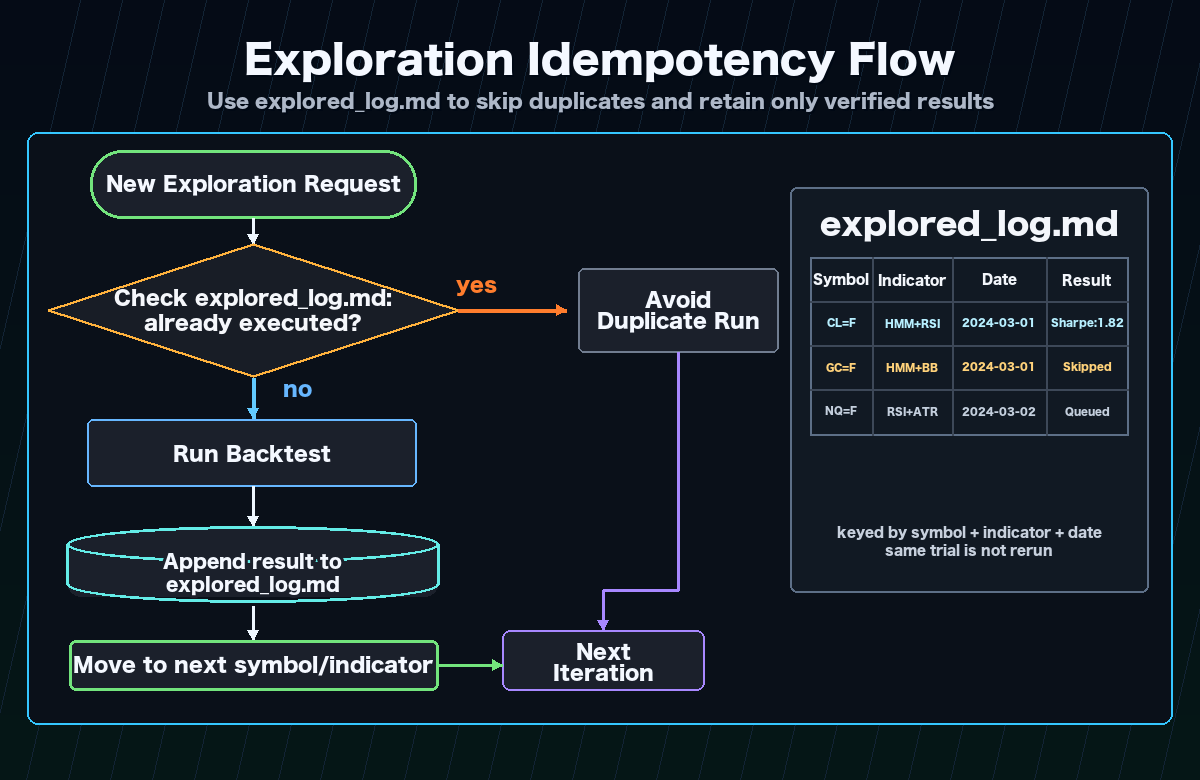
Idempotency
goals/<goal_name>/explored_log.md acts as the checkpoint, so re-runs never re-explore the same combination within a goal. Safe to interrupt and resume at any time.
Continuous runs and rate limit handling
Use --runs 0 to loop until a rate limit is hit or all combinations are exhausted.
| Agent | Main limit | Mitigation |
|---|---|---|
| Claude Code | 5-hour token window (plan-dependent) | Spread across night → morning → noon (3 windows) |
| Codex | RPM / TPM (per model) | Lower parallelism; serialize to one iteration at a time |
| Cursor | Monthly / daily request limit | Composer Agent is heavy; reserve for strategy generation |
Parallel execution with multiple goals
Goals are independent — each has its own explored_log.md under goals/<name>/. You can run different goals simultaneously in separate Claude Code sessions without conflicts. Backtest results are shared via exploration.db, so the same symbol × indicator combination is never backtested twice across goals.
Scaffold supported indicators and behavior (post issue #427)
alpha-forge strategy scaffold supports the following indicators:
- mean-reversion: BB (required), RSI, MACD, ADX, SUPERTREND, STOCH, HMM, SMA (long-term trend filter), EMA (mid-term trend filter)
- trend-following: EMA (required), ADX, MACD, RSI, SUPERTREND, STOCH, HMM, BB (volatility / trend confirmation filter), SMA (long-term bull/bear filter)
- ATR is auto-added for all types (use
--no-atrto disable)
Requesting an indicator that is incompatible with the chosen strategy type raises an explicit ValueError; indicators are never silently dropped. See alpha-forge issue #427 for details.
mean-reversion + single EMA/SMA + FX/commodity is signal-starve prone (issue #830)
Combining --type mean-reversion with a single EMA or SMA trend filter on FX (USDJPY=X, etc.) / commodity (GC=F / CL=F, etc.) symbols structurally produces almost no overlap between the BB ±1.5σ break (entry) and the close > long-EMA/SMA filter — many runs return no_signals (0 trades) across a full 5y backtest.
scaffold emits a stderr WARNING with suggested alternatives (non-blocking — generation still succeeds). The empirically validated control case BB+MACD+RSI was the first combination to pass pre_filter on USDJPY (Sharpe=1.00). Recommended alternatives:
- Drop the
EMA/SMAfilter (useBB+RSIorBB+MACD+RSI) - Swap in
MACDas the trend filter (validated as the firstpre_filter-passing FX combination) - Add a second trend filter (e.g.
EMA,SUPERTRENDso they OR-aggregate) - Switch to
--type trend-following
STOCH double-oscillator AND-aggregation is signal-starve prone (issue #857)
alpha-forge strategy scaffold prints a stderr WARNING + remediation list (non-blocking) for the following combinations. They were observed to produce drastically low or zero trade counts in the 2026-05-21 exploration sweep.
| Pattern | Condition | Observed example |
|---|---|---|
| A: Double-oscillator AND (mean-reversion) | STOCH + RSI + mean-reversion |
GC=F BB+RSI+STOCH → trades 67, Sharpe -1.42 |
| B: Double-oscillator AND (trend-following) | STOCH + RSI + trend-following |
CL=F EMA+RSI+STOCH → trades 4 |
| C: SMA trend filter + STOCH | STOCH + SMA + mean-reversion |
USDJPY=X BB+SMA+STOCH → trades 0 (no_signals) |
⚠️  warning: STOCH double-oscillator signal-starve risk detected
  Using RSI and STOCH simultaneously in strategy_type=mean-reversion AND-aggregates both
  oversold/overbought (mean-reversion) or overheat filters (trend-following), structurally
  collapsing entry opportunities (issue #857).
  Alternatives:
  - Drop either RSI or STOCH (single-oscillator strategy)
  - Drop STOCH and use the classical BB+RSI mean-reversion / EMA+RSI trend-following
  - OR-aggregate the RSI and STOCH conditions (requires scaffold logic change)
  - Use MACD histogram as the momentum filter instead
Not covered: STOCH alone (BB+STOCH / EMA+STOCH), STOCH+ADX (NVDA EMA+STOCH+ADX produced trades 1071 — different problem than signal-starve, just a Sharpe shortfall), STOCH+MACD.
Recurring HMM non-convergence on a symbol triggers a scaffold WARNING (issue #852)
alpha-forge strategy scaffold queries exploration.db and, when the same symbol × HMM combination produced skip_reason="hmm_not_converged" in at least the configured ratio (default 0.6) of the last N trials (default 5), prints a WARNING + remediation list to stderr. The aggregation normalizes =F / =X suffixes so e.g. EURUSD=X warnings include EURUSD history.
⚠️  warning: HMM compatibility risk detected
  symbol=EURUSD + HMM failed with hmm_not_converged in 4 of the last 5 trials (issue #843).
  Alternatives:
  - Increase HMM params.n_iter to 500 or more in the strategy JSON
  - Switch HMM features to ["return", "bb_width"] or ["return", "atr_ratio"]
  - Try a non-HMM regime indicator (BB band width / ATR ratio / ADX)
  - Try the same combination on a different symbol; drop HMM for this symbol
The thresholds can be overridden in goals.yaml (defaults are usually sufficient):
HMM strict mode and n_iter override (issue #852)
The exploration.hmm section in goals.yaml controls HMM-specific behavior:
exploration:
  hmm:
    allow_non_converged: false   # default true; false promotes partial non-convergence to a hard failure
    n_iter: 500                  # default 200 - sets the n_iter baked into HMM strategies that scaffold generates
allow_non_converged |
All fits non-converged | Partial (some non-converged) | All converged |
|---|---|---|---|
true (default, issue #843) |
Promote to skip_reason="hmm_not_converged" |
Keep existing skip_reason | Keep existing skip_reason |
false (strict, issue #852) |
Promote to skip_reason="hmm_not_converged" |
Promote to skip_reason="hmm_not_converged" |
Keep existing skip_reason |
exploration.hmm.n_iter is written into indicators[HMM].params.n_iter whenever alpha-forge strategy scaffold --goal <name> is invoked. An explicit n_iter inside the strategy JSON still wins.
Both long and short entries (issue #469)
scaffold now generates both long and short entry_conditions / exit_conditions. In symmetric markets such as FX this doubles the opportunity surface and lets the strategy capture profit on the down leg as well.
| Strategy type | long | short |
|---|---|---|
| mean-reversion | BB lower touch → exit on bb_mid cross up | BB upper touch → exit on bb_mid cross down |
| trend-following | EMA fast cross up → exit on cross down | EMA fast cross down → exit on cross up |
Filters are mirrored across directions:
- RSI: oversold → overbought (long) / overbought → oversold (short)
- MACD histogram: < 0 (long) / > 0 (short)
- ADX: identical (range detection is direction-agnostic)
- SuperTrend / SMA / EMA: price above (long) / price below (short)
When HMM is enabled, the range regime (mean-reversion state 1) or the high-return state (trend-following state 0) allows both directions. For long-only stock strategies, delete entry_conditions.short after scaffolding.
Reversal confirmation bar (issue #470)
For mean-reversion strategies, --confirm-bars 1 requires that the bar after a BB touch closes as a reversal candle before an entry fires. This avoids the "knife-catch" problem of entering at the moment of a BB break.
| confirm_bars | long entry |
|---|---|
| 0 (default) | close < bb_lower (instant) |
| 1 | close.shift(1) < bb_lower.shift(1) & close > open (prev-bar break + current-bar bullish candle) |
Short is mirrored (prev-bar BB upper break + current-bar bearish candle). Set the default per goal with goals.yaml.exploration.scaffold_defaults.confirm_bars: 1.
confirm_bars=2/3 (issue #473): 2 / 3 consecutive reversal bars. wick_ratio option additionally requires pin-bar reversals (wick ≥ body × N):
alpha-forge strategy scaffold --symbol GBPUSD=X --indicators BB,EMA,ADX \
  --type mean-reversion --confirm-bars 2 --wick-ratio 1.0 --allow-extreme --save
Mind the indicator-count gate (issue #888) when using --confirm-bars
--indicators BB,EMA,ADX auto-adds ATR (4 indicators), and --confirm-bars then adds a reversal-confirmation EXPR indicator, bringing the total to 5 indicators. Five or more indicators produce overly tight AND conditions that flood no_signals / pre_filter_failed, so scaffold aborts with exit 1 ("Indicator count 5 produces overly tight AND conditions… Use --allow-extreme to override intentionally."). Add --allow-extreme, as shown above, when you intend to try such a combination.
Set goals.yaml.scaffold_defaults.wick_ratio: 1.0 for a goal default. Measured impact (GBPUSD BB+EMA+ADX 1h): confirm_bars=2 + wick_ratio=1.0 yields trades 140→7 / MDD 87% → 8.84% / CAGR -55% → +3.40% (MDD shrinks to 1/10, CAGR flips positive). For more trades, lower wick_ratio to ~0.5.
Per-goal scaffold defaults (issue #461)
Goal-specific leverage / position size / stop can be set in the exploration.scaffold_defaults section of goals.yaml, and alpha-forge strategy scaffold --goal <name> applies them automatically. exploration.initial_capital overrides the forge.yaml capital assumption.
# Example: oanda_gold/goals.yaml
exploration:
  initial_capital: 6800              # USD-denominated capital assumption (forge.yaml override)
  scaffold_defaults:
    position_size_pct: 100
    leverage: 5
    type_overrides:
      mean-reversion:
        stop_loss_pct: 1.5
        take_profit_pct: 3.0
      trend-following:
        stop_loss_pct: null          # null = keep scaffold's existing default
CLI:
# Goal reference
alpha-forge strategy scaffold --symbol USDJPY=X --indicators BB,RSI \
  --type mean-reversion --strategy-id usdjpy_bb_rsi_v1 \
  --goal oanda_gold --save

# Explicit flags (override)
alpha-forge strategy scaffold ... \
  --position-size-pct 100 --leverage 5 \
  --stop-loss-pct 1.5 --take-profit-pct 3.0 --save
Priority: explicit CLI flag > goals.yaml.scaffold_defaults (+ type_overrides) > existing defaults
alpha-forge backtest run --goal <name> and alpha-forge explore run --goal <name> also read goals.yaml.exploration.initial_capital and override the BacktestConfig (no need to edit forge.yaml).
Typical use cases:
oanda_gold(maintain OANDA Gold): 1M JPY (~6,800 USD) × 5x leveragecommodities: 5-10x leverage for futuresdefault/stocks: no leverage / 10-15% sizing (existing defaults)
scaffold default field reference (issue #784)
Defaults, units, and intent of the risk_management section emitted by alpha-forge strategy scaffold. Fields not specified via CLI flags or scaffold_defaults are written with the values below (including null).
| Field | scaffold default | Unit | Notes |
|---|---|---|---|
position_size_pct |
type-specific: mean-reversion=15.0 / trend-following=50.0 (issue #949) | % of equity | Fraction of equity per position (used in fixed mode). trend-following assumes long-term holding, so #949 raised it from 10.0 to 50.0 |
position_sizing_method |
"fixed" |
— | fixed / risk_based / signal_strength / kelly (static size from prior stats via the Kelly criterion; requires kelly_win_rate_pct and kelly_payoff_ratio, kelly_fraction defaults to 0.5) / vol_target (per-bar dynamic size = target vol ÷ realized vol; requires vol_target_annual_pct, vol_lookback_bars defaults to 20, vol_max_size_pct defaults to 100) |
risk_per_trade_pct |
1.0 | % of equity / trade | Only used in risk_based mode (size = risk_per_trade_pct ÷ stop_loss_pct) |
max_positions |
1 | count | Max concurrent open positions |
leverage |
1.0 | multiplier | 0=no position, 1=unleveraged, >1=leveraged |
stop_loss_pct |
type-specific: mean-reversion=2.0 (vol-tier default, issue #886) / trend-following=null |
% from entry price | mean-reversion uses tier-specific defaults when --vol-tier is set, and 2.0 otherwise. null=no SL |
take_profit_pct |
type-specific: mean-reversion=4.0 (vol-tier default, issue #886) / trend-following=null |
% from entry price | mean-reversion uses tier-specific defaults when --vol-tier is set, and 4.0 otherwise. null=no TP |
trailing_stop_pct |
null |
% drawdown from peak close (issue #765) | null=no trailing |
commission_pct |
null |
% per side, absolute | null inherits forge.yaml backtest.commission_pct (issue #766) |
slippage_pct |
null |
% per side, absolute | Same — inherits backtest.slippage_pct |
partial_fill_pct |
null |
% | null=100% fill (market order) |
entry_limit_pct |
null |
% offset from prior close | null=market order |
All
%values are absolute percentages (not bps). For example,commission_pct: 0.10means 0.10% (= 10 bps).
Broker preset backtest defaults in forge.yaml
Strategies with commission_pct / slippage_pct set to null inherit forge.yaml backtest.commission_pct / slippage_pct. The broker presets selectable via alpha-forge system init --template [commodities|crypto|default|fx|stocks] (src/alpha_forge/resources/config/*.yaml) ship the following defaults:
| Preset | backtest.commission_pct |
backtest.slippage_pct |
Intent |
|---|---|---|---|
crypto.yaml |
0.10% | 0.05% | Crypto exchange taker fees |
stocks.yaml |
0.0% | 0.01% | US-stock CFDs / zero-commission brokers |
commodities.yaml |
0.0% | 0.02% | Commodity-futures CFDs |
fx.yaml |
0.0% | 0.005% | FX CFD majors |
default.yaml |
0.0% | 0.01% | Generic CFD default |
Real-broker cost examples: moomoo US Stock ≈ 0.49% (≈ 0.5% of trade value), Binance Spot taker = 0.10%, IBKR US Stock = 0.005 USD/share (% varies by symbol).
If your broker differs significantly from the preset, either edit the
backtestsection inforge.yaml, or pass--commission-pct/--slippage-pctduring scaffold so the value is baked into the strategy JSON.
Cost presets (cost_preset, issue #785)
Built-in: 11 broker / exchange cost presets. Either set forge.yaml.backtest.cost_preset for a default, or pass --cost-preset from the CLI for ad-hoc switching.
# List built-in presets (with source URLs)
alpha-forge strategy cost-presets

# As JSON
alpha-forge strategy cost-presets --json
| Preset | commission_pct | slippage_pct | Other | Intent |
|---|---|---|---|---|
moomoo-us-stock |
0.0% | 0.01% | — | moomoo paper/live US stocks, commission-free |
moomoo-crypto-spot |
0.49% | 0.05% | — | moomoo crypto live (US, live only) |
moomoo-hk-stock |
0.03% | 0.02% | — | moomoo paper/live HK stocks |
binance-spot-vip0 |
0.10% | 0.02% | maker/taker both 0.10% | Binance Spot regular |
binance-spot-vip5 |
0.057% | 0.02% | maker -0.013% (rebate) / taker 0.057% | Binance VIP 5 |
kraken-spot |
0.26% | 0.03% | maker 0.16% / taker 0.26% | Kraken Pro tier 0 |
coinbase-advanced |
0.40% | 0.03% | maker 0.25% / taker 0.40% | Coinbase Advanced Trade |
oanda-fx-major |
0.0% | 0.0% | spread 0.015% | OANDA FX majors |
oanda-fx-minor |
0.0% | 0.0% | spread 0.030% | OANDA FX minors |
ibkr-us-stock-fixed |
0.0% | 0.01% | $0.005/share (min $1) | IBKR Fixed Pricing |
ibkr-us-stock-tiered |
0.0% | 0.01% | $0.0035/share (min $0.35) | IBKR Tiered Pricing |
Engine integration scope (as of 2026-05, cost preset series complete): the backtest engine honors these fields: -
commission_pct/slippage_pct/spread_pct— both from the strategy JSON andforge.yaml(strategy JSON >forge.yaml, alpha-forge#785 PR1 + alpha-forge#792 PR2) -maker_pct/taker_pct— strategies withentry_limit_pctuse (entry=maker + exit=taker) / 2 as effective commission; market-only strategies use taker (alpha-forge#793 PR3). An explicitrm.commission_pctstill wins (backward-compatible). Rebates (maker_pct < 0, e.g. Binance VIP5) are added in as-is -fixed_per_share/fixed_per_share_min— IBKR-style per-share commissions are approximated as equivalent pct usingmean(close)and added toeffective_fees(alpha-forge#794 PR4).fixed_per_share_minis passed to vectorbt'sfixed_fees(per-trade min fee) and takes precedence overforge.yaml.backtest.min_commission. Themean(close)approximation introduces error for wide-price-range symbols (strict per-trade shares computation is not supported due to vectorbt's single-fees constraint)
Usage:
# Set a default preset in forge.yaml
backtest:
  cost_preset: "moomoo-crypto-spot"
  # commission_pct: 0.20   # ← explicit value overrides the preset
# Bake the preset into the strategy JSON at scaffold time
alpha-forge strategy scaffold --symbol BTC-USD --indicators EMA,SMA \
  --type trend-following --strategy-id btc_v1 \
  --cost-preset moomoo-crypto-spot --save

# Re-evaluate an existing strategy under a different broker (strategy JSON unchanged)
alpha-forge backtest run BTC-USD --strategy btc_v1 \
  --cost-preset binance-spot-vip0 --json
When scaffold is invoked with --cost-preset, the preset name is recorded in risk_management.cost_preset_used of the strategy JSON, making it traceable later which cost model the strategy was designed against.
User-defined presets can also be added in forge.yaml (same-name built-ins are overridden):
# forge.yaml
backtest:
  cost_preset: "my-bitflyer"

cost_presets:
  my-bitflyer:
    commission_pct: 0.15
    slippage_pct: 0.03
    description: "bitFlyer Lightning (Japan residents)"
Priority (high → low): explicit --commission-pct etc. > strategy JSON risk_management.commission_pct > forge.yaml.backtest.commission_pct (explicit) > cost_presets[forge.yaml.backtest.cost_preset] > built-in default
Per-goal timeframe / backtest_period (issue #463)
To support shorter timeframes (e.g. 1h), exploration.timeframe and exploration.backtest_period can be specified as goal-level defaults in goals.yaml.
# Example: oanda_gold/goals.yaml (high-frequency FX setup)
exploration:
  timeframe: "1h"           # strategy timeframe produced by scaffold (default: "1d")
  backtest_period: "2y"     # data fetch period for explore run (default: "5y")
These values flow into the timeframe of strategies generated by alpha-forge strategy scaffold --goal <name> and the data fetch period used by alpha-forge explore run --goal <name>. Use --timeframe to override per invocation:
alpha-forge strategy scaffold --symbol USDJPY=X --indicators BB,RSI \
  --type mean-reversion --strategy-id usdjpy_bb_rsi_1h_v1 \
  --timeframe 1h --save
Priority: explicit --timeframe > goals.yaml.exploration.timeframe > default "1d"
yfinance constraint: The yfinance provider hits Yahoo Finance's 730-day cap, so 1h × 5y is not retrievable (measured: 1h × 2y yields ~12,000 bars). When using 1h, shorten to backtest_period: "2y" or switch to an alternative provider such as Dukascopy or OANDA.
Per-goal backtest_period and data_provider_override (long-term data / issue #674)
Many low-frequency strategies (HMM-based trend-following, etc.) cannot satisfy wft.min_oos_trades_per_window with only 5 years of data (issue #670). Long-term data exploration helps. Real-world testing confirmed that yfinance can retrieve 20y × 1d (~5030 bars) without issues (the "yfinance ~5y limit" really applies only to the 730-day cap on the 1h timeframe; 1d / 1w / 1mo retrieve 20y+ fine).
# Example: long-term-stocks/goals.yaml (shipped template)
exploration:
  backtest_period: "20y"        # 20-year data (yfinance 1d works)
  assets:
    - SPY
    - QQQ
    - NVDA
    - AAPL
    - MSFT
    - GOOGL
Manually pre-cache the long-term data before starting /explore-strategies (avoids rate limits during unattended runs):
for sym in SPY QQQ NVDA AAPL MSFT GOOGL; do
  alpha-forge data fetch $sym --provider yfinance --period 20y --interval 1d
done
Empirical result (NVDA EMA+MACD+SuperTrend, 20y):
| Window | OOS Sharpe | OOS Trades | min_oos_trades(=3) |
|---|---|---|---|
| 1 | -0.01 | 3 | ✅ |
| 2 | 0.97 | 3 | ✅ |
| 3 | — | 0 | ❌ |
| 4 | -1.68 | 6 | ✅ |
| 5 | -0.12 | 5 | ✅ |
→ 4 of 5 windows met min_oos_trades_per_window=3. With 20-year data, the per-window trade count constraint that was structurally infeasible for the default goal (5y) becomes realistic.
data_provider_override (per-goal provider override)
exploration.data_provider_override.{stock|fx} in goals.yaml overrides forge.yaml's stock_provider / fx_provider on a per-goal basis. Useful when one goal needs to switch to oanda or dukascopy:
exploration:
  data_provider_override:
    stock: tv_mcp     # e.g. switch to TradingView MCP for short-term chart use cases
    fx: oanda         # e.g. only switch FX to OANDA
⚠️ TV MCP cannot be used for long-term fetches (issue #683)
Thechart_scroll_to_datetool in tradesdontlie / vinicius MCP servers fails with"evaluate is not defined", so TV Desktop never loads historical data beyond what is currently shown. Sincedata_get_ohlcvonly returns bars currently visible on the chart,alpha-forge data fetch <SYM> --provider tv_mcp --period 20yreturns only the latest ~14 months. Use yfinance for long-term data.
TV MCP is still useful for Pine verification (alpha-forge pine verify --check-mode metrics) and chart PNG capture (alpha-forge data tv-mcp chart).
/explore-strategies TV MCP preflight
When a goal has exploration.data_provider_override.{stock|fx}: tv_mcp set, the skill executes alpha-forge data tv-mcp check --json at the start of each run:
- Exit
0: continue - Exit
2: endpoint missing / TV Desktop not running / MCP server connection failed → loop is stopped and recorded to<goal_dir>/explored_log.md(no auto-launch / no retry)
Early cutoff via pre_filter min_trades (issue #429)
Adding min_trades to the pre_filter section of goals.yaml makes alpha-forge explore run abort strategies whose backtest trade count is below the threshold immediately after the backtest, skipping the Optuna optimization (tens of seconds to minutes) and WFT to save compute resources.
pre_filter:
  sharpe_ratio:        ">= 1.0"
  max_drawdown:        "<= 30%"
  min_trades:          ">= 15"          # issue #429: roughly half of target_metrics.min_trades is recommended
  monthly_volume_usd:  ">= 500000"
Behavior:
- When
total_tradesafter the backtest is belowpre_filter.min_trades,pre_filter_pass=falseand the run is aborted withstatus="pre_filter_failed" pre_filter_diagnostics.failed_criteriaincludes"trades", andtrades.thresholdmatches thegoals.yamlvalue- When
min_tradesis omitted (or set to>= 0), the trade count check is disabled (backwards compatibility) - Genuinely promising strategies (Sharpe>1.0 with insufficient trades) are still rescued by the auto-relaxation variants (#428) described below, which broaden the search space
pre_filter.near_pass rescue zone (issue #452 / #456)
Mechanism that lets "almost-passing" strategies proceed to the optimizer. Configure under pre_filter.near_pass in goals.yaml; eligibility is decided in 3 stages.
pre_filter:
  sharpe_ratio: ">= 1.0"
  max_drawdown: "<= 30%"
  near_pass:
    # Stage 1: factors (independent coefficient evaluation / issue #452)
    sharpe_ratio: 0.9
    max_drawdown: 1.1
    min_trades: 0.8

    # Stage 2: cross_compensation (issue #456)
    cross_compensation:
      max_drawdown_floor: 0.1     # MDD <= 30% × 0.1 = 3% triggers sharpe relaxation
      sharpe_relax_factor: 0.7    # sharpe acceptable down to 1.0 × 0.7 = 0.7
      # optional: min_trades_floor: 5.0  # trades >= 30 × 5 = 150 also triggers

    # Stage 3: composite (issue #456)
    composite:
      calmar_ratio: 5.0           # CAGR/MDD >= 5.0 rescues sharpe shortfall
Order: factors → cross_compensation → composite. The first stage that returns eligible runs the optimizer. cross_compensation and composite only apply when sharpe is the only failed criterion (multi-metric failures are not rescued).
pre_filter_diagnostics.near_pass records eligible_via (factors/cross_compensation/composite/null) and compensation_evidence (rescue rationale) for observability.
Typical rescue cases (issue #456):
- QQQ ADX+EMA+SuperTrend: sharpe 0.771 / MDD 0.91% / trades 705 → MDD is 1/33 of the threshold → rescued via cross_compensation
- CL=F BB+RSI: sharpe 0.758 / MDD 1.84% / trades 36 → same pattern, rescued
pre_filter.monthly_volume_usd evaluation (issue #459)
monthly_volume_usd (monthly USD turnover) is computed by MetricsCalculator._calc_monthly_volume_usd. Setting pre_filter.monthly_volume_usd >= N in goals.yaml actively evaluates the value at pre_filter time, and shortfall strategies have monthly_volume_usd added to failed_criteria.
Useful for enforcing OANDA Gold status (monthly turnover ≥ 500,000 USD):
When unset or >= 0, evaluation is skipped (backwards compatible).
target_metrics arbitrary-metric evaluation (issue #458)
The target_metrics section of goals.yaml accepts the following arbitrary metrics. alpha-forge explore run Step 5 evaluates every entry, and the structured outcome is stored in DB under target_metrics_diagnostics.
| Metric | Meaning | Source |
|---|---|---|
sharpe_ratio |
Sharpe ratio | WFT average when exploration.optimization_metric is the default sharpe_ratio. Issue #912: automatically falls back to backtest evaluation when switched to another metric. |
max_drawdown |
Max drawdown (%) | backtest |
cagr |
Annual return (%) | backtest (becomes WFT average only when optimization_metric: cagr_pct) |
win_rate_pct |
Trade win rate (%) | backtest |
profit_factor |
Profit / loss (null when all trades are winners — issue #791) |
backtest |
min_trades |
Lower bound on trade count | backtest |
calmar_ratio |
CAGR / MDD (recommended, issue #845) | backtest (becomes WFT average only when optimization_metric: calmar_ratio, issue #912) |
sortino_ratio |
Downside-only risk-adjusted return (issue #912) | backtest (becomes WFT average only when optimization_metric: sortino_ratio) |
cagr_at_target_dd |
Leverage-adjusted CAGR (%, issue #673) | backtest (derived) |
implied_leverage_to_target_dd |
Leverage multiplier to scale linearly to the reference MaxDD | backtest (derived) |
positive_months_ratio |
Fraction of profitable months (0–1) | backtest |
worst_month_pnl_pct |
Worst-month P&L (%) | backtest |
best_month_pnl_pct |
Best-month P&L (%) | backtest |
consecutive_negative_months |
Max consecutive negative months | backtest |
worst_oos_sharpe |
Minimum OOS Sharpe across WFT valid windows (issue #859) | backtest (WFT injected) |
wft_sharpe_std |
Population stdev (pstdev) of OOS Sharpe across WFT valid windows (issue #859) | backtest (WFT injected) |
positive_oos_windows_ratio |
Fraction of WFT valid windows with OOS Sharpe > 0 (0–1, issue #859) | backtest (WFT injected) |
Example requiring a high positive-months ratio (not a guarantee of achieving it):
target_metrics:
  positive_months_ratio: ">= 0.9"
  worst_month_pnl_pct: ">= -1.5"
  consecutive_negative_months: "<= 2"
  max_drawdown: "<= 5%"
  profit_factor: ">= 1.3"
Unsupported metric names or operators are skipped with a warning (the strategy is not marked failed because of them).
Risk-adjusted-return criteria for low-vol strategies (issue #673 / #845, recommended)
cagr >= 20% alone discards otherwise excellent low-volatility / low-return strategies (e.g. Sharpe 1.4 / MaxDD 0.5% / CAGR 0.6%). Since real-world deployments lever up to lift CAGR, evaluating with risk-adjusted criteria salvages more high-quality candidates.
Option A) calmar_ratio — simplest, no derived_metrics_config: needed:
target_metrics:
  sharpe_ratio:  ">= 1.5"
  calmar_ratio:  ">= 0.8"     # CAGR/MDD ≥ 0.8 (≡ CAGR 20% at MaxDD 25%)
  max_drawdown:  "<= 25%"
  min_trades:    ">= 30"
Option B) cagr_at_target_dd — when you want the absolute return target after leverage:
target_metrics:
  sharpe_ratio:       ">= 1.5"
  cagr_at_target_dd:  ">= 20%"  # CAGR scaled linearly to target_metrics.max_drawdown
  max_drawdown:       "<= 25%"
  min_trades:         ">= 30"
# derived_metrics_config: not required (reference_max_dd_pct auto-detected from max_drawdown)
The reference MaxDD for cagr_at_target_dd is auto-detected from target_metrics.max_drawdown (issue #845). Override with derived_metrics_config.reference_max_dd_pct if needed. Leverage adjustment uses a linear assumption (ignores funding cost / borrow / slippage).
Option C) cagr_at_target_dd_realistic — when you want the absolute return target after funding / borrow / slippage costs (issue #850):
target_metrics:
  sharpe_ratio:                ">= 1.5"
  cagr_at_target_dd_realistic: ">= 20%"   # after funding / borrow / slippage drag
  max_drawdown:                "<= 25%"
  min_trades:                  ">= 30"
derived_metrics_config:
  reference_max_dd_pct: 25.0
  funding_cost_pct_per_year: 3.0      # margin borrow rate, e.g. SBI 2.0 / IBKR 3.0
  borrow_fee_pct_per_year: 0.0        # FX short borrow rate (0 disables)
  slippage_amplification_factor: 1.0  # 1.0 keeps slippage linear; >1.0 adds drag per leverage unit
Computation (% units):
funding_drag    = max(0, implied_leverage - 1) * funding_cost_pct_per_year
borrow_drag     = (short_exposure_pct / 100) * borrow_fee_pct_per_year
slippage_drag   = annualized_slippage_pct
                  * (slippage_amplification_factor - 1) * implied_leverage
cagr_at_target_dd_realistic
                = cagr_at_target_dd - funding_drag - borrow_drag - slippage_drag
- Only
funding_cost_pct_per_yearis active today. Whenimplied_leverage > 1, the formula subtracts(implied_leverage - 1) × rate%from CAGR. Withimplied_leverage <= 1the drag is 0 (no borrowing). borrow_fee_pct_per_yearandslippage_amplification_factorare forward-compatible hooks. BecauseMetricsCalculatordoes not yet emitshort_exposure_pct/annualized_slippage_pct, those drag terms evaluate to 0. They will take effect once those backtest fields are added; you can safely declare the config keys now.
compute_derived_metrics records two machine-readable fields in bt_metrics: derived_metrics_assumption ("linear_no_cost" or "with_costs") and derived_metrics_costs_applied (list of applied cost names). alpha-forge explore result show <id> prints a footnote listing which cost terms are applied.
Carry-aware evaluation for explore (exploration.carry: true)
FX swap (carry) strategies can have a negative price-only Sharpe that turns positive once swap income is included. Setting exploration.carry: true in goals.yaml switches the entire alpha-forge explore run evaluation pipeline (backtest → pre_filter → optimization → WFT → pass/fail → DB record) to FX-carry-inclusive metrics (carry_adjusted_metrics), so carry-seeking strategies are no longer wrongly rejected by a price-only pre_filter.
# goals.yaml
exploration:
  carry: true
  optimization_metric: carry_sharpe_ratio   # optional; without it the Optuna objective stays price-only sharpe_ratio

target_metrics:
  carry_sharpe_ratio: ">= 1.0"
  carry_cagr:         ">= 8%"
  carry_max_drawdown: "<= 25%"
Enabling it: just add exploration.carry: true to the goal's goals.yaml. Carry is resolved through the same path as backtest run --carry / optimize run --carry (priority: ① a stored real swap-point series via data alt import-swap → ② the backtest.carry mapping in forge.yaml → ③ the built-in currency-to-rate-series mapping). If none of the three resolve, explore run does not silently fall back to price-only — it stops with UsageError (exit code 2), a deliberate fail-fast so a carry goal's evaluation axis never drifts back to price-only unnoticed.
Evaluation-axis switch table: with carry enabled, the following stages are judged against carry_adjusted_metrics values instead of price-only ones. Since carry is a per-goal setting, the axis stays consistent throughout a single goal.
| Stage | carry disabled (default) | carry enabled |
|---|---|---|
| pre_filter (Sharpe / MaxDD) | price-only sharpe_ratio / max_drawdown_pct |
carry-side sharpe_ratio / max_drawdown_pct |
| pre_filter (trade count) | price-only total_trades |
unchanged — stays price-only (same convention as optimize run --carry) |
| near_pass (factors / cross_compensation / composite) | judged on price-only values | judged on carry-side values; the composite calmar rescue uses the carry-derived calmar_ratio (from carry_cagr_pct / carry_max_drawdown_pct) |
| Optimization (Optuna objective) | optimization_metric defaults to sharpe_ratio |
maximizes the carry side only when optimization_metric: carry_sharpe_ratio / carry_cagr_pct is set explicitly (otherwise stays price-only) |
| WFT (OOS evaluation) | price-only result from bt_engine.run() |
when optimization_metric is carry_*, OOS is evaluated from carry_adjusted_metrics (oos_total_trades stays price-only) |
| target_metrics | sharpe_ratio / cagr / max_drawdown etc. |
carry_sharpe_ratio (WFT average when optimization_metric=carry_sharpe_ratio, backtest otherwise) / carry_cagr / carry_max_drawdown / carry_calmar_ratio / carry_total_return (all backtest-sourced) |
| Auto-relax / recommendations | parent/child comparison and score computed from price-only sharpe_ratio / max_drawdown_pct |
parent/child comparison and score / basis_sharpe / basis_maxdd computed from carry-side values |
Metrics that don't exist on the carry side: carry_adjusted_metrics only contains total_return_pct / cagr_pct / max_drawdown_pct / sharpe_ratio / volatility_pct (plus annual_breakdown). total_trades / win_rate_pct / profit_factor / sortino_ratio and monthly-series metrics (e.g. positive_months_ratio) don't exist on the carry side, so writing them into a carry goal's target_metrics can't be evaluated on that axis (the value resolves to None, which is logged as a warning and skipped rather than failing the strategy).
Per-window WFT carry is an approximation: each WFT window's and OOS segment's carry is computed by reindexing the full-period accrual series onto that window's index (partial application). This means the elapsed-day count for a window's first bar is still computed against the full-period baseline — a known approximation that only affects the very first carry accrual crossing a window boundary; everything after that follows the normal reindex logic.
DB record and result show: trials run with carry enabled get an exploration_trials.carry_adjusted_json column containing {"metrics": {...carry_adjusted_metrics...}, "note": "..."} (non-carry trials store NULL, meaning "not tracked"). It shows up in the carry_adjusted field of alpha-forge explore result show <id> --json, and the text view also prints carry-adjusted Sharpe/CAGR/MaxDD. The pre_filter diagnostics' Sharpe / Max DD labels also get a "(carry)" suffix to make clear they were judged on the carry axis (the trade-count gate has no suffix since it stays price-only).
WFT dispersion target_metrics (issue #859)
The WFT mean Sharpe (the value used by target_metrics.sharpe_ratio) is a plain mean across valid windows and therefore cannot detect pathological patterns where a single peak window inflates the average. For example the QQQ EMA+MACD+SUPERTREND v2/v3 runs from 2026-05-21 had windows=(-1.24, -1.98, -0.98, -0.94, +2.54) with mean -0.32 — looks almost passable, yet four of five windows are deeply negative and the auto-relax v(N+1) chain stalls at degraded_chain.
runner.run() injects the following three dispersion metrics into bt_metrics once WFT completes so target_metrics can threshold them individually.
| Metric | Meaning | None when |
|---|---|---|
worst_oos_sharpe |
Minimum OOS Sharpe across valid windows | no valid windows |
wft_sharpe_std |
Population stdev (pstdev) of OOS Sharpe across valid windows | no valid windows |
positive_oos_windows_ratio |
Fraction of valid windows with OOS Sharpe > 0 (0–1) | no valid windows |
target_metrics:
  sharpe_ratio:                 ">= 1.5"
  worst_oos_sharpe:             ">= -0.5"   # even the worst window stays above -0.5
  wft_sharpe_std:               "<= 1.2"    # keep dispersion within 1.2
  positive_oos_windows_ratio:   ">= 0.6"    # at least 60% of windows positive
The QQQ example would now fail individually on each of worst_oos_sharpe=-1.98 < -0.5, wft_sharpe_std≈1.85 > 1.2, positive_oos_windows_ratio=0.2 < 0.6. The same values are also surfaced in wft_diagnostics.summary as worst_oos_metric / oos_metric_std / positive_oos_windows_ratio (the bt_metrics keys exposed to target_metrics use the sharpe-explicit names worst_oos_sharpe / wft_sharpe_std).
Auto-relaxation of failed variants (issue #428)
alpha-forge explore run automatically generates a relaxed v(N+1) variant JSON for any strategy that passed pre_filter but failed WFT (status="wft_failed"), and registers it as rank: 1 in recommendations.yaml. The agent no longer needs to craft v(N+1) variants by hand.
Trigger: status="wft_failed" (covers skip_reason of wft_insufficient_oos_data / wft_no_valid_oos_windows / wft_failed) and pre_filter passed.
Relaxation rules (up to 2 per variant, in priority order):
| Parameter pattern | Mutation |
|---|---|
rsi*_th / rsi*entry* / rsi2_entry_th |
max += 10 (loosen entry threshold) |
adx_threshold |
min -= 5 (loosen ADX filter) |
*length / *period |
max *= 0.7 (shorten lookback period) |
Example CLI output:
❌ SPY / spy_atr_ema_macd_v1 — failed (wft_insufficient_oos_data)
  ✓ Sharpe=1.17; quality is acceptable. Auto-generated relaxed variant spy_atr_ema_macd_v2 (rsi_th.max=80→90)
  ✓ Registered in recommendations.yaml as rank: 1
alpha-forge explore result show <name> --json exposes an auto_relax field. skipped_reason="duplicate_id" means the variant already exists; "no_relaxable_params" means no parameter in param_ranges matched the relaxation rules. Disable the feature with alpha-forge explore run --no-auto-relax.
Health-check gate (auto-escalation on consecutive failures)
When running unattended with --runs 0, a scaffold bug or goals.yaml drift can quietly produce a loop where every trial fails. To catch this early, /explore-strategies invokes alpha-forge explore health --strict at the start of every iteration and inspects the most recent five trials (alpha-forge issue #408).
Trigger conditions and behavior:
- All last 5 trials failed and scaffold transformation rate is
>= 50%→escalation: true(escalation_type: "scaffold_degradation") — hard stop - All last 5 trials share the same
indicator_combo→ - scaffold transformation rate
<= 10%→warning: true/escalation: false(escalation_type: "agent_selection_bias", the agent is intentionally repeating the same combo) — loop continues (issue #467) - mid-range (10% < rate < 50%) → conservatively treated as
escalation: true/"scaffold_degradation" - Fewer than 5 trials in the DB (shallow history) → observe-only, never blocks
When escalation: true fires the command exits with code 1, and the skill stops the loop and surfaces recommended_actions to the human operator. With warning: true (agent_selection_bias) the command still exits 0; the skill prints recommended_actions and the agent is expected to pick a different indicator combo in the next iteration (the recent_selections diversity guard then auto-resolves the warning). escalation_type tells you whether to investigate scaffold (alpha-forge) or adjust agent behavior (alpha-forge issues #436 / #467). See the alpha-forge explore health reference for full details.
Step 2: Analysis & narrowing down (/analyze-exploration)
Purpose: Aggregate all past exploration logs and scientifically recommend the next set of combinations to try.
Processing
- Read all of
goals/*/explored_log.md+goals/*/reports/*.md - Build a per-symbol performance table (trials, max/avg Sharpe, min MaxDD, pass count)
- Build a per-indicator-set performance table (trials, avg/max Sharpe, pass rate)
- Score untried combinations (0–10):
- Average Sharpe of similar indicators (+0–4)
- Symbol with few trials = more room to explore (+0–2)
- Indicator novelty (+0–2)
- Listed in the previous run's recommendations (+2)
- Save the report to
data/explorer/analysis/YYYY-MM-DD_HH-MM.md - Write top-5 candidates to
recommendations.yaml(read by the next/explore-strategies)
Sample output (recommendations.yaml)
candidates:
  - rank: 1
    asset: QQQ
    indicators: [HMM, BBANDS, RSI, MACD]
    score: 8.5
    rationale: "HMM × BBANDS shows high avg Sharpe; QQQ has few trials; MACD adds novelty."
    basis_sharpe: 1.32
    basis_maxdd: 18.4
    variant_of: hmm_bb_pipeline_v1
Step 3: Precision tuning (/grid-tune)
Purpose: For a strategy that passed Step 1, expand optimizer_config.param_ranges into a Cartesian grid and run an exhaustive search; on pass, save automatically as <name>_optimized.
Steps
- Inspect the strategy:
alpha-forge strategy show <strategy_name>to confirmparam_rangesand grid size - Signal count check (mandatory):
alpha-forge backtest signal-count - Capture baseline:
alpha-forge backtest runto record the original strategy's Sharpe - Exhaustive grid search:
alpha-forge optimize grid <symbol> --strategy <name> --metric sharpe_ratio --top-k 20 --chunk-size 100 --max-memory-mb 4096 --min-trades 30 --save --save-format csv --yes - Review Top-20 (overfitting smell, clustering of top trials)
- Apply best:
alpha-forge optimize grid ... --top-k 1 --apply --yes - WFT validation:
alpha-forge optimize walk-forward <symbol> --strategy <name>_optimized --windows 5 - Decision: If WFT mean Sharpe exceeds the original strategy's Sharpe, pass
- Pass →
alpha-forge journal verdict <name>_optimized <run_id> pass - Fail →
alpha-forge strategy delete <name>_optimized --yes+ add anoteto the original strategy's journal
- Pass →
Memory / OOM guidance
- 1 symbol × 5 years × 1,000-cell grid →
--chunk-size 100 --max-memory-mb 4096runs without OOM - Larger grids → drop to
--chunk-size 50 --max-memory-mb 2048 - Coarsening
stepinparam_rangesis also effective
Step 4: Live monitoring (/tune-live-strategies)
Purpose: For strategies running live, detect drift between live performance and backtest, and automatically re-tune the affected strategies.
Steps
- Detect drift:
alpha-forge live list→ for each strategy ID, runalpha-forge live compare <strategy_id>and pick those exceedinglive_tuning.sharpe_drift_thresholdingoals/<goal_name>/goals.yaml - Re-optimize: For each drifting strategy:
alpha-forge optimize run <SYMBOL> --strategy <name> --metric sharpe_ratio --savealpha-forge optimize walk-forward <SYMBOL> --strategy <name> --windows 5
- Adoption decision: Update
<name>_optimized.jsononly if WFT mean Sharpe improves; keep current otherwise - Append the report to
data/explorer/reports/tuning-YYYY-MM-DD.md
A weekly cron or manual periodic run is sufficient. If drift persists for N consecutive weeks, consider rethinking the strategy (replace indicators, switch scenario).
Key files
alpha-strategies/data/explorer/
├── goals/
│   ├── default/                       # Default goal (used when --goal is omitted)
│   │   ├── goals.yaml                 # Target metrics and exploration scope
│   │   ├── explored_log.md            # Idempotent checkpoint for this goal
│   │   └── reports/
│   │       ├── YYYY-MM-DD.md          # /explore-strategies daily report
│   │       └── tuning-YYYY-MM-DD.md   # /tune-live-strategies report
│   ├── stocks/                        # US stocks / ETF goal
│   │   ├── goals.yaml
│   │   ├── explored_log.md
│   │   └── reports/
│   ├── commodities/                   # Commodities goal
│   │   └── ...
│   └── crypto/                        # Crypto goal
│       └── ...
├── exploration.db                     # Shared backtest result cache (all goals)
├── recommendations.yaml               # Next-candidate output from /analyze-exploration
└── analysis/
    └── YYYY-MM-DD_HH-MM.md           # /analyze-exploration output
goals/<goal_name>/goals.yaml: Defines target Sharpe, MaxDD, the set of symbols and indicator candidates, and strategies_per_run for each goal. Pass --goal <name> to /explore-strategies to select a goal; defaults to goals/default/.
goals/<goal_name>/explored_log.md: Checkpoint recording every combination tried within a goal. As long as this file exists, the same combination will never be re-explored for that goal.
exploration.db: Shared SQLite cache across all goals. If the same symbol × indicator combination has already been backtested by any goal, the cached result is reused — no duplicate backtest runs.
recommendations.yaml: Next-candidate output from /analyze-exploration. /explore-strategies reads this file and prioritizes high-scoring combinations.
Why run WFT after optimization?
Each step requires a Walk-Forward Test (WFT) to prevent overfitting.
Evaluating only on the in-sample period (the data used for optimization) risks parameters that over-fit that historical data. WFT addresses this by:
- Splitting the full period into multiple windows
- Running "optimize → Out-of-Sample validation" in each window
- Using the OOS mean Sharpe as the final evaluation metric
This design filters out strategies that perform well on past data but are unlikely to work going forward.
End-to-end example (explore → optimize → validate → live)
A worked example: validating and adopting "Add MACD to QQQ HMM × BB × RSI".
# 1. Record the idea (optional; can be linked later)
alpha-forge idea add "Add MACD to QQQ HMM×BB×RSI" \
  --type improvement --tag hmm --tag qqq

# 2. Try one cycle with /explore-strategies (inside Claude Code)
> /explore-strategies
# → Auto-generates strategy JSON; runs validate, signal-count, backtest
# → Sharpe=0.95 fails the pre-filter (requires Sharpe ≥ 1.0)

# 3. Try a derivative (ask the agent to tweak parameters)
> Reduce HMM n_components to 2 for the strategy above and retry
# → Agent generates the revised JSON, re-registers, and backtests (Sharpe=1.18 passes pre-filter)
# → Auto-runs optimize run + walk-forward
# → WFT mean Sharpe=1.32 passes

# 4. Run /grid-tune for exhaustive optimization
> /grid-tune hmm_bb_pipeline_macd_v1 QQQ
# → Grid Top-1 → apply → WFT validation reaches 1.45
# → Records pass via alpha-forge journal verdict

# 5. Sensitivity / overfitting check
alpha-forge optimize sensitivity \
  /path/to/data/results/optimize_hmm_bb_pipeline_macd_v1_optimized_20260415_103021.json
# → overall_robustness_score=0.82 (passes)

# 6. Final approval in journal
alpha-forge journal verdict hmm_bb_pipeline_macd_v1_optimized <run_id> pass
alpha-forge journal note hmm_bb_pipeline_macd_v1_optimized "OOS pass + sensitivity 0.82. Live candidate."

# 7. Generate Pine Script for TradingView
alpha-forge pine generate --strategy hmm_bb_pipeline_macd_v1_optimized --with-training-data

# 8. Begin live operation (deploy execution engine to VPS — out of scope here)

# 9. After a week, compare live vs backtest
alpha-forge live import-events hmm_bb_pipeline_macd_v1_optimized
alpha-forge live compare hmm_bb_pipeline_macd_v1_optimized

# 10. If drift is large, run /tune-live-strategies for auto re-tuning
> /tune-live-strategies
In this entire flow, humans only judge in 3 places:
- Direction of the idea (add MACD to HMM × BB × RSI)
- Top-20 review of grid-tune (sniff overfitting)
- Decision to go live
Everything else runs autonomously through the agent.
Related documentation
- End-to-End Strategy Development Workflow — Manual CLI walkthrough for every step
- Getting Started — Tutorial through the first backtest
- CLI Reference — Every
alpha-forgecommand parameter - Strategy Templates — Bundled strategies like HMM × BB × RSI