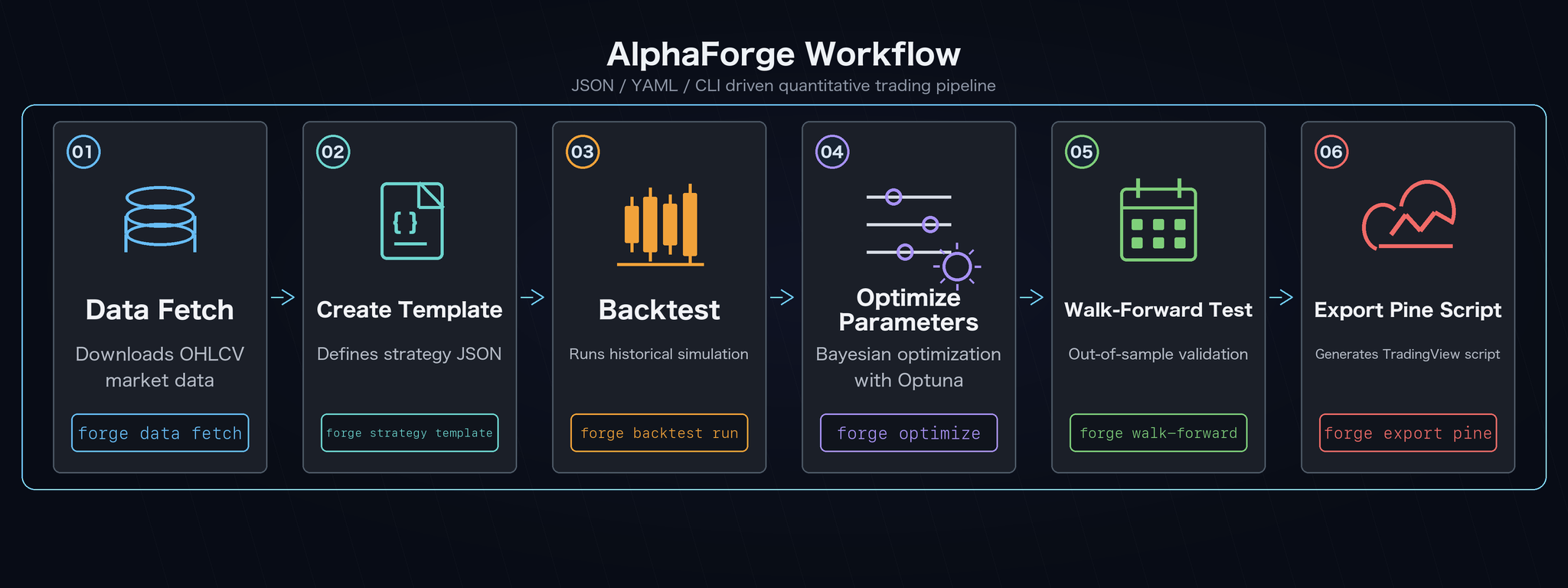
End-to-End Strategy Development Workflow
A typical flow from raw data to live execution. This pairs naturally with a coding agent (e.g. Claude Code) for automated parameter exploration and strategy generation.
Prerequisite
This page assumes you have installed alpha-forge (binary) per Getting Started and have run alpha-forge system init in your working directory (so forge.yaml and data/ exist). All commands invoke alpha-forge directly from the working directory.
If you're working inside the alpha-trade developer monorepo, prepend FORGE_CONFIG=forge.yaml uv --directory alpha-forge run alpha-forge ... to each command.
1. Fetch historical data
Save historical OHLCV data for a target symbol locally.
Symbol naming for FX / Futures / Crypto
yfinance (the default provider) requires fixed suffixes per asset class.
| Asset class | Examples |
|---|---|
| US stocks / ETFs | SPY, AAPL, QQQ |
| FX | USDJPY=X, EURUSD=X, GBPJPY=X (always =X) |
| Futures | CL=F (WTI), GC=F (Gold), ES=F (S&P) |
| Crypto | BTC-USD, ETH-USD (hyphen) |
Quote symbols containing shell metachars (e.g., 'USDJPY=X').
2. Create a strategy from a template
Generate a JSON scaffold, edit parameters, and register it.
How to list available templates (F-005)
There is currently no dedicated alpha-forge strategy template list command.
Use one of the following to discover template IDs.
-
Trigger the error message (fastest) — pass an unknown template name and the error prints the full list of available templates:
-
Check the documentation — each template's details (indicator stack, target markets, recommended use cases) are catalogued in Strategy Templates.
Three fields you should always edit in the JSON
The generated JSON inherits the template's defaults, so edit at minimum:
strategy_id: leaving it assma_crossover_v1collides with the built-in template. Change it to a unique value (e.g.usdjpy_sma_v1).name: a human-readable label.target_symbols: defaults to[]. Either set the symbol list (e.g.["USDJPY=X"]) or pass it on eachalpha-forge backtest run <SYMBOL>.
If you plan to optimize, also fill in optimizer_config.param_ranges. (It works even when null, but explicit ranges are easier to reproduce.)
Then save it to the strategy DB.
Skip DB registration with --strategy-file
alpha-forge backtest run accepts --strategy-file <path>, which loads JSON directly without DB registration — handy during rapid iteration.
3. Run a backtest
Validate the strategy against historical data.
alpha-forge backtest run 'USDJPY=X' --strategy usdjpy_sma_v1

# Show the chart URL and open it in your browser
alpha-forge backtest chart usdjpy_sma_v1 --open
Visualize results in your browser (alpha-visualizer)
The 📊 View charts via alpha-vis serve line printed at the end of alpha-forge backtest run points at the separate OSS package alpha-visualizer. Run alpha-vis serve and your browser opens the Equity / Drawdown / trades / metrics view (install instructions).
4. Optimize parameters
Bayesian search with Optuna (TPE), then apply the best result.
alpha-forge optimize run 'USDJPY=X' --strategy usdjpy_sma_v1 \
  --metric sharpe_ratio --trials 300 --save

# Apply the saved result file (optimize_usdjpy_sma_v1_<timestamp>.json) as a new strategy
# Pass the base ID (no suffix) to --to-strategy. The CLI appends _optimized automatically, registering usdjpy_sma_v1_optimized
alpha-forge optimize apply data/results/optimize_usdjpy_sma_v1_<timestamp>.json \
  --to-strategy usdjpy_sma_v1
When the best score is -inf
Every trial returned NaN. Common causes: the optimization range is too narrow, or the period has too few trades. Re-check optimizer_config.param_ranges and widen the data range.
Visualize optimization results in your browser (alpha-visualizer)
Optimization runs saved with --save are rendered as Grid heatmaps / sensitivity plots / Top-trial equity curves under alpha-visualizer's Optimize view. Start alpha-vis serve in your working directory (e.g., quickstart/).
5. Walk-forward validation
Detect overfitting with out-of-sample testing.
What is a Walk-Forward Test (WFT)? (F-006)
Running alpha-forge optimize run alone optimizes parameters across the entire
period, which often produces a "curve-fitted" strategy that overfits the
very data it was tuned on. WFT cures this by splitting the period into
equal-sized windows and, for each window, optimizing on the In-Sample (IS)
portion and then scoring on the unseen Out-of-Sample (OOS) portion.
If OOS performance stays close to IS performance, the strategy is more
likely to be robust across time.
| Term | Meaning |
|---|---|
| IS (In-Sample) | Training period — the first half of each window, used by Optuna for optimization |
| OOS (Out-of-Sample) | Test period — the second half of each window, scored with the optimized params |
| Window | One equal-sized partition. --windows 5 splits the full period into 5 |
| IS/OOS pair | The IS score and OOS score for each window |
Rule of thumb: if OOS Sharpe is at least half of IS Sharpe, the strategy
leans robust. A high IS that collapses on OOS suggests curve fitting. See
alpha-forge optimize walk-forward CLI reference
for the full option list.
alpha-forge optimize walk-forward 'USDJPY=X' \
  --strategy usdjpy_sma_v1_optimized --windows 5

# Sensitivity analysis (point at the optimization result JSON file)
alpha-forge optimize sensitivity data/results/optimize_usdjpy_sma_v1_<timestamp>.json
When all WFT windows show OOS 0 trades
Short data periods leave each window without any trades. For FX / 1d, aim for ~5 years (~1,250 rows). Either fetch a longer history (alpha-forge data fetch '<SYM>' --period 5y) or coarsen with --windows 2.
Visualize WFT results in your browser (alpha-visualizer)
alpha-visualizer's Optimize view renders the WFO composite equity curve (IS / OOS spliced) plus an IS-vs-OOS stability heatmap. Launch with alpha-vis serve.
6. Generate Pine Script
Export a TradingView alert script from the optimized strategy.
Output: output/pinescript/usdjpy_sma_v1_optimized.pine
Related commands
See CLI Reference for the complete option lists. Next step: Bringing Pine Scripts into TradingView.
See actual output samples
For output formats, equity curve examples, optimization results, and Pine Script samples, see Output Examples.