Getting Started
A complete onboarding guide — from installing AlphaForge CLI to reading your first backtest.
- The ~10-minute Trial walkthrough (no Whop registration required) is at the top. Just install and start using the CLI immediately.
- After that you'll find detailed install instructions, paid-plan login (Lifetime / Annual / Monthly), uninstall, and troubleshooting.
Getting started from an AI agent
Pairing AlphaForge with an AI agent such as Claude Code / Codex / Cursor? You can start from the Agent Quickstart. Installing AlphaForge itself still follows the steps on this page, so finish the install below first.
Glossary (terms used on this page)
| Term | Meaning |
|---|---|
| AlphaForge | The CLI product that runs backtests, parameter optimization, and Pine Script export from a strategy JSON (this tool itself). |
alpha-forge command |
The CLI executable name for AlphaForge. Renamed from forge to alpha-forge in v0.5.0. |
| Trial plan | The default mode immediately after install. No email, no account, no signup required. Data is capped at 2023-12-31 in exchange for access to nearly every feature except Pine Script export. |
| Paid plan | Lifetime / Annual / Monthly. Removes the data date cap and the optimization-trial limit, and enables Pine Script export. |
| Whop | The external billing & license-management platform AlphaForge uses (whop.com). You only create a Whop account when purchasing a paid plan (Google / GitHub SSO also work). |
| OAuth 2.0 PKCE login | After buying a paid plan, alpha-forge system auth login opens your browser, you log in to Whop, and an access token is saved to ~/.config/forge/credentials.json. |
~10-Minute First Backtest on the Trial Plan
What the Trial plan covers (no Whop registration)
- Backtesting & optimization ✅ (data capped at 2023-12-31)
- Optimization trials: up to 50 per run
- Pine Script export ❌ (a paid plan is required)
See Trial Limits for full details.
Starting on a paid plan
Prefer to begin directly on a paid plan (Lifetime / Annual / Monthly)? Buy it from the purchase page. You can also upgrade from Trial later. See Trial Limits for the per-plan feature matrix.
Step 1 — Install (~2 min)
Run in PowerShell (no admin rights needed).
After installation, close all open terminals and open a new one before continuing (new tabs/windows of an already-running Windows Terminal do not pick up the PATH change).
After installation, open a new terminal before continuing.
On macOS (Apple Silicon) you can also install with Homebrew. Updates flow through brew upgrade.
If you have uv / Python, you can install from PyPI too (currently macOS Apple Silicon; more platforms coming). It provides the alpha-forge command.
Verify the installation.
If you see output like AlphaForge, version <X.Y.Z>, you're ready. For manual installation or custom install paths, see Detailed Installation.
Download the latest binary directly
Prefer a manual setup over the installer? Grab the per-platform binaries (alpha-forge-macos-arm64 / alpha-forge-linux-x64 / alpha-forge-windows-x64.exe, etc.) from GitHub Releases (latest). See "Detailed Installation → Manual Install" later on this page for placement and PATH details.
The Trial plan works without Whop registration
From the moment installation finishes, the CLI runs immediately as the Trial plan. Whop OAuth login is only needed when you purchase a paid plan (Lifetime / Annual / Monthly); Trial usage requires nothing additional. See the "Paid-plan login" section later on this page for the upgrade flow.
Step 2 — Initialize the working directory and prepare a strategy file (~2 min)
Create a quickstart/ directory and run alpha-forge system init to bootstrap it. This drops in forge.yaml (configuring strategy/data/result paths) plus subdirectories like data/.
Fastest path: alpha-forge demo runs init-through-backtest in one command
Instead of running each step by hand, a single command performs initialization, a backtest on the bundled DEMO data, the result summary, and the visualization hint all at once (no network or login required).
It creates ./alpha-forge-demo, backtests demo_sma_cross on the bundled DEMO synthetic data, and prints the result summary plus the next action (visualize with alpha-vis serve). If you want to understand each step, follow the manual steps below (alpha-forge demo automates all of them).
v0.12.0+: one-command initialization with a directory name
From v0.12.0 you can pass a directory name, e.g. alpha-forge system init quickstart && cd quickstart, creating and initializing it in one command. A confirmation prompt also now guards against accidental deployment into unintended locations such as your home directory (pass --yes for non-interactive runs like CI).
alpha-forge system init is required
Without forge.yaml, the CLI falls back to its default config, auto-creates a data/ directory, and—if no strategy or data is registered yet—stops with a friendly error message (no raw FileNotFoundError traceback). Running system init first pins the strategy DB location, data store, and result output paths and avoids deploying into an unintended location, so it is recommended to run it before the steps below. The default invocation (no --force) is sufficient for quickstart. Note that when FORGE_CONFIG is unset and there is no config/default.yaml in the current directory, the CLI proceeds on the built-in default config after printing a WARNING (issue #1184); run alpha-forge system init or point FORGE_CONFIG at your forge.yaml to run against the intended locations. In addition, system init automatically deploys bundled synthetic learning data (data/historical/DEMO_1d.parquet) and the demo_sma_cross strategy (data/strategies/demo_sma_cross.json) alongside the config. Pass --no-sample to skip this deployment.
A one-time EULA acceptance prompt [y/n] appears on first run
The first time you run a main command (such as alpha-forge system init above), a summary of the End-User License Agreement (EULA) is shown along with a [y/n] acceptance prompt. Enter y and your acceptance is recorded under ~/.config/forge/, so it won't appear again.
In non-interactive environments (CI, pipes, agents) you can't type y, so the command stops with Aborted!. In that case, set the environment variable FORGE_ACCEPT_EULA=1 (true / yes / on also work) to auto-accept the EULA on first run and continue (available in a recent version onward).
The display language follows your locale
The CLI picks its display language — including the EULA acceptance prompt — from LC_ALL / LC_MESSAGES / LANG: Japanese for a Japanese locale, English for any other real locale. When no locale is set, or it is C / POSIX, it falls back to Japanese.
Set FORGE_LANG to choose explicitly; it takes precedence over the locale.
The full EULA text is available in English only. The prompt shows a summary and points at the full-text file.
Zero-fetch instant result — run the DEMO backtest now
alpha-forge system init automatically deploys bundled synthetic learning data and a demo strategy alongside the config, so you can run a backtest immediately — no data fetch, no network access needed.
DEMO is not a real market ticker. It is synthetic deterministic OHLCV data designed to stay within the Trial plan's date range, pre-deployed at data/historical/DEMO_1d.parquet. The paired demo strategy is at data/strategies/demo_sma_cross.json (strategy ID: demo_sma_cross). Use it to verify your install and get an instant first result.
Suppress the bundled sample with --no-sample
alpha-forge system init --no-sample skips deploying the DEMO data (DEMO_1d.parquet) and the demo_sma_cross strategy.
The steps below use a real-market symbol (SPY) to show the typical workflow.
Save the following as sma_cross.json (the _qs suffix in strategy_id just marks it as the quickstart strategy — feel free to use any ID).
{
  "strategy_id": "sma_cross_qs",
  "name": "SMA Crossover Quickstart",
  "version": "1.0.0",
  "description": "SMA(10)/SMA(50) golden-cross strategy (quickstart sample)",
  "target_symbols": ["SPY"],
  "asset_type": "stock",
  "timeframe": "1d",
  "indicators": [
    { "id": "sma_fast", "type": "SMA", "params": { "length": 10 }, "source": "close" },
    { "id": "sma_slow", "type": "SMA", "params": { "length": 50 }, "source": "close" }
  ],
  "entry_conditions": {
    "long": {
      "logic": "AND",
      "conditions": [{ "left": "sma_fast", "op": ">", "right": "sma_slow" }]
    }
  },
  "exit_conditions": {
    "long": {
      "logic": "AND",
      "conditions": [{ "left": "sma_fast", "op": "<", "right": "sma_slow" }]
    }
  },
  "risk_management": {
    "position_size_pct": 10.0,
    "position_sizing_method": "fixed",
    "max_positions": 1,
    "leverage": 1.0
  }
}
Step 2.5 — Fetch historical data for real-market symbols (~1 min)
Unlike DEMO, real-market symbols such as SPY require a data fetch before backtesting. backtest run does not auto-fetch data for the target symbol, so if you skip this step the next backtest fails with ❌ データが見つかりません: SPY (1d) (data not found).
The data is saved to data/historical/SPY_1d.parquet. Running this step on its own also helps you isolate online-fetch failures (network issues, rate limits) before the backtest.
Step 3 — Register the strategy and run the backtest (~2 min)
Register sma_cross.json (from Step 2) with AlphaForge (the strategy DB).
Run a backtest directly from a JSON file (--strategy-file)
To skip DB registration, you can pass --strategy-file sma_cross.json instead of --strategy. The quickstart uses the registered form, but --strategy-file is handy for fast edit-and-run cycles.
Run a backtest within the Trial plan's data range (up to 2023-12-31).
Historical data must be fetched first
backtest run does not auto-fetch data for the target symbol. If you have not run alpha-forge data fetch SPY --period 10y in Step 2.5, the backtest stops with ❌ データが見つかりません: SPY (1d) (data not found). If it stops, run Step 2.5 and retry.
Step 4 — Read the results (~3 min)
When complete, you'll see output like this.
Your numbers will not match this (sample output)
The figures below were measured with alpha-forge v0.4.0 against SPY 1d
data fetched via yfinance on 2026-05-15. The backtest engine and internal
metrics evolve continuously, and yfinance also adjusts splits/dividends/CA
backfills over time, so the literal numbers printed in this doc drift across
versions (finding F-103b). Don't expect to reproduce 4.74% on your machine —
use this only as a reference for label structure and order-of-magnitude
intuition. For deterministic regression tests, capture
alpha-forge backtest run --json snapshots and diff them against your own baseline.
The CLI label table below maps Japanese CLI labels to conventional English metric names.
Running backtest: SPY x sma_cross_qs  (2019-01-01 → 2023-12-29, 1258 bars)
⚠️  Backtest done   signal-quality score: 0.48/1.0  (0.4–0.7: caution, more validation suggested)
⚠️  Warning: too few trades (trades=15, ≥ 30 recommended)
    → Fewer than 30 trades is statistically noisy and may be filtered out by
      optimization / WFT pre_filter. Consider widening the data period
      (`--start` to go further back).
Total Return: 4.74%   CAGR: 0.93%
SR: 0.85   Sortino: -2.86   Calmar: 0.52
MDD: 1.79%   Length: 71d   Recovery: 154d
PF: 4.01   Win%: 35.7%   avgWin: 10.39%   avgLoss: -1.72%
Kelly: 0.25  Payoff: 6.04  Expectancy: 2.60%/trade  GPR: 0.31  Ulcer: 0.0079  Recovery: 2.65
Trades: 15   AvgHold: 56.8d(57bar)   Max: 218.0d(218bar)   Win streak: 4   Loss streak: 6
Win-rate CI(90%): 17.8% - 54.8%
📊 View charts via `alpha-vis serve` (result ID: sma_cross_qs_report)
DB save: run_id=<uuid>
A quick read of the key metrics is below. For the full metric list, see Reading the Results in detail or the CLI Reference.
| CLI label | Conventional name | What it means |
|---|---|---|
| CAGR | CAGR (annualized return) | Compare against S&P 500 (~10% avg). A positive CAGR that still trails the market means limited added value. |
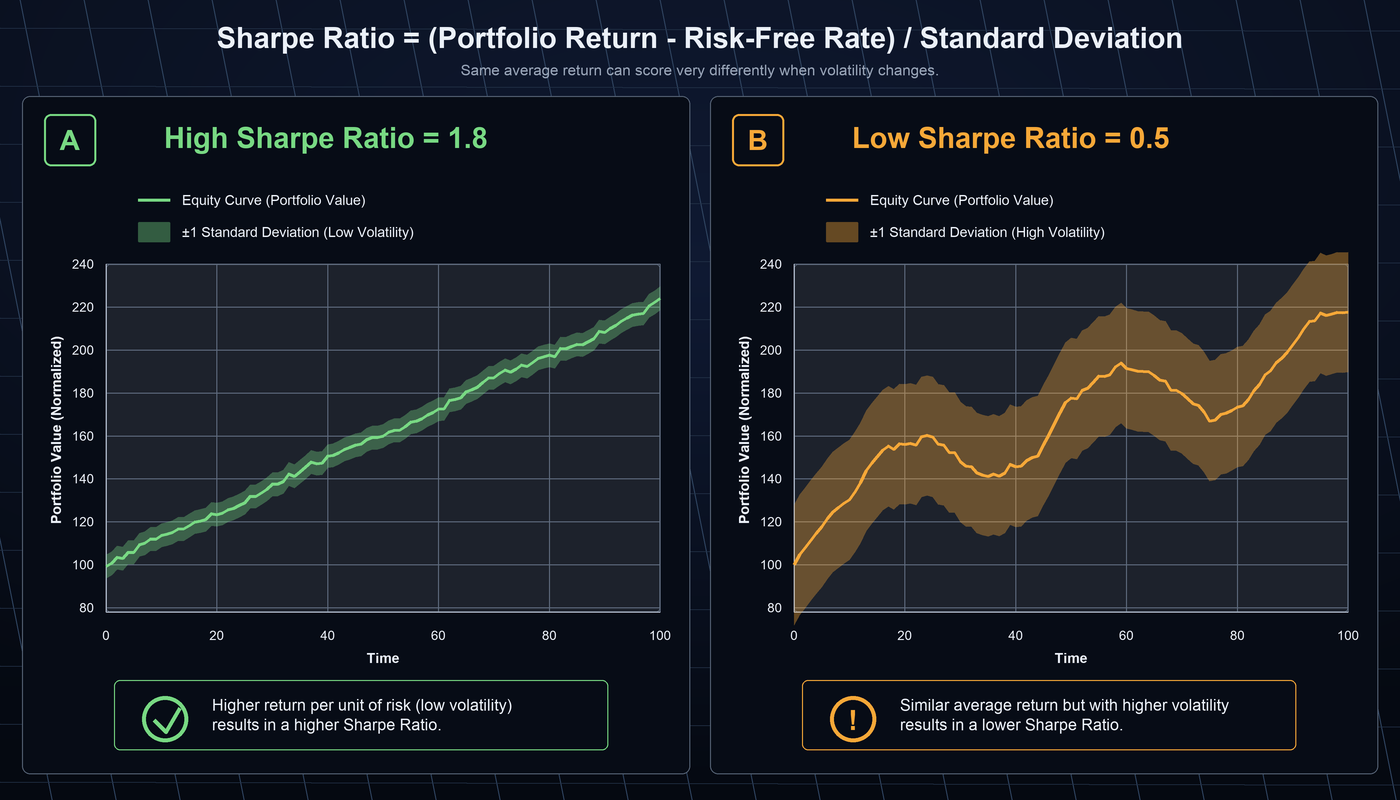
| SR | Sharpe Ratio | Risk-adjusted return. 1.0+ is the target. |
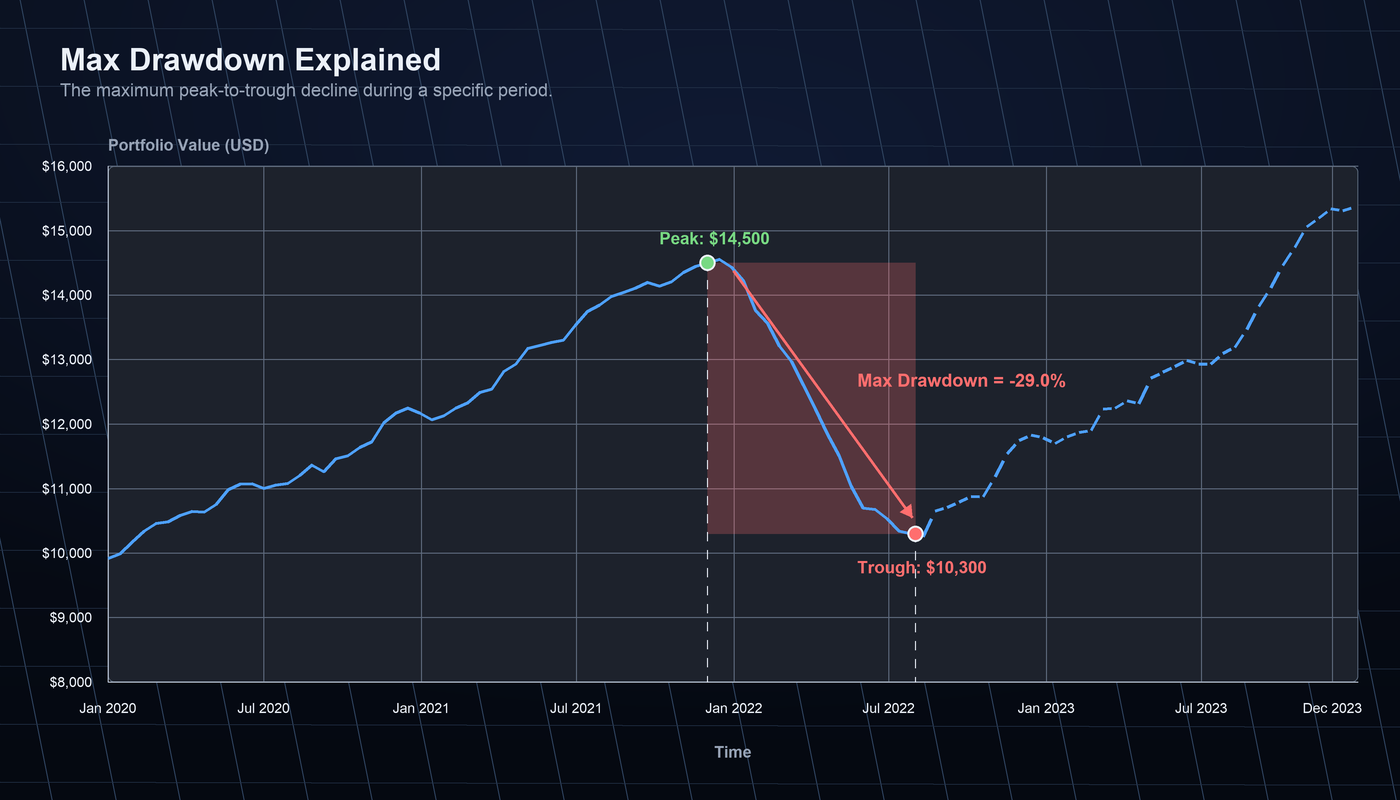
| MDD | Max Drawdown | Worst peak-to-trough drop. Staying under 20% makes it easier to stick with a strategy. |
| Win% | Win Rate | Percentage of winning trades. 40–60% is normal for trend-following. |
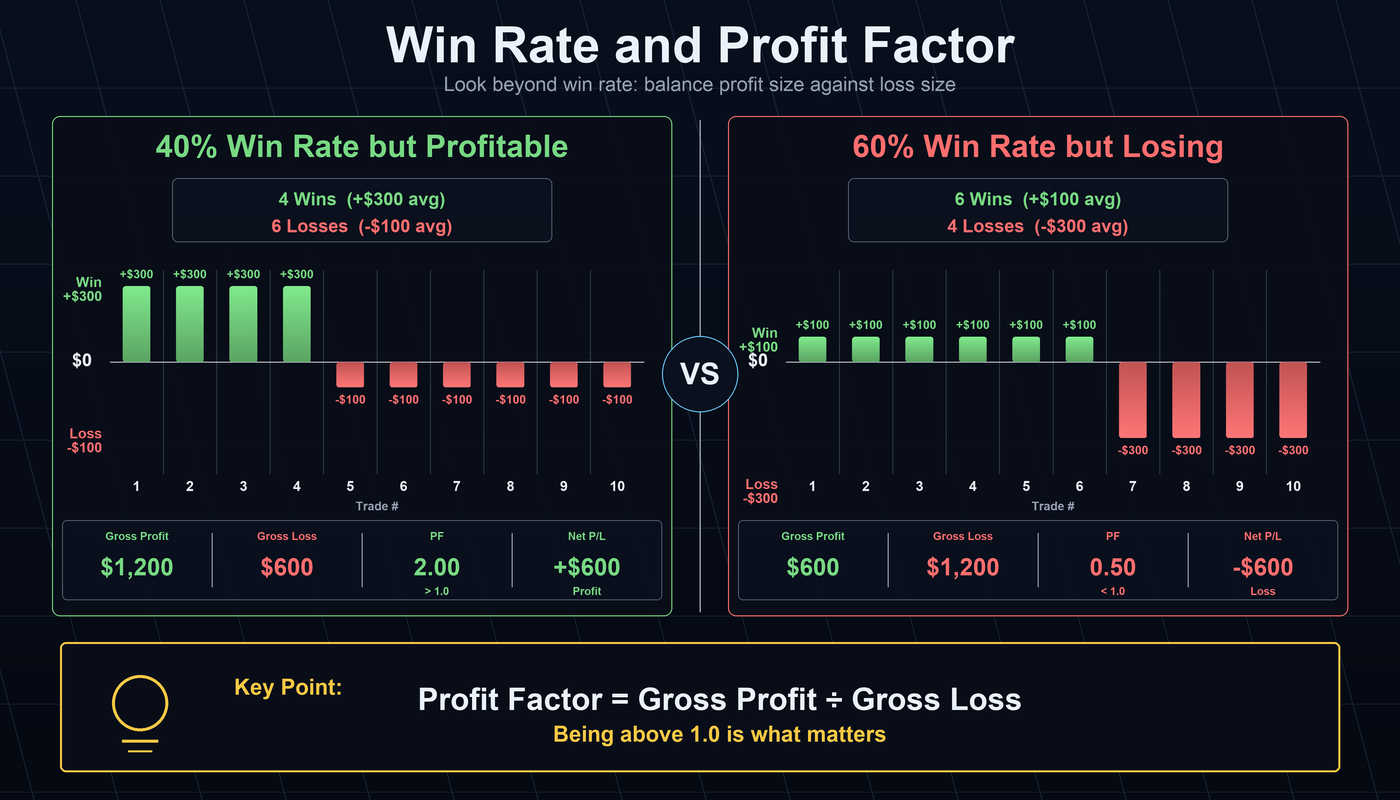
| PF | Profit Factor | Total profit ÷ total loss. 1.5+ is solid. |
| Trades | Total trades | Aim for 30+ for statistical reliability; 15 triggers the warning in the sample output. |
Additional metrics printed by the CLI
Beyond the six core metrics above, the CLI also prints supporting metrics.
| CLI label | Conventional name | What it means |
|---|---|---|
| Signal quality score | — | A 0.0–1.0 score from alpha-forge's internal statistical validity check on the trade signal. ≥0.7 = reliable, 0.4–0.7 = caution, <0.4 = reference only. |
| Sortino | Sortino Ratio | Sharpe variant that only penalizes downside volatility. For the same Sharpe, a higher Sortino means smaller risk on the way down. Negative values indicate negative returns relative to downside risk. |
| Calmar | Calmar Ratio | CAGR ÷ |MDD|. Annualized return normalized by max drawdown. ≥0.5 acceptable, >1.0 strong. |
| Length / Recovery | Drawdown duration / Recovery | Days from MDD peak to trough / from trough back to a new peak. Longer recovery means longer capital lock-up. |
| avgWin / avgLoss | Avg Win / Avg Loss | Average winning trade % and average losing trade %. avgWin ÷ |avgLoss| is the payoff ratio; ≥2.0 is healthy for trend-following. |
| AvgHold / Max | Avg Hold / Max Hold | Average and maximum position-holding length in days. Compare with the timeframe (1d, 1h, etc.) — large divergences from the strategy's intended horizon are a red flag. |
| Kelly / Payoff / Expectancy / GPR / Ulcer / Recovery | Kelly Criterion / Payoff Ratio / Expectancy / Gain-Pain Ratio / Ulcer Index / Recovery Factor | Extended trade-quality metrics. Kelly is the theoretically optimal position fraction (negative = no edge), payoff is avgWin ÷ |avgLoss|, expectancy is the expected return per trade, and recovery is total return ÷ |MDD|. Shown as N/A when the denominator is undefined. See the CLI Reference for details. |
| Win streak / Loss streak | Max consecutive wins / losses | Longest winning / losing run. Long losing streaks raise the psychological cost of running the strategy live. |
| Win-rate CI(90%) | Win Rate 90% CI | 90% confidence interval for the win rate. A wide CI (e.g. 17.8% – 54.8%) means too few trades to pin down the true win rate; 30+ trades narrows it considerably. |
Next steps: visualize the results (optional)
The 📊 View charts via alpha-vis serve line at the end of the output points at the separate OSS package alpha-visualizer. It renders the same result as Equity / Drawdown / trades / metric comparisons in your browser.
Three install paths are available (details):
uv tool install alpha-visualizer   # uv tool (installs as a standalone CLI — recommended)
pip install alpha-visualizer       # pip (installs into your current Python env)
pip install -i https://pypi.org/simple alpha-visualizer  # explicit PyPI source
Then run alpha-vis serve inside the quickstart/ directory and your browser opens the dashboard (default: http://127.0.0.1:8000).
If alpha-vis is not recognized
macOS ships a standard /usr/bin/vis, and pre-v0.3.0 the CLI was named vis (renamed to alpha-vis in v0.3.0+). When plain alpha-vis is not recognized, use the absolute path ~/.local/bin/alpha-vis serve (uv tool layout) or ~/.local/share/uv/tools/alpha-visualizer/bin/alpha-vis serve.
Add optimizer_config when you want to try optimization (F-003)
The sma_cross.json above is a minimal backtest-only configuration that
omits optimizer_config. If you want to try alpha-forge optimize run,
append the block below just before the trailing } of the JSON
(a comma after risk_management):
"optimizer_config": {
  "param_ranges": {
    "sma_fast.length": { "min": 5,  "max": 25, "step": 5 },
    "sma_slow.length": { "min": 20, "max": 60, "step": 5 }
  }
}
If you skip it, alpha-forge falls back to its built-in default ranges
(sma_fast.length=[5,25] / sma_slow.length=[20,60]) and prints
Search params (built-in default ranges): at startup. Declaring the
block explicitly makes runs reproducible and lets you tune min/max/step
by hand.
What to do next
| Goal | Where to go |
|---|---|
| Pick the next page based on your role | Use Cases by Goal |
| Optimize parameters | optimize command |
| Validate against overfitting | End-to-End Workflow |
| Try complex strategy templates | Strategy Templates |
| Connect to TradingView | Pine Script Integration Guide |
| Understand Trial plan limits | Trial Limits |
Detailed Installation
Requirements
- macOS 12 (Monterey) or later / Ubuntu 22.04 or later / Windows 11
- Internet access (for the first data fetch, or for paid-plan authentication)
- A Whop account is not required for the Trial plan. Only purchase a paid plan (Lifetime / Annual / Monthly) if you want to lift the Trial limits.
Install procedure
Run the following command in your terminal. The installer extracts the latest binary bundle (forge.dist) into ~/.local/share/alpha-forge/ and symlinks the executable as ~/.local/bin/alpha-forge.
The default install location is ~/.local/bin (user-local, no sudo required). During install, you'll be asked Install to system-wide /usr/local/bin instead? (requires sudo) [y/N]:. Press Enter or n to keep the default, or y to install system-wide to /usr/local/bin (which will prompt for sudo).
Non-interactive install (INSTALL_DIR env var)
For CI, Dockerfiles, or any environment where the interactive prompt can't be answered, set INSTALL_DIR to choose the symlink directory directly. The prompt is then skipped entirely.
# Pin to ~/.local/bin without any prompt
INSTALL_DIR=~/.local/bin bash <(curl -sSL https://alforge-labs.github.io/install.sh)

# Custom directory (must be writable)
INSTALL_DIR=/opt/forge/bin bash <(curl -sSL https://alforge-labs.github.io/install.sh)
The forge.dist bundle is extracted under <dirname of INSTALL_DIR>/share/alpha-forge/ (e.g. INSTALL_DIR=/opt/forge/bin → /opt/forge/share/alpha-forge/). Pass the same INSTALL_DIR to uninstall.sh when removing.
Display language (FORGE_INSTALL_LOCALE env var)
The installer auto-detects language from LANG / LC_ALL (Japanese for ja*, English otherwise). To force a specific language, set FORGE_INSTALL_LOCALE=ja|en. uninstall.sh honors the same variable.
Run this in PowerShell (no administrator rights required). It extracts the bundled binary set (forge.dist\) into %LOCALAPPDATA%\Programs\alpha-forge\, generates the sibling alpha-forge.cmd launcher, and automatically registers that directory in your User PATH.
If a legacy install ($HOME\bin\forge.exe or C:\Program Files\forge\forge.exe) is detected, it is removed after confirmation and replaced with the new layout. To preview what the installer would do without touching the filesystem, run with -DryRun:
Display language
The installer auto-detects from Windows display language (CurrentUICulture). To force a specific language, set $env:FORGE_INSTALL_LOCALE = "en" (or "ja") before irm | iex.
New terminal
Close all open terminals after installation, then open a new one before continuing. While an already-running Windows Terminal process remains, even its new tabs/windows will not pick up the PATH change.
-
Download the binary for your platform from GitHub Releases.
-
macOS / Linux: make it executable and move it to a directory on your PATH.
-
Windows: place the binary in any folder and add that folder to PATH.
Shell completion (optional)
To speed up alpha-forge, you can enable shell completion (dynamically generated by Click). The activation environment variable is _ALPHA_FORGE_COMPLETE (issue #1166).
After setup, alpha-forge <TAB> completes top-level commands, and alpha-forge analyze <TAB> / alpha-forge system <TAB> / alpha-forge data <TAB> complete their subcommands.
Paid-plan Login
The CLI runs immediately as the Trial plan with no Whop registration. You only need this section once you've purchased a paid plan (Lifetime / Annual / Monthly), which lifts the data date cap, the optimization trial cap, and the Pine Script export block.
Happy with the Trial plan?
If the Trial limits (data through 2023-12-31, 50 optimization trials, Pine output blocked) cover your use case, you can skip this section and keep running backtests/optimizations. alpha-forge system auth login is not required for Trial usage.
1. Purchase a paid plan
Open the purchase page in your browser, sign up to Whop (email / GitHub / Google), and complete checkout for Lifetime, Annual, or Monthly.
2. Authenticate with Whop OAuth from forge
After the purchase finishes, run the command below in your terminal. It launches a browser and walks you through Whop's OAuth 2.0 PKCE flow.
Credentials are cached at $XDG_CONFIG_HOME/forge/credentials.json (default ~/.config/forge/credentials.json). Internet access is required.
3. Verify the login state
Inspect the cached user ID, token expiry, and plan tier:
User ID         : user_abc123
Access token    : 2026-05-13 12:30 UTC (45 min remaining)
Last verified   : 2026-05-13 11:45 UTC (13 min ago)
Plan            : Paid (Lifetime)
Plan: Paid (Lifetime) confirms a successful paid-plan activation. Due to an implementation holdover, the CLI also shows Paid (Lifetime) for Annual and Monthly subscribers (Whop OAuth treats all paid tiers as a single "customer" access level). Without Whop registration (i.e. on the Trial plan), the plan details above are not shown at all; instead the command prints only [AlphaForge] Not logged in. followed by Run: alpha-forge system auth login.
4. Confirm the unlock
Verify that a paid-plan-only feature (Pine Script export) now works:
If the red "Premium-only feature" Panel does not appear and a .pine file is generated, the paid plan is fully active.
Reading the Results (Detailed)
The six metrics you'll look at first. For the full metric list, see the CLI Reference and Strategy Templates.
| Metric | Meaning | Rule of thumb |
|---|---|---|
| CAGR | Compound annual growth rate | Compare against the market benchmark (S&P 500: ~10%). Positive but below market = limited edge. |
| Sharpe Ratio | Risk-adjusted return | ≥ 1.0 is "usable", ≥ 1.5 is good, ≥ 2.0 is top-tier. Negative is out. |
| Max Drawdown | Largest peak-to-trough equity drop | Shallower is better. Beyond −20% becomes psychologically hard to keep trading. |
| Win Rate | Share of profitable trades | ~50% is typical. Trend-following: 30–40%. Mean-reversion: 60–70%. |
| Profit Factor | Gross profit ÷ gross loss | ≥ 1.5 is good, ≥ 2.0 is excellent. < 1.0 means net loss. |
| Total Trades | Number of trades over the test period | Aim for 30+ for statistical significance. Too few suggests overfitting risk. |
What to try next
- Parameter optimization:
alpha-forge optimize runfor Optuna Bayesian search - Walk-forward validation:
alpha-forge optimize walk-forwardto detect overfitting - Strategy templates: try HMM × BB × RSI and others
Uninstall
Run the official uninstaller. It removes the alpha-forge symlink, the entire forge.dist/ directory (~1,100 bundled library files), and the PATH line that was appended to your shell rc.
Your credentials (~/.config/forge/credentials.json) are kept by default. This is intentional: if you reinstall later, you can skip alpha-forge system auth login and the install will pick up your existing Whop OAuth session.
Full wipe (delete credentials and EULA acceptance too)
--purge additionally removes ~/.config/forge/ (Whop OAuth token + EULA state) and the legacy ~/.forge/ path if it exists.
Preview before deleting
Shows exactly which paths would be removed without touching anything.
Uninstall from a custom path (INSTALL_DIR env var)
If you installed via INSTALL_DIR=..., pass the same value to the uninstaller so it can locate the symlink:
Without it, both ~/.local/bin and /usr/local/bin are auto-discovered.
What is NOT removed:
- Your project working directories created by
alpha-forge system init(forge.yaml,data/, etc.) — these are your data - Shared parent directories like
~/.local/share/and~/.config/(used by other apps)
Run the official uninstaller. It removes both the new layout (%LOCALAPPDATA%\Programs\alpha-forge\) and any legacy layouts ($HOME\bin\forge.exe / C:\Program Files\forge\forge.exe), and cleans up the matching User PATH entries.
Authentication cache (~\.config\forge\credentials.json) is preserved by default. Pass -Purge to delete it as well:
Troubleshooting
| Symptom | Cause & Fix |
|---|---|
| Something seems off (PATH / data / config) | Run alpha-forge system doctor first. It reports the status of your PATH, data directories, and config file, and lists the exact next command to run — e.g. alpha-forge system init if uninitialized, or alpha-forge demo to try the bundled data. |
command not found: forge / command not found: alpha-forge |
To use it right away in the current shell (instead of opening a new terminal), run export PATH="$HOME/.local/bin:$PATH" (Windows PowerShell: $env:PATH = "$env:PATH;$env:LOCALAPPDATA\Programs\alpha-forge"). The installer already appended the permanent entry to ~/.bashrc / ~/.zshrc, so source ~/.bashrc / source ~/.zshrc or a new terminal also work. If it still fails, confirm the binary exists with ls ~/.local/bin/alpha-forge and that echo $PATH includes ~/.local/bin. |
(Windows) alpha-forge: The term 'alpha-forge' is not recognized ... |
Close all open terminals and open a new one (new tabs of an already-running Windows Terminal do not pick up PATH changes). If it persists, check that [Environment]::GetEnvironmentVariable('PATH','User') contains %LOCALAPPDATA%\Programs\alpha-forge as a standalone entry; if it is missing or corrupted, re-run the installer (it repairs the entry automatically). |
First command shows a [y/n] prompt / Aborted! in non-interactive runs |
A one-time EULA acceptance prompt appears on first run. In an interactive terminal, enter y. In non-interactive environments (CI, pipes, agents), set FORGE_ACCEPT_EULA=1 to auto-accept the EULA on first run and continue (available in a recent version onward). Acceptance is recorded under ~/.config/forge/ and won't appear again. |
❌ 未知のテンプレート名です: <id>。利用可能: ... (unknown template name) / 戦略 'sma_cross_qs' が見つかりません |
Run alpha-forge strategy save sma_cross.json first to register the strategy in the DB. Or pass the JSON directly via alpha-forge backtest run SPY --strategy-file sma_cross.json --start .... |
❌ データが見つかりません: SPY (1d) (data not found) |
The target symbol's historical data has not been fetched. backtest run does not auto-fetch, so run Step 2.5 (alpha-forge data fetch SPY --period 10y) first. |
Failed to fetch data: symbol=USDJPY (404) |
yfinance requires fixed suffixes per asset class: FX USDJPY=X / EURUSD=X / GBPJPY=X, futures CL=F, crypto BTC-USD. Quote symbols containing = (e.g., 'USDJPY=X'). |
forge.yaml not found / Config file not found |
No forge.yaml in the current directory. Run alpha-forge system init inside a project working directory, or set the FORGE_CONFIG environment variable (macOS/Linux: FORGE_CONFIG=/path/to/forge.yaml alpha-forge ...; Windows PowerShell: run $env:FORGE_CONFIG = "C:\path\to\forge.yaml" first, then alpha-forge ...). |
Backtest reports 0 trades |
Either the strategy parameters are too strict for the entry conditions, or the data window is too short. Inspect parameters with alpha-forge strategy show <id> --json, extend data via alpha-forge data fetch '<SYM>' --period 10y, or try a different template such as bbands_breakout_v1. |
Best score: -inf / all optimization trials return -inf |
Every trial returned NaN. Often the optimizer_config.param_ranges are too narrow or the data has too few trades. Widen the ranges, raise --trials, or switch --metric to e.g. total_return. |
WFT reports every window as OOS 0 trades / skipped |
The data window is too short to produce trades inside each window. For FX / 1d data, aim for 5+ years (~1,250 rows). Extend data with alpha-forge data fetch '<SYM>' --period 10y, or lower the partition count with --windows 2. |
vis: serve: No such file or directory / vis: illegal option |
macOS ships a built-in /usr/bin/vis that wins on $PATH. Run with the absolute path ~/.local/bin/alpha-vis serve (uv tool) or ~/.local/share/uv/tools/alpha-visualizer/bin/alpha-vis serve (renamed to alpha-vis in v0.3.0+). |
Trialプランでは2023-12-31までのデータのみ取得できます。最新データを取得するには有料プラン(Lifetime / Annual / Monthly)が必要です。 (shown in Japanese regardless of locale) |
Expected behavior. Data beyond the Trial plan cap is automatically excluded. Purchase a paid plan (Lifetime / Annual / Monthly) to lift the cap. |
Credentials expired / Token expired |
Re-run alpha-forge system auth login. Verify your Whop membership is still active on the Whop dashboard. |
| Other authentication errors | Verify your network connection and rerun alpha-forge system auth login. Confirm your Whop membership is active. |
| macOS security warning | System Settings → Privacy & Security → click "Open alpha-forge". |
For other issues and detailed FAQ, see /en/install.html.
- For usage questions and conversations with other users, head to GitHub Discussions.
- For individual support, contact support@alforgelabs.com.
Next Steps
- Visualize results — alpha-visualizer — OSS package that renders alpha-forge's backtest results in your browser (
uv tool install alpha-visualizer/pip install alpha-visualizer) - Use Cases by Goal — Pick the most relevant next page based on your role (TradingView user / Python developer / Quant / Auto-trading / AI agent user)
- CLI Reference — Every
alpha-forgecommand, parameters, and output format - Strategy Templates — Compound strategies like HMM × BB × RSI
- AI-Driven Strategy Exploration Workflow — Autonomous exploration with Claude Code / Codex × AlphaForge
Update notices (at most once per 24 hours)
When a newer version is available, a one-line notice appears after a command finishes.
ℹ A new version is available: 1.2.0 → 1.3.0
  Run `alpha-forge self update` to upgrade (set FORGE_NO_UPDATE_CHECK=1 to disable this notice).
- The latest version is checked at most once per 24 hours and the result is cached. You are never made to wait long when offline (1.5 s connect / 2.0 s read timeout; a failed check is silently retried next time)
- The notice for a given version appears at most once per 24 hours. When a new version ships, it is shown right away
- Neither the check nor the notice happens when
- the command was run with
--json(machine-readable output stays clean) - the run is non-interactive (
FORGE_NONINTERACTIVE=1/CI=1/ stdin is not a TTY) - running from source —
alpha-forge self updateis unavailable there
- the command was run with
- Pre-releases (beta and the like) are never recommended. To install one, pass its tag explicitly with
alpha-forge self update --version <tag>
To disable the notice:
Check state is recorded in $XDG_CONFIG_HOME/forge/update_check.json (or ~/.config/forge/update_check.json when unset).
Where the check goes
The update check talks to GitHub (the distribution repository's Releases API). Nothing is sent to the AlphaForge developers. There is no telemetry of any kind.
About reviews (shown once)
After your 10th backtest run, the next interactive command prints a single message
pointing at the Product Hunt review page.
It never repeats.
It is not shown when:
- the run uses
--json(so machine-readable output stays clean) - the run is non-interactive (
FORGE_NONINTERACTIVE=1/CI=1/ stdin is not a TTY)
To disable it entirely:
State is recorded in $XDG_CONFIG_HOME/forge/review_prompt.json (or ~/.config/forge/review_prompt.json when unset). Whether it worked for you or not, a review gives the next person with the same problem something concrete to go on.
Sending feedback
What did not work, what you wish existed, or just what you thought — one command:
This opens an issue form at alforge-labs/feedback in your browser. If an error occurred within the last 24 hours, the bug report template is selected and the following are filled in for you.
| Filled in automatically | Never included |
|---|---|
| AlphaForge version | Command arguments (tickers, strategy IDs) |
| OS / architecture | Diagnostic log contents |
| Error type (exception class name) | |
| Subcommand name (without arguments) | |
| Diagnostic log path |
Nothing is sent until you press Submit
Only the left column above is filled in. Command arguments — which carry your tickers and strategy IDs — and the contents of the diagnostic log are never included. Edit or delete anything before submitting. Whether to attach the log is your call, after you have read it.
To see the URL without opening a browser, use alpha-forge feedback --print-url. Non-interactive runs (FORGE_NONINTERACTIVE=1 / CI / stdin is not a TTY) behave the same way.