alpha-forge backtest
Run backtests and analyze results. Provides single-strategy runs, parallel batch runs, automated diagnostics, listing/reporting/migrating saved results, multi-strategy comparison, portfolio backtests, dashboard chart navigation, Monte Carlo simulation, and signal count checks.
About sample output
Sample outputs in this page are based on the formats read from the alpha-forge source. Actual numbers depend on the data and environment.
Subcommands
| Command | Description |
|---|---|
alpha-forge backtest run |
Run a backtest for the given symbol and strategy |
alpha-forge backtest batch |
Run parallel backtests for multiple strategy JSON files |
alpha-forge backtest timeframes |
Backtest the same strategy across multiple timeframes and compare |
alpha-forge backtest diagnose |
Automatically diagnose performance issues in a strategy |
alpha-forge backtest list |
Show saved backtest results |
alpha-forge backtest report |
Display a saved backtest result |
alpha-forge backtest migrate |
Import existing JSON report files into the database |
alpha-forge backtest compare |
Compare multiple strategies side by side on the same symbol and period |
alpha-forge backtest combine |
Run a combined portfolio backtest across multiple strategies |
alpha-forge backtest portfolio |
Run a portfolio backtest across multiple symbols |
alpha-forge backtest chart |
Display dashboard URL to navigate to charts |
alpha-forge backtest signal-count |
Fast signal count check without running the full backtest |
alpha-forge backtest monte-carlo |
Run a Monte Carlo simulation from an existing backtest result |
alpha-forge backtest dca |
Simulate dollar-cost averaging compared against a lump-sum purchase |
alpha-forge backtest withdraw |
Simulate withdrawal (fixed/percent, inflation-adjusted, guard rules) |
alpha-forge backtest prune-orphans |
Delete orphaned backtest / optimization results whose strategy definition no longer exists (destructive) |
alpha-forge backtest run
Run a backtest. Specify either --strategy or --strategy-file.
Synopsis
Arguments and options
| Name | Kind | Default | Description |
|---|---|---|---|
SYMBOL |
argument (required) | - | Symbol (e.g. SPY, AAPL, CL=F) |
--strategy |
option | - | Strategy ID (mutually exclusive with --strategy-file) |
--strategy-file |
option | - | Path to a strategy JSON file (no DB registration required) |
--json |
flag | false | Output results as JSON to stdout |
--summary |
flag | false | (With --json) Exclude heavy arrays (trades / monthly_returns / annual_returns / equity_curve) and emit a lightweight JSON of scalar metrics + verdict only (issue #1224, to save tokens for agents / MCP; details) |
--start |
option | - | Start date YYYY-MM-DD |
--end |
option | - | End date YYYY-MM-DD |
--split |
flag | false | Split into in-sample / out-of-sample periods (details) |
--benchmark |
option | config | Benchmark symbol (per-asset_type defaults apply, see below) |
--no-benchmark |
flag | false | Disable benchmark comparison entirely (F-304). Useful for FX / commodities where a SPY comparison is meaningless |
--check-criteria |
flag | false | Run acceptance criteria check |
--cagr-min |
float | 20.0 |
Minimum CAGR (%), used with --check-criteria |
--sharpe-min |
float | None (falls back to goal or 1.0) |
Minimum Sharpe ratio |
--max-dd |
float | None (falls back to goal or 25.0) |
Max drawdown limit (%); also used for pre_filter_pass |
--win-rate-min |
float | 55.0 |
Minimum win rate (%) |
--pf-min |
float | 1.3 |
Minimum profit factor |
--min-trades |
int | - | Minimum trade count; exits with code 1 if below |
--regime |
flag | false | Display per-regime statistics on the console |
--trades-csv |
path | - | Write a per-trade CSV to the given path (issue #800, details) |
--debug |
flag | false | Raise the alpha_forge.* loggers to DEBUG (issue #800) |
--goal |
option | - | Goal name (e.g. default, stocks); auto-loads pre_filter thresholds from goals.yaml into --sharpe-min / --max-dd |
--cost-preset |
option | - | Cost preset name (issue #785, e.g. moomoo-crypto-spot / binance-spot-vip0 / ibkr-us-stock-fixed); overrides the strategy's risk_management commission/slippage in-memory at run time (strategy JSON is untouched) |
--dividend-reinvest |
flag | false | Include dividend-reinvest metrics in the result (#958); requires saved dividends data (data fetch --with-dividends). When set, --json includes dividend_adjusted_metrics (dividend-reinvested total_return_pct / max_drawdown_pct / cagr_pct) and dividend_adjusted_note, and the text output shows the same block. Note: closes stored by data fetch for ETFs and stocks are dividend-adjusted, so applying --dividend-reinvest to stored data double-counts dividends. |
--regime-filter |
option | - | Post-hoc entry gating by macro regime (issue #1012); format <source>:<label> (e.g. macro:risk_on), source=macro only; requires FRED data fetched in advance (data alt fetch FRED:T10Y3M) |
--carry |
flag | false | Accrue FX carry (swap) and include carry_adjusted_metrics (details). Resolution order: real swap CSV (data alt import-swap) > rate-differential approximation. 17 major currencies resolve via the builtin rate-series mapping without configuration (pre-fetched FRED rate data is still required) |
--carry-spread-scenarios |
flag | false | Sensitivity analysis comparing low/base/high spread scenarios from spread_pct_range in one run (details). Requires --carry and a spread_pct_range for the pair |
--carry-spread-pct |
option | - | Override spread_pct (broker margin, annual %, 0–10) for this run only (details). Requires --carry |
Approximate FX carry (swap) with --carry
To evaluate FX swap/carry strategies, the daily carry is approximated from the short-term rate differential (instead of broker swap points) and reported as carry_adjusted_metrics (total_return_pct / cagr_pct / max_drawdown_pct / sharpe_ratio / volatility_pct) alongside the price-only metrics.
daily carry fraction = (base short rate − quote short rate − spread_pct) / 100 / 365 × elapsed calendar days
Major pairs work without configuration: when backtest.carry has no entry for the pair, the builtin currency → series mapping below resolves it automatically (reported at runtime as an optimistic spread_pct=0 value; a user-defined mapping always takes precedence).
| Currency | FRED series | Description |
|---|---|---|
| USD | DFF |
Effective federal funds rate (daily) |
| JPY | IRSTCI01JPM156N |
Uncollateralized O/N call rate (OECD, monthly) |
| EUR | ECBDFR |
ECB deposit facility rate (daily) |
| GBP | IUDSOIA |
SONIA (daily) |
| AUD | IRSTCI01AUM156N |
RBA cash-rate equivalent (OECD, monthly) |
| CAD | IRSTCI01CAM156N |
BoC O/N equivalent (OECD, monthly) |
| CHF | IR3TIB01CHM156N |
3-month interbank rate (OECD, monthly) |
| NZD | IR3TIB01NZM156N |
3-month interbank rate (OECD, monthly) |
| MXN | IRSTCI01MXM156N |
Uncollateralized O/N call rate equivalent (OECD, monthly) |
| TRY | IRSTCI01TRM156N |
Uncollateralized O/N call rate equivalent (OECD, monthly) |
| ZAR | IRSTCI01ZAM156N |
Uncollateralized O/N call rate equivalent (OECD, monthly) |
| CZK | IRSTCI01CZM156N |
Uncollateralized O/N call rate equivalent (OECD, monthly) |
| HUF | IRSTCI01HUM156N |
Uncollateralized O/N call rate equivalent (OECD, monthly) |
| PLN | IRSTCI01PLM156N |
Uncollateralized O/N call rate equivalent (OECD, monthly) |
| NOK | IRSTCI01NOM156N |
Uncollateralized O/N call rate equivalent (OECD, monthly) |
| SEK | IR3TIB01SEM156N |
3-month interbank STIBOR (OECD, monthly) |
| CNH | IR3TIB01CNM156N |
3-month interbank, onshore CNY approximation (OECD, monthly) |
For CHF/NZD/SEK the O/N series stopped updating (CHF/NZD in 2024, SEK in 2020), so the still-updated 3-month rates (interbank/STIBOR) are used (a small additional approximation error from the tenor difference). CNH (offshore RMB) has no offshore rate series in FRED, so it is approximated with the 3-month onshore CNY interbank rate (CHIBOR family) — onshore/offshore rates can diverge, so tune spread_pct accordingly. HKD/SGD have no usable short-term rate series in FRED and are not built in (carry can only be accrued via a real swap-point CSV import with data alt import-swap). RUB is excluded because its rate series has effectively stopped since the sanctions. If a series' last observation is roughly 6+ months older than the end of the backtest period, a staleness warning is printed.
Importing real swap points (higher fidelity)
If you have a broker-published history of real swap points, import it with data alt import-swap and it is automatically preferred over the rate-differential approximation (no mapping needed; values are net of broker margin so spread_pct does not apply). However, if the real swap data covers less than 80% of the backtest period, a warning is printed and the rate-differential approximation is used instead (preferring a thin accumulation over a long backtest would leave most bars with zero carry; once the accumulation sufficiently covers the period, the real-swap preference resumes automatically).
Broker-published CSVs often cover only a limited window (e.g. the last few dozen days), so importing the same file repeatedly would overwrite older history. Add --merge to merge with the previously stored SWAP data by date (new rows win on duplicate dates). Use this for periodic (e.g. weekly) imports where you want to retain accumulated history — see here for details.
Setup (2 steps — to customize the rate-differential approximation)
-
Define the pair → rate-series mapping under
backtest.carryinforge.yaml:backtest: carry: "USDJPY=X": base_rate_series: "DFF" # short rate of the base currency (USD; effective fed funds, % p.a.) quote_rate_series: "IRSTCI01JPM156N" # short rate of the quote currency (JPY; uncollateralized O/N call, % p.a.) spread_pct: 0.5 # broker margin (% p.a.; deducted regardless of direction) -
Fetch the rate data from FRED (stored as look-ahead-free vintage panels):
Behavior notes
- Weekend days accrue on the Monday bar as 3 days' worth (calendar-day gap from the previous bar; the "triple Wednesday" T+2 convention is not modeled)
- Holding short flips the sign of the rate differential;
spread_pctis deducted regardless of direction - Flat bars accrue nothing; this is an adjunct — the main equity curve (SL/TP evaluation etc.) is unaffected
- A missing mapping or unfetched rate data prints a warning and the backtest continues without carry (the run does not fail)
- The approximation assumes daily or higher timeframes (a warning is printed on sub-daily timeframes, where accrual clusters on day-crossing bars)
- With
--split,carry_adjusted_metricsis an IS-period value - Real broker swap points deviate from the theoretical differential by the broker margin (roughly 0.2–1.0% p.a.) — tune
spread_pctaccordingly
Spread sensitivity analysis (--carry-spread-scenarios / --carry-spread-pct)
Swap points can differ widely between brokers even for the same pair on the same day (several-fold for some currencies), so the choice of spread_pct alone can reorder long-horizon results. To check in one command whether your conclusion is robust to the margin assumption, define the broker range spread_pct_range under backtest.carry and pass --carry-spread-scenarios:
backtest:
  carry:
    "MXNJPY=X":
      base_rate_series: "IRSTCI01MXM156N"
      quote_rate_series: "IRSTCI01JPM156N"
      spread_pct: 0.5              # base scenario (as before)
      spread_pct_range: [0.2, 3.6] # broker range [low, high] (0 ≤ low ≤ base ≤ high ≤ 10)
alpha-forge backtest run MXNJPY=X --strategy mxnjpy_carry_v1 --carry --carry-spread-scenarios --json
carry_adjusted_metricsbecomes a nested object keyed by scenario ({"low": {...}, "base": {...}, "high": {...}}), and--jsonadditionally reports the spread values used ascarry_spread_scenarios(without the flag the output shape is unchanged)- The simulation (entries/exits/fills) runs once; only the carry deduction differs between scenarios, so price-only metrics such as the trade count are identical across scenarios
- Because spread is a parameter of the rate-differential approximation, the real-swap preference is skipped even when
SWAP:<PAIR>data is saved (an informational message is printed) - If
spread_pct_rangeis missing, the pair has nobacktest.carryentry, or the rate data has not been fetched, the command stops with exit code 2 instead of continuing price-only (carry is the whole point of the sensitivity analysis) - To try a single point without defining a range, use
--carry-spread-pct <value>to overridespread_pctfor that run only (the output keeps the traditional single-object shape; the override is stated in the note and also reported machine-readably ascarry_spread_pctin--json) - Choose the range endpoints deliberately: put real broker levels into
spread_pct_range(not theoretical floors or safety margins). Brokers do not spread out evenly: in measured data, most quotes clustered in a narrow band while one distant quote created a "several-fold spread". You can test whether an endpoint is pinned to a single broker by checking how much the width shrinks when you drop the single lowest (or highest) quote (in one measured example a pair's width shrank from 9.50 yen to 1.50 yen — an 84% collapse — while another pair stayed at 2.00 yen because three brokers shared the bottom quote). An endpoint that collapses after dropping one quote is pinned to that broker. Whether that broker stays at the same level over the long run is a separate question — a few weeks of observation cannot justify a 10-year assumption. Decide with this caveat in mind whether to read the low scenario as a "plausible worst case" or as "the answer you get if you pick that broker". Which one you chose remains traceable viacarry_spread_scenarios(the spread values used) in the output - The constant range is itself an approximation: the broker range moves over time (swap points are revised frequently, and the width between brokers can shrink substantially within weeks). Carrying a spread time series through a long backtest is impractical, so use this feature as a sensitivity analysis — checking whether the conclusion is robust across a fixed range — rather than a model of actual spreads (it freezes a range measured at one point in time)
- To see how the cross-currency ranking moves between scenarios,
backtest carry-compare <SYMBOLS...> --carry --carry-spread-scenariosadds per-scenario carry-return rankings plus a summary of rank changes and sign flips (every symbol needs aspread_pct_range; missing symbols are listed and the command exits with code 2)
Export per-trade CSV with --trades-csv
backtest run --trades-csv <path> writes a one-row-per-trade CSV. Use it to cross-check against another engine (e.g. TradingView Strategy Tester) or to investigate divergences like the profit_factor artifact in issue #791.
| Column | Meaning |
|---|---|
trade_idx |
0-origin trade index |
entry_bar_idx / exit_bar_idx |
Entry / exit bar index |
entry_time / exit_time |
Date (YYYY-MM-DD for 1d timeframes) |
entry_price / exit_price |
Fill price |
direction |
long / short |
pnl_pct / pnl_abs |
Return (%) / absolute PnL |
bars_held |
Holding period in bars |
sl_price / tp_price |
SL / TP price at entry (empty when unset) |
mae_pct / mfe_pct |
Maximum adverse / favorable excursion (%) |
entry_reason |
One-line summary of strategy entry conditions (shared across trades in Phase 1) |
exit_reason |
strategy_exit placeholder (Phase 2 will distinguish SL/TP/trailing) |
Even with zero trades, the header row is still written so that sort / uniq / diff pipelines do not break on empty stdout. --debug raises the alpha_forge.* loggers to DEBUG level, but a backtest that completes normally emits almost no additional DEBUG output (most detailed logs are for diagnosing exceptions). Detailed logs appear on stderr in error paths such as data-fetch failures or signal-evaluation errors.
Benchmark selection logic (F-304)
Resolution order when --benchmark is omitted:
- Explicit
--benchmark <SYM>(highest priority) forge.yamlreport.benchmark_symbol, if set to anything other than the defaultSPY- Per-
asset_typemap on the strategy JSON (used when (2) is still defaultSPY)
asset_type |
Default benchmark |
|---|---|
stock / etf |
SPY |
fx |
DX-Y.NYB (Dollar Index) |
crypto |
BTC-USD |
commodity / future |
DBC (commodity ETF) |
| Other / unset | SPY (fallback) |
To disable benchmark comparison entirely, pass --no-benchmark. This is the right choice when alpha / beta / correlation against SPY is meaningless (e.g. FX or commodities strategies).
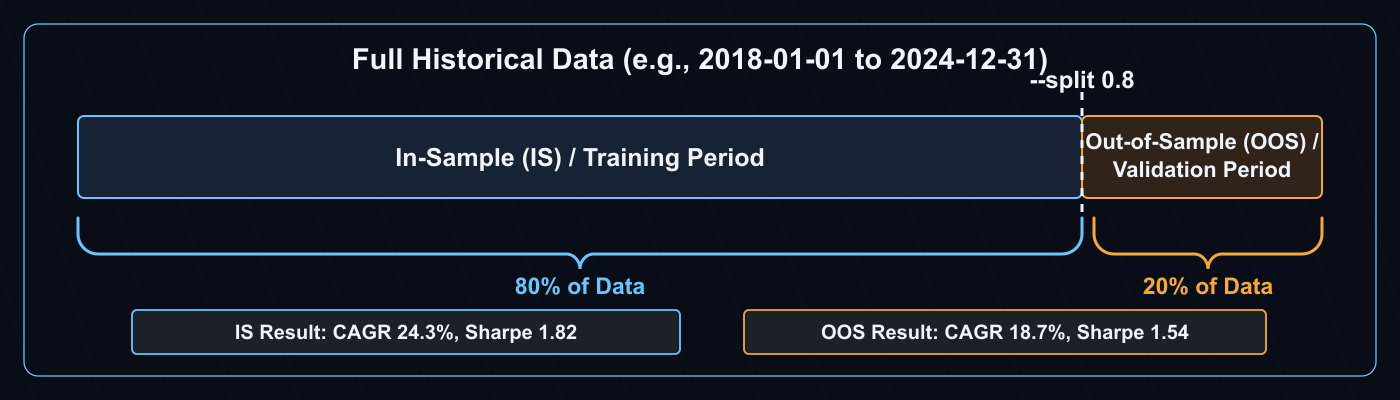
IS / OOS Split (--split)
When --split is specified, the full data range is divided into an In-Sample (IS / training) period and an Out-of-Sample (OOS / validation) period. The IS performance is then independently validated on the OOS period, making it the recommended approach for evaluating strategy generalization.
Progress bar (Rich UI)
While running in a TTY, a Rich-powered progress bar is shown on stderr. The backtest progresses through 6 phases below; with --split, both IS and OOS flows run, totaling 12 steps.
| Phase | Description |
|---|---|
指標計算 (Indicators) |
Pre-compute technical indicators |
変数評価 (Variables) |
Evaluate intermediate boolean variables |
シグナル生成 (Signals) |
Evaluate entry/exit conditions and apply risk masks |
シミュレーション (Simulate) |
Run the vectorbt portfolio simulation |
メトリクス算出 (Metrics) |
Compute Sharpe / MDD / win rate, etc. |
レジーム分析 (Regime) |
Compute per-regime metrics (no-op when not configured) |
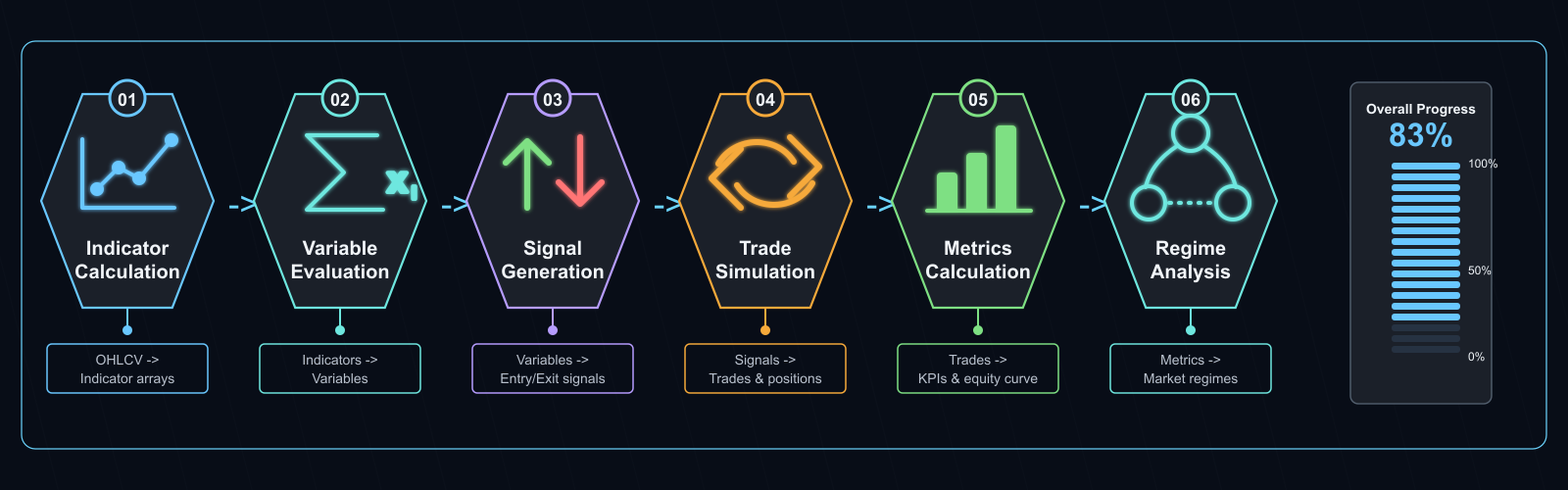
The progress bar is rendered on stderr, so combining it with --json keeps stdout as pure JSON (when --json is passed and stderr is a TTY, the dashboard is still drawn on stderr). When stderr is not a TTY (CI, pipes, redirected files), the progress bar is automatically suppressed. This way, --json invocations from agent loops like /explore-strategies show progress in interactive terminals without polluting CI logs.
Sample output (text)
The leading icon is driven by whether the trade count is statistically sufficient (is_valid = total_trades >= 30): ✅ when sufficient, ⚠️ when not. The signal quality score line always carries a hint about how to read the score (≥0.7 is reliable / 0.4–0.7 caution / <0.4 low reliability).
Running backtest: SPY x sma_crossover_v1
⚠️ Backtest complete  Signal quality score: 0.38/1.0 (<0.4: low reliability, treat as reference only)
    → Docs: https://alforgelabs.com/en/docs/cli-reference/backtest/#signal-quality-score
Total Return: +52.30%  CAGR: 5.40%
SR: 0.92  Sortino: 1.15  Calmar: 0.32
MDD: -16.80%  Duration: 187d  Recovery: 92d
PF: 1.74  Win%: 50.0%  avg_win: 4.20%  avg_loss: -2.40%
Kelly: 0.21  Payoff: 1.75  Expectancy: 0.90%/trade  GPR: 0.42  Ulcer: 0.0480  Recovery: 3.11
Trades: 14  Avg hold: 28.5d(28bar)  Max: 65.0d(65bar)  Win streak: 4  Loss streak: 3
Win rate CI(90%): 35.2% - 64.8%
The Kelly: line shows extended trade-quality metrics: the Kelly criterion (theoretically optimal position fraction), payoff ratio (average win ÷ |average loss|), expectancy (expected return per trade), Gain/Pain ratio, Ulcer Index, and recovery factor (total return ÷ |max drawdown|). With --json these are available as kelly_criterion / payoff_ratio / expectancy_pct / expected_daily_return_pct (and monthly / yearly) / ulcer_index / serenity_index / gain_to_pain_ratio / recovery_factor; values are null when the denominator is undefined (e.g. no losing trades, no drawdown).
Monetary metrics assume USD (issue #1191)
Turnover and cost-related monetary metrics are computed assuming a USD base. No FX conversion is applied for non-USD accounts or symbols, so interpret the reported monetary amounts as USD. Ratio metrics such as return percentage, Sharpe, and win rate are currency-independent.
When the score or trade count fails the recommended thresholds, a warning and a one-line docs link are added (F-302):
⚠️  Backtest complete  Signal quality score: 0.43/1.0 (0.4–0.7: caution, more validation suggested)
    → Docs: https://alforgelabs.com/en/docs/cli-reference/backtest/#signal-quality-score
⚠️  Warning: trade count is insufficient (trades=27, minimum 30 recommended)
    → Fewer than 30 trades is statistically noisy and may be filtered out by
      optimization / WFT pre_filter. Consider widening the data period (`--start`
      to go further back).
    → Docs: https://alforgelabs.com/en/docs/cli-reference/backtest/#signal-quality-score
Signal Quality Score and Minimum Trades (F-302)
Signal Quality Score (signal_quality_score, 0.0–1.0)
sharpe_score        = min(max(sharpe_ratio / 2.0, 0.0), 1.0)             # 30%
profit_factor_score = min(max((profit_factor - 1.0) / 1.5, 0.0), 1.0)    # 20% (0 when profit_factor is None)
win_rate_score      = max(0.0, (win_rate_pct - 50.0) / 30.0)             # 20% (only the portion above 50% win rate contributes)
sample_size_score   = min(total_trades / 30, 1.0)                        # 30%
signal_quality_score = (
    0.30 * sharpe_score
    + 0.20 * profit_factor_score
    + 0.20 * win_rate_score
    + 0.30 * sample_size_score
)
| Score range | Interpretation | CLI hint |
|---|---|---|
≥ 0.70 |
Reliable | "≥0.7 is reliable" |
0.40 – 0.69 |
Caution. Further validation (WFT / cross-symbol) recommended | "0.4–0.7: caution, more validation suggested" |
< 0.40 |
Low reliability, treat as reference only | "<0.4: low reliability, treat as reference only" |
Detecting all-winning-trades backtest artifacts (issue #791)
When profit_factor is returned as null and StrategyDiagnostics emits an ALL_WINNING_TRADES warning, you are looking at an all-winning-trades backtest artifact. Likely causes include a too-loose trailing stop, exit conditions that almost never fire right after entry, or entry evaluation that has degenerated into a state-based predicate firing every bar. Cross-validate with another engine such as the TradingView Strategy Tester. null is treated as "unmeasurable" by signal_quality_score, anomaly_score, check_criteria.pf, and target_metrics.profit_factor, all of which fall back to the safe side (score = 0, criterion fails).
Why a minimum of 30 trades
- Rough threshold for statistical significance: n ≥ 30 (where the Central Limit Theorem starts to apply)
- Below that, the
total_trades < 30flag is raised and thesample_size_scoreterm is linearly penalized - If
total_trades < 10, the result is also marked as "statistically meaningless" withis_valid=false
What happens if not met
alpha-forge optimize run --goal <name>/alpha-forge optimize walk-forward --goal <name>will fail thepre_filter.min_tradescheck (default 30), setpre_filter_pass=false, and exclude the strategy from the/explore-strategiesshortlist- A single backtest run is not aborted, but the result is low-confidence — extend the data window (
--startfurther into the past) or rework the indicator mix toward higher signal frequency
Sample output (--json)
{
  "total_return_pct": 52.30,
  "cagr_pct": 5.40,
  "sharpe_ratio": 0.92,
  "max_drawdown_pct": -16.80,
  "win_rate_pct": 50.0,
  "profit_factor": 1.74,
  "total_trades": 14,
  "pre_filter_pass": false,
  "pre_filter": { "sharpe_min": 1.0, "max_dd_max": 25.0 },
  "next_step": [
    "Next: alpha-forge optimize run SPY --strategy sma_crossover_v1 --save",
    "  or: alpha-forge pine generate --strategy sma_crossover_v1"
  ],
  "warnings": []
}
next_step (issue #1234) returns the recommended next commands as a string array on a successful backtest, so an agent can follow the scaffold → save → backtest → optimize / pine order without inferring it. The text output prints an equivalent guidance line at the end.
Lightweight JSON with --summary (issue #1224)
backtest run --json --summary excludes heavy arrays (trades / monthly_returns / annual_returns / equity_curve) and returns a lightweight JSON of scalar metrics + verdict (pre_filter_pass / pre_filter) + next_step only. Use it to cut token usage over agents / MCP. Only the array fields are dropped; the meta-field contract above is unchanged.
See also the top-level field contract in the --json output reference.
Common errors
| Message | Cause | Fix |
|---|---|---|
Specify either --strategy or --strategy-file |
Neither given | Provide one of them |
--strategy and --strategy-file are mutually exclusive |
Both given | Use only one |
Error: Invalid start date format (YYYY-MM-DD) |
Date format invalid | Use 2024-01-15 style |
⚠️ {interval} data not found. Falling back to 1d data. |
Strategy timeframe data missing |
Run alpha-forge data fetch for the interval |
alpha-forge backtest batch
Run parallel backtests for many strategy JSON files. Strategies passing the filter (Sharpe / MaxDD) are marked as "passed".
Synopsis
Arguments and options
| Name | Kind | Default | Description |
|---|---|---|---|
SYMBOL |
argument (required) | - | Symbol |
--strategy-file |
repeatable | - | Path to a strategy JSON file |
--strategy-dir |
option | - | Directory containing strategy JSON files |
--pattern |
option | *.json |
Glob pattern for --strategy-dir |
--workers |
int | 3 |
Number of parallel workers |
--sharpe-min |
float | 1.0 |
Sharpe lower bound for pre_filter_pass |
--max-dd |
float | 25.0 |
MaxDD upper bound for pre_filter_pass |
--json |
flag | false | Output results as a JSON array to stdout |
Sample output
Starting batch backtest: SPY × 5 strategies (workers=3)
  ✅ spy_sma_v1: Sharpe=1.32  MaxDD=-12.4%  CAGR=8.2%  trades=18
  ❌ spy_rsi_v1: Sharpe=0.61  MaxDD=-22.1%  CAGR=4.1%  trades=24
  ✅ spy_macd_v1: Sharpe=1.18  MaxDD=-15.6%  CAGR=7.0%  trades=15
  🔴 spy_broken_v1: ERROR - failed to load strategy JSON

Passed strategies: 2/4
  ✅ spy_sma_v1: Sharpe=1.32  MaxDD=-12.4%
  ✅ spy_macd_v1: Sharpe=1.18  MaxDD=-15.6%
Common errors
| Message | Cause | Fix |
|---|---|---|
Specify either --strategy-file or --strategy-dir |
Neither given | Provide one of them |
🔴 <id>: ERROR - <reason> |
Per-strategy load/run failure | Address the message |
alpha-forge backtest timeframes
Backtest the same strategy across multiple timeframes and print a comparison table (timeframe sweep). The strategy's timeframe field is overridden per run, using the stored per-interval data (<SYMBOL>_<interval>.parquet).
Syntax
Arguments and options
| Name | Kind | Default | Description |
|---|---|---|---|
SYMBOL |
Argument (required) | - | Ticker symbol |
--strategy |
One of the two required | - | Saved strategy name |
--strategy-file |
One of the two required | - | Path to a strategy JSON file |
--timeframes |
Option | 1h,4h,1d |
Comma-separated list of timeframes (duplicates are de-duplicated) |
--start / --end |
Option | - | Backtest period (YYYY-MM-DD) |
--json |
Flag | false | Emit results as JSON |
Example output
=== Timeframe Comparison: AAPL × sma_crossover_v1 ===
TF       Sharpe   Return%     MDD%      PF    Win%  Trades    Bars
──────────────────────────────────────────────────────────────────
1h     (no data)
4h         1.12    +38.40    12.10    1.62    54.2      48    4380
1d   ★     1.45    +52.30    16.80    1.74    50.0      14     730

Best: 1d (Sharpe=1.45)
No data: 1h (run `data fetch --interval <tf>` to populate)
When data for an interval is missing, the command does not fall back to 1d data; the row and the trailing summary both report it explicitly. --json returns a {"symbol", "strategy_id", "timeframes": [...], "count", "best_timeframe", "missing_timeframes"} envelope (each entry has timeframe / status / bars / metrics).
Common errors
| Message | Cause | Fix |
|---|---|---|
Specify either --strategy or --strategy-file |
Neither or both given | Provide exactly one |
All timeframes report no_data |
Per-interval data not fetched | Run alpha-forge data fetch <SYMBOL> --interval <tf> (exit code 1) |
| Invalid date format | --start/--end not YYYY-MM-DD |
Fix the format (exit code 2) |
alpha-forge backtest diagnose
Automatically diagnose performance issues in a strategy (overfitting, low trade count, extreme win/loss balance, etc.).
Synopsis
Arguments and options
| Name | Kind | Default | Description |
|---|---|---|---|
SYMBOL |
argument (required) | - | Symbol |
--strategy |
required | - | Strategy ID |
--start |
option | - | Start date YYYY-MM-DD |
--end |
option | - | End date YYYY-MM-DD |
--split |
flag | true | Split into in-sample / out-of-sample (default ON) |
--json |
flag | false | Output as JSON |
Output
The diagnostic result lists the inferred problems and recommended actions. See alpha-forge backtest diagnose --help and the internal StrategyDiagnostics logic for details.
alpha-forge backtest list
Show saved backtest results from the DB.
Synopsis
Options
| Name | Kind | Default | Description |
|---|---|---|---|
--strategy |
option | - | Filter by strategy ID |
--symbol |
option | - | Filter by symbol |
--sort |
option | run_at |
Sort key (sharpe_ratio / total_return_pct / cagr_pct / max_drawdown_pct / win_rate_pct / profit_factor / run_at) |
--limit |
int | 20 |
Number of rows to display |
--best |
flag | false | Show only the best record per group |
--by |
choice | strategy |
Group key for --best (strategy / symbol) |
Sample output
Backtest Results (5 records)
run_id                               strategy_id                   symbol         Return  Sharpe      MDD  Trades
──────────────────────────────────────────────────────────────────────────────────────────────────────────────
spy_sma_v1_20260415_103021           spy_sma_v1                    SPY            +52.3%    0.92   -16.8%      14
spy_macd_v1_20260414_181522          spy_macd_v1                   SPY            +38.1%    1.18   -15.6%      12
...
Common messages
| Message | Cause |
|---|---|
No saved backtest results found. |
DB empty |
alpha-forge backtest report
Display a saved backtest result in detail.
Synopsis
Arguments and options
| Name | Kind | Default | Description |
|---|---|---|---|
RESULT_ID |
argument (required) | - | DB mode: strategy_id or run_id. File mode: result_id |
--json |
flag | false | Output the full JSON |
--symbol |
option | - | DB mode: filter by symbol |
If RESULT_ID does not match a run_id, the latest run for that strategy_id is used.
Sample output
=== spy_sma_v1 / SPY (2026-04-15T10:30:21) ===
Total Return: 52.30%  CAGR: 5.40%
SR: 0.92  Sortino: 1.15  Calmar: 0.32
MDD: -16.80%  PF: 1.74  Win%: 50.0%
Trades: 14  Avg hold: 28.5d(28bar)  Max: 65.0d(65bar)
Trade log: 14 records (use --json to view all)
Common errors
| Message | Cause | Fix |
|---|---|---|
Error: Result not found - <id> |
Neither run_id nor strategy_id matches |
Verify with alpha-forge backtest list |
alpha-forge backtest migrate
Import existing *_report.json files into the DB.
Synopsis
Options
| Name | Kind | Default | Description |
|---|---|---|---|
--dry-run |
flag | false | Preview without writing to the DB |
--force |
flag | false | Overwrite on run_id conflict |
run_id values are generated as migrated_<file_stem>.
Sample output
  ✅ migrated_spy_sma_v1
  ♻️  migrated_spy_macd_v1 (overwritten)
  Skipping (duplicate): migrated_spy_rsi_v1

Done: 2 imported, 1 skipped
Common messages
| Message | Cause |
|---|---|
Report directory does not exist. |
config.report.output_path not created |
No JSON files found to import. |
No *_report.json files |
alpha-forge backtest compare
Compare multiple strategies on the same symbol and period.
The two meanings of compare: this one runs new backtests (heavy)
backtest compare runs fresh backtests of the given strategies on the spot and compares them (a heavy operation with side effects). In contrast, journal compare / live compare are read-only and merely reference saved runs / summaries. Despite the shared verb, the cost and side effects differ — be careful not to let an agent generalize "compare is a safe reference" and unintentionally launch long-running backtests.
Synopsis
alpha-forge backtest compare <STRATEGY1> [STRATEGY2 ...] --symbol <SYM> [--symbol <SYM> ...] [OPTIONS]
Arguments and options
| Name | Kind | Default | Description |
|---|---|---|---|
STRATEGIES |
arguments (required, repeatable) | - | Strategies to compare (space-separated) |
--symbol / -s |
repeatable (required) | - | Symbols to compare |
--start |
option | - | Start date YYYY-MM-DD |
--end |
option | - | End date YYYY-MM-DD |
--benchmark |
option | config | Benchmark symbol |
--json |
flag | false | Output as JSON |
Sample output (text table)
The output uses a one-row-per-metric transposed layout. The first strategy you pass is the "baseline" (基準:); for each subsequent strategy the difference from the baseline is shown in the Delta column (✅ = improvement / ❌ = regression). The final line shows the Winner (most improvements; ties broken by Sharpe Ratio). The header column labels are emitted in Japanese (指標 = metric, 基準: = baseline) regardless of locale.
The period (e.g. (2020-01-01 to present)) is only added to the header when --start / --end are supplied; otherwise only the strategy count is shown.
=== Strategy Comparison: SPY (2 strategies) ===

────────────────────────────────────────────────────────────
指標                     基準: sma_crossover_v1    sma_cross_qs           Delta
────────────────────────────────────────────────────────────
Sharpe Ratio                       0.92            1.18          +0.26 ✅
Total Return %                    52.30%          38.10%         -14.2% ❌
CAGR %                             5.40%           4.20%          -1.2% ❌
Max Drawdown %                   -16.80%         -15.60%          +1.2% ✅
Win Rate %                        50.00%          58.00%          +8.0% ✅
Profit Factor                      1.74            1.92          +0.18 ✅
────────────────────────────────────────────────────────────
Winner: sma_cross_qs (4/6 metrics)
Common errors
| Message | Cause | Fix |
|---|---|---|
Error: Data for <SYM> not found. |
Data missing | alpha-forge data fetch <SYM> |
Warning: Failed to load strategy '<id>' |
Invalid strategy ID / JSON | alpha-forge strategy list, alpha-forge strategy validate |
alpha-forge backtest combine
Run a combined portfolio backtest across two or more strategies. Phase 1 supports equal allocation; Phase 2 supports custom weights.
Synopsis
Arguments and options
| Name | Kind | Default | Description |
|---|---|---|---|
STRATEGY_IDS |
arguments (required, 2 or more) | - | Strategy IDs to combine (e.g. iwm_sma200_bho_v1 qqq_ema_macd_v2) |
--allocation |
choice | equal |
Allocation method (equal / custom / risk_parity / vol_target) |
--weights |
option | - | Weights when --allocation custom, e.g. sid1=0.4,sid2=0.6. Sum must be within 1.0 ± 0.01. Required with --allocation custom |
--wft |
int | - | Number of windows for a walk-forward test (>= 2). Returns a wft section when set |
--rebalance |
choice | monthly |
Rebalance frequency for dynamic allocation (risk_parity / vol_target): monthly / weekly / quarterly (#1287) |
--vol-lookback |
int | 63 |
Lookback bars (trading days) used for the realized-vol calculation in dynamic allocation (#1287) |
--target-vol |
float | - | Target annualized volatility for --allocation vol_target (e.g. 0.15 = 15%). Required for vol_target (#1287) |
--max-leverage |
float | 1.0 |
Exposure cap for vol_target scaling (default 1.0 = no leverage) (#1287) |
--max-pillar-weight |
float | - | Per-pillar weight cap for dynamic allocation (risk_parity / vol_target), e.g. 0.3. Omitting it leaves weights uncapped. Exits with an error when combined with equal / custom |
--wft-warmup-bars |
int | 0 |
Warmup bars per WFT window. Feeds data starting N bars before the window for indicator computation, while evaluation (metrics) covers only the window itself (#1287) |
--dividend-reinvest |
flag | false | Include dividend-reinvest metrics. Loads saved dividend data for each strategy's symbol and reflects it in the combined result |
--json |
flag | false | Output results as JSON to stdout |
--allocation risk_parity / vol_target replace fixed weights with a periodically rebalanced allocation driven by realized volatility (#1287). risk_parity allocates weight inversely proportional to each strategy's realized volatility over the trailing --vol-lookback window (inverse-vol). vol_target builds on risk_parity weights and additionally scales the combined portfolio's total exposure so its realized volatility tracks --target-vol; unused exposure is treated as cash (zero return), capped by --max-leverage. To prevent look-ahead, weights (and the vol_target scale) are computed from returns up to and including rebalance date t and applied starting the next trading day after t. Periods with insufficient lookback data fall back to equal weight (scale 1.0 for vol_target). The combined block in JSON output includes only the final applied weights; the daily weight history (weights_history) is not included.
Dynamic allocation can concentrate weight in a single strategy. Passing --max-pillar-weight <cap> (e.g. 0.3) clips each strategy's weight to the cap and redistributes the excess proportionally to the strategies still under the cap, iterating until none remain over (water-filling; the total stays at 1.0). If n_strategies * cap < 1.0 the cap is infeasible and the command exits with an error. Passing this option with --allocation equal / custom also exits with an error (fail-loud). Omitting it (default None) preserves the uncapped behavior.
When combining --wft with dynamic allocation, short windows may not accumulate enough bars for --vol-lookback within the window, causing the allocation to fall back to equal weight for most of the window. Use --wft-warmup-bars to feed each window's data starting N bars before the window boundary while still evaluating only the window itself.
Strategies that reference external symbols (e.g. VIX) via the symbol field are now correctly included in backtest combine as well. Previously, the external-symbol merge step was not invoked on this path, silently disabling those indicators; backtest combine now runs the same merge step as backtest run (#1287).
# risk_parity allocation + monthly rebalance + 5-window WFT with warmup prepend
alpha-forge backtest combine schd_v1 vym_v1 tlt_v1 \
    --allocation risk_parity --rebalance monthly --vol-lookback 63 \
    --wft 5 --wft-warmup-bars 63 --json

# vol_target allocation (target 15% annualized vol, 1.5x leverage cap)
alpha-forge backtest combine schd_v1 vym_v1 tlt_v1 \
    --allocation vol_target --target-vol 0.15 --max-leverage 1.5 --json

# risk_parity allocation with a 30% per-pillar weight cap
alpha-forge backtest combine schd_v1 vym_v1 tlt_v1 \
    --allocation risk_parity --max-pillar-weight 0.3 --json
Common errors
| Message | Cause | Fix |
|---|---|---|
Error: --allocation custom requires --weights |
--allocation custom given without --weights |
Provide --weights |
Error: invalid --weights token (expected sid=val): <token> |
Malformed --weights entry |
Use sid1=0.4,sid2=0.6 style |
Error: --allocation vol_target requires --target-vol |
--allocation vol_target given without --target-vol |
Provide --target-vol |
Error: max_pillar_weight is only valid with allocation='risk_parity'/'vol_target' |
--max-pillar-weight combined with --allocation equal / custom |
Use --allocation risk_parity / vol_target, or drop --max-pillar-weight |
Error: per-pillar cap is infeasible: n=..., cap=... (n*cap < 1.0, cannot preserve total 1.0) |
n_strategies * --max-pillar-weight is below 1.0 |
Raise the cap or add more strategies |
alpha-forge backtest portfolio
Run a portfolio backtest across multiple symbols.
Synopsis
Arguments and options
| Name | Kind | Default | Description |
|---|---|---|---|
SYMBOLS |
arguments (required, repeatable) | - | Space-separated list of symbols |
--strategy |
required | - | Strategy ID |
--allocation |
choice | equal |
Allocation method (equal / risk_parity / custom) |
--weights |
option | - | Custom weights AAPL=0.4,MSFT=0.6 (used with --allocation custom). Split on the last =, so symbols with = in the name like GC=F=0 work as expected |
--start |
option | - | Start date YYYY-MM-DD. Applies the same date filter as backtest run to each symbol (aligns symbols with different start points) |
--end |
option | - | End date YYYY-MM-DD |
--rebalance |
choice | none |
How often to reset weights to target (none / monthly / quarterly / annual). none sums the per-symbol curves as usual. Others rebalance to target allocation at the close of the last business day of each period. No transaction cost is applied. Each asset's daily returns come from its stand-alone backtest and the same return series is reused after every reset (an approximation that assumes per-asset performance does not depend on the capital allocated). |
--json |
flag | false | Output as JSON |
--save |
flag | false | Save results to a file |
The --json output includes daily equity_curve (as [{"date": "YYYY-MM-DD", "value": ...}]) and the rebalance mode.
Example command
alpha-forge backtest portfolio ^GSPC GC=F IEF --strategy <ID> --allocation custom --weights '^GSPC=60,GC=F=0,IEF=40' --start 2002-08-01 --end 2026-08-13 --rebalance annual --json
Sample output
Running portfolio backtest: ['AAPL', 'MSFT', 'GOOGL'] (equal allocation)

=== Portfolio Results: tech_basket_v1 (equal) ===
Symbols: AAPL, MSFT, GOOGL
Weights: AAPL=33.3%, MSFT=33.3%, GOOGL=33.3%
Total Return: 78.40%  CAGR: 12.30%
SR: 1.45  Sortino: 1.85  Calmar: 0.62
MDD: -19.80%  CVaR(95%): -3.20%
Diversification ratio: 1.085

Symbol     Weight    Return     SR      MDD
──────────────────────────────────────────────────
AAPL          33.3%   +85.2%   1.52  -22.1%
MSFT          33.3%   +72.0%   1.41  -18.4%
GOOGL         33.3%   +78.0%   1.38  -19.5%
Common errors
| Message | Cause | Fix |
|---|---|---|
Error: Invalid --weights format. |
Format violation | Use AAPL=0.4,MSFT=0.6 style |
Error: Data for <SYM> not found. |
Data missing | alpha-forge data fetch |
Error: Backtest failed - <reason> |
Engine exception | Address the message |
alpha-forge backtest chart
Show the dashboard chart URL and optionally open it.
Synopsis
Arguments and options
| Name | Kind | Default | Description |
|---|---|---|---|
RESULT_ID |
argument (optional) | - | run_id or strategy_id |
--open |
flag | false | Open the URL in a browser |
--compare |
repeatable | - | Strategy to compare. Use strategy_id:run_id to target a specific run |
Sample output
?run_id= contains the RESULT_ID you passed verbatim (pass a strategy_id and you get that strategy_id; pass a specific run_id and you get that run_id).
When comparing strategies:
The command itself only prints a URL. To view charts, start alpha-vis serve (alpha-visualizer).
alpha-forge backtest signal-count
Skip vectorbt and just count entry-condition signal occurrences. Useful for sanity-checking condition expressions.
Synopsis
alpha-forge backtest signal-count <SYMBOL> --strategy <ID> [--period 5y] [--estimate-trades] [--json]
Arguments and options
| Name | Kind | Default | Description |
|---|---|---|---|
SYMBOL |
argument (required) | - | Symbol |
--strategy |
required | - | Strategy ID |
--period |
option | 5y |
Data period (e.g. 5y, 1y, 6m, 30d) |
--estimate-trades |
flag | false | Estimate expected trades from signal blocks (for trend-following strategies) |
--json |
flag | false | Output as JSON |
Sample output
Signal count check: spy_sma_v1 × SPY (5y)
Total bars: 1258 days

Entry conditions (long AND):
  sma_fast > sma_slow              :   687 days ( 54.6%)
  ──────────────────────────────────
  All conditions AND               :   687 days ( 54.6%)

Signal days per regime:
  state=0    :   312 days ( 24.8%)
  state=1    :   375 days ( 29.8%)
If 0 signals, ⚠️ No signals generated is printed.
Strategies that reference external symbols
For strategies that reference external symbols (e.g. ^VIX, USDJPY=X), signal-count now applies the same merge_external_symbols() step used by alpha-forge backtest run / alpha-forge optimize run before counting signals. The bug (#266) where entry_signal_days would always be 0 for external-symbol strategies has been fixed.
Common errors
| Message | Cause | Fix |
|---|---|---|
Invalid period format: <value> |
Bad --period |
Use 5y, 6m, 30d style |
Error: No data for <SYM> (period: <p>). |
Data exists but no rows fall within the period | Widen --period, or re-fetch with alpha-forge data fetch <SYM> |
⚠️ 1d data not found. Falling back to 1d data. + ❌ データが見つかりません: <SYM> (1d) + a data-fetch hint |
The parquet file itself was never fetched | alpha-forge data fetch <SYM> |
alpha-forge backtest monte-carlo
Resample trade history from a saved backtest result and run a Monte Carlo simulation to evaluate ruin probability and worst-case scenarios.
Synopsis
Arguments and options
| Name | Kind | Default | Description |
|---|---|---|---|
RESULT_ID |
argument (required) | - | run_id or strategy_id |
--simulations |
int | 1000 |
Number of simulation runs |
--json |
flag | false | Output as JSON |
Sample output
Running Monte Carlo simulation: spy_sma_v1_20260415_103021 (1000 runs)
✅ Simulation complete
Initial capital: 10000
Mean final equity: 14820
Median final equity: 14250
Worst final equity: 7340
Best final equity: 23150
Mean max MDD: 18.40%
95% max MDD:  31.20%
Ruin probability: 0.40%
Sample output (--json)
With --json, in addition to the statistics, a default verdict (pre_filter_pass / pre_filter) is always included even without --goal, with naming and contract aligned with backtest run / optimize walk-forward (issue #1237). The verdict checks whether the ruin probability (ruin_probability_pct) is at or below the default threshold of 5.0%.
{
  "initial_capital": 10000,
  "simulations_run": 1000,
  "mean_final_equity": 14820,
  "worst_final_equity": 7340,
  "best_final_equity": 23150,
  "mean_max_drawdown_pct": 18.40,
  "max_drawdown_95pct": 31.20,
  "ruin_probability_pct": 0.40,
  "pre_filter_pass": true,
  "pre_filter": { "max_ruin_pct": 5.0 }
}
See also the top-level field contract in the --json output reference.
Common errors
| Message | Cause | Fix |
|---|---|---|
Error: Result not found - <id> |
Not in DB | Check alpha-forge backtest list |
Error: No valid trade history found (minimum 10 trades required). |
Trade count < 10 | Use a longer period or a different strategy |
Error: Simulation failed - <reason> |
Exception during simulation | Address the message |
alpha-forge backtest dca
A pure-function command that simulates dollar-cost averaging (DCA). It does not use vectorbt; it simply spreads the budget across fixed monthly purchases ("remaining budget ÷ remaining number of purchases"). With --rolling-years, it enumerates every window whose start month is shifted by one month at a time, in a single command. Use it to compare a lump-sum purchase against DCA (e.g. to check whether "lump-sum beats DCA" or "purchase timing doesn't matter").
Synopsis
Arguments and options
| Name | Kind | Default | Description |
|---|---|---|---|
SYMBOL |
argument (required) | - | Symbol |
--start |
option | - | Start date YYYY-MM-DD (defaults to the start of the stored data) |
--end |
option | - | End date YYYY-MM-DD (defaults to the end of the stored data). With --rolling-years, this instead sets the range over which every window is enumerated |
--total |
float | 1,000,000 |
Total amount invested |
--months |
int | number of months in the window | Number of purchases |
--buy-day |
string | first |
Purchase day: first / last, or 1..28 |
--boost-dd |
float | - | Boost when down this % from the peak (mutually exclusive with --boost-sma) |
--boost-sma |
int | - | Boost when below the N-period SMA (mutually exclusive with --boost-dd) |
--boost-mult |
float | 1.0 |
Boost multiplier (must be >= 1) |
--rolling-years |
int | - | Enumerate every window, shifting the start month by 1, for this many years |
--compare-lump |
flag | false | Compare against a lump-sum purchase of the same total made on day one |
--cost-preset |
option | - | Cost preset name (derives one-way cost %; a preset with fixed_per_share is unsupported) |
--json |
flag | false | Output results as JSON to stdout |
- The total amount invested never changes: lump-sum and DCA invest the same total; only how it is spread out differs
- Cash still waiting to be invested earns 0% interest (a disclosed simplification that favors the lump-sum case)
- The lump-sum comparison always buys on the window's first business day, regardless of
--buy-day(--buy-dayonly affects the DCA purchases) --start/--endchange meaning when combined with--rolling-years: for a single window they are the period itself; with--rolling-years Nthey instead set the range over which every window is enumerated, and results are returned per-window inrows- A cost preset with
fixed_per_shareis unsupported and fails with exit code 1 if specified - Dividends are the series' responsibility: to see total-return performance, point this at a dividend-reinvested (total-return) series such as
^SP500TR
Sample output
alpha-forge backtest dca "^GSPC" --start 2000-01-01 --end 2009-12-31 --months 120 \
  --compare-lump --cost-preset moomoo-us-stock
^GSPC: DCA simulation 2000-01-03 .. 2009-12-31
Final: 964,732  Invested: 1,000,000  IRR: -0.71%  MaxDD: 48.72%
Lump-sum final: 766,199
Sample output (--json)
A raw object with no envelope. Numbers are not rounded (display-only rounding applies only without --json). For a single window (no --rolling-years):
{
  "symbol": "^GSPC",
  "total": 1000000.0,
  "months": 120,
  "buy_day": "first",
  "cost_pct": 0.01,
  "start": "2000-01-03",
  "end": "2009-12-31",
  "final": 964732.4685807923,
  "invested": 1000000.0,
  "cash": 0.0,
  "units": 865.153340240965,
  "buys": 120,
  "boosted": 0,
  "underwater": true,
  "mdd_pct": 48.7151774245476,
  "irr_pct": -0.7141,
  "curve": [
    { "date": "2000-01-03", "value": 8332.5, "invested": 8333.333333333334 },
    { "date": "2000-01-04", "value": 8012.9930532359185, "invested": 8333.333333333334 }
  ],
  "lump": {
    "start": "2000-01-03", "end": "2009-12-31",
    "final": 766199.2606173794, "invested": 1000000.0, "cash": 0.0,
    "units": 687.1126153641734, "buys": 1, "boosted": 0,
    "underwater": true, "mdd_pct": 56.77538774277282, "irr_pct": -2.6298
  }
}
curve is a daily series (date / value / invested). lump is populated only with --compare-lump (same keys minus curve); otherwise it is null.
With --rolling-years N, the output instead has rows (each with start / end / final / invested / underwater / irr_pct / mdd_pct / boosted / lump_final / lump_wins) and summary (n_windows / n_underwater / n_lump_wins). lump_final / lump_wins / summary.n_lump_wins are null unless --compare-lump is given.
Common errors
| Message | Cause | Fix |
|---|---|---|
--start has an invalid date format: ... |
--start/--end is not YYYY-MM-DD |
Fix the date format |
--buy-day must be 'first', 'last', or a number 1..28: ... |
--buy-day out of range |
Pass first/last or a number 1..28 |
--boost-dd and --boost-sma are mutually exclusive |
Both given | Pass only one |
--boost-mult must be >= 1 |
--boost-mult below 1 |
Pass a value >= 1 |
--total must be a positive number |
--total is <= 0 |
Pass a positive value |
--months must be >= 1 |
--months is < 1 |
Pass a value >= 1 |
--months cannot exceed the --rolling-years window (N months): M |
--months exceeds --rolling-years × 12 |
Reduce --months or increase --rolling-years |
--months: months=N が窓の月数 M を超えています (message stays in Japanese even under FORGE_LANG=en) |
--months exceeds the number of months in the window (--start..--end) |
Set --months to at most the number of months in the window |
Unknown --cost-preset: ... |
Preset name does not exist, or the preset includes fixed_per_share |
Check the list of cost presets in alpha-forge |
Exit code: 0 on success, 1 on a run failure such as missing data or an unknown --cost-preset (including fixed_per_share), 2 on a usage/argument error.
alpha-forge backtest withdraw
A pure-function command that simulates withdrawal (fixed/percent, inflation-adjusted, guard rules). Like backtest dca, it does not use vectorbt: it buys the principal on the window's first business day, then sells only what's needed on the first business day of the same month each following year. With --rolling-years, it enumerates every window whose start month is shifted by one month at a time, in a single command. Use it to check claims like "how many years does a 4% withdrawal rate last" or "how does inflation-adjusting change the outcome".
Synopsis
Arguments and options
| Name | Kind | Default | Description |
|---|---|---|---|
SYMBOL |
argument (required) | - | Symbol |
--start |
option | - | Start date YYYY-MM-DD (defaults to the start of the stored data) |
--end |
option | - | End date YYYY-MM-DD (defaults to the end of the stored data). With --rolling-years, this instead sets the range over which every window is enumerated |
--rolling-years |
int | - | Enumerate every window, shifting the start month by 1, for this many years |
--initial |
float | 1,000,000 |
Initial principal |
--rate |
float | 4 |
Withdrawal rate (%) (must be >= 0 and < 100) |
--mode |
choice | fixed |
fixed = grow the first year's amount with inflation / percent = the rate times the current after-cost balance |
--cpi |
option | - | Stored CPI series key (e.g. FRED:CPIAUCNS). If omitted, amounts are not inflation-adjusted |
--guard |
option | - | Cut rule on a downturn: yoy (down year-over-year) or dd:N (down N% from the peak). Only valid with --mode fixed |
--guard-cut |
float | 0 |
Cut percentage when the guard triggers (one of 0/10/20) |
--cost-preset |
option | - | Cost preset name (derives one-way cost %; a preset with fixed_per_share is unsupported) |
--json |
flag | false | Output results as JSON to stdout |
- Fixed mode grows the previous year's amount by the change in CPI; percent mode multiplies the current after-cost balance by the rate (with no
--cpi, fixed mode stays a plain fixed amount with no inflation-adjustment) - A window is marked "depleted" once the balance can no longer cover the planned amount (with a relative tolerance so rounding error doesn't falsely trigger depletion)
--guardcan only be used with--mode fixed(combining it with--mode percentexits with code 2)--start/--endchange meaning when combined with--rolling-years: for a single window they are the period itself; with--rolling-years Nthey instead set the range over which every window is enumerated, and results are returned per-window inrows- If the
--cpiseries has not been fetched, it points you atalpha-forge data alt fetch <KEY> --start ... --end ...and exits with code 1; if there is no CPI value before the month of a window's first withdrawal date, it exits with code 2
Sample output
alpha-forge backtest withdraw "^GSPC" --rolling-years 30 --cpi FRED:CPIAUCNS --cost-preset moomoo-us-stock
Sample output (--json)
A raw object with no envelope. Numbers are not rounded (display-only rounding applies only without --json). For a single window (no --rolling-years):
{
  "symbol": "^GSPC",
  "start": "2000-01-03",
  "end": "2005-12-30",
  "initial": 1000000.0,
  "rate_pct": 4.0,
  "mode": "fixed",
  "cpi": null,
  "guard": null,
  "guard_cut_pct": 0.0,
  "cost_pct": 0.0,
  "final": 15501257.90753982,
  "final_real": 15501257.90753982,
  "depleted": false,
  "depleted_year": null,
  "withdrawn_total": 240000.0,
  "withdrawn_real_total": 240000.0,
  "min_withdrawal_ratio": 1.0,
  "guarded": 0,
  "schedule": [
    { "date": "2000-01-03", "amount": 40000.0, "amount_real": 40000.0, "balance_after": 960000.0 },
    { "date": "2001-01-01", "amount": 40000.0, "amount_real": 40000.0, "balance_after": 3416000.0 }
  ]
}
schedule is the per-withdrawal series (date / amount / amount_real / balance_after). Without --cpi, final_real / amount_real / withdrawn_real_total equal their nominal counterparts.
With --rolling-years N, the output instead has rows (each with start / end / final / final_real / depleted / depleted_year / withdrawn_total / withdrawn_real_total / min_withdrawal_ratio / guarded; no schedule) and summary (n_windows / n_depleted).
Common errors
| Message | Cause | Fix |
|---|---|---|
--start has an invalid date format: ... |
--start/--end is not YYYY-MM-DD |
Fix the date format |
--initial must be a positive number |
--initial is <= 0 |
Pass a positive value |
--rate must be >= 0 and < 100: ... |
--rate out of range |
Pass a value >= 0 and < 100 |
--guard can only be used with --mode fixed |
--guard combined with --mode percent |
Use --mode fixed, or drop --guard |
--guard must be 'yoy' or 'dd:<number>': ... |
--guard has an invalid format |
Pass yoy or dd:<number> |
--guard-cut must be one of 0/10/20: ... |
--guard-cut is not 0/10/20 |
Pass 0, 10, or 20 |
CPI data for <KEY> was not found. ... |
The --cpi series has not been fetched |
Run alpha-forge data alt fetch <KEY> --start ... --end ... |
Messages about missing business days / CPI coverage before a window's start (stay in Japanese even under FORGE_LANG=en, same known limitation as backtest dca) |
Insufficient price data or --cpi coverage around the window's withdrawal dates |
Check the data range and the --cpi fetch range |
Unknown --cost-preset: ... |
Preset name does not exist, or the preset includes fixed_per_share |
Check the list of cost presets in alpha-forge |
Exit code: 0 on success, 1 on a run failure such as missing CPI data or an unknown --cost-preset (including fixed_per_share), 2 on a usage/argument error.
alpha-forge backtest prune-orphans
Deletes backtest and optimization results whose strategy definition no longer exists (destructive: removes rows from the DB). Use it when results linger in backtest_results.db after deleting scaffolded or throwaway strategies.
Orphans are not necessarily junk
strategy delete intentionally keeps results unless you pass --with-results. Orphans are also created by "delete the definition but keep the run history". Always inspect with --dry-run before deleting. Deletion cannot be undone.
Synopsis
Options
| Name | Kind | Default | Description |
|---|---|---|---|
--dry-run |
flag | false | Show targets and exit without deleting |
--strategy |
repeatable | - | strategy_id to delete. Repeatable. All orphans when omitted |
-y, --yes |
flag | false | Delete without a confirmation prompt |
--vacuum |
flag | false | Run VACUUM after deleting to shrink the file (needs an exclusive lock and temp space; off by default) |
--json |
flag | false | Output results as JSON to stdout |
Being a destructive operation, it exits with code 2 when --yes is missing in a non-interactive environment (FORGE_NONINTERACTIVE / CI / non-TTY). The same applies to --json without --yes (exit code 2), so the confirmation prompt cannot pollute the JSON on stdout. Passing a non-orphan strategy_id to --strategy exits with code 1.
--vacuum is off by default because VACUUM takes an exclusive lock on the whole database and temporarily needs free space comparable to the original file. It can fail while alpha-vis serve is running or on a nearly full disk. The deletion itself still completes — free up space and re-run with --vacuum.
# Inspect targets without deleting
alpha-forge backtest prune-orphans --dry-run

# Delete every orphan
alpha-forge backtest prune-orphans -y

# Delete only some of them
alpha-forge backtest prune-orphans -y --strategy old_a --strategy old_b

# Delete and shrink the file
alpha-forge backtest prune-orphans -y --vacuum
Sample output
[dry-run] Prune targets:

  old_scaffold_v1  backtest=3  optimize=1  0.8MB  2026-05-01T09:12:00..2026-05-03T14:02:11
  old_scaffold_v2  backtest=1  optimize=0  0.2MB  2026-05-02T10:00:00..2026-05-02T10:00:00

Total 2 IDs / 5 rows / 1.0 MB
Common errors
| Message | Cause | Fix |
|---|---|---|
No orphan runs found |
Zero orphans | No action needed (the DB is already clean) |
Error: not orphan or unknown strategy_id(s): <id> |
--strategy names a live or unknown ID |
Check the orphan list with --dry-run first, then re-run |
--json requires an explicit --yes (to avoid blocking on a destructive-action confirmation). |
--json used without -y/--yes |
Add -y/--yes |
Warning: rows were deleted but VACUUM failed (<reason>). Free up disk space and run with --vacuum again |
VACUUM failed to get its exclusive lock or ran out of space |
Free up disk space and re-run with --vacuum (the deletion itself already completed) |
Common behavior
- DB / file mode:
list,report,migrate,monte-carlouseconfig.report.output_path / config.report.db_filename(SQLite) as the primary store. FORGE_CONFIG: The strategy / data / results locations are determined by theforge.yamlreferenced by theFORGE_CONFIGenvironment variable.- Exit codes:
0on success,1when--min-tradesis below threshold,click.UsageErrorfor argument errors, fatal errors print to stderr and exit. - Trial plan limit: On the Trial plan, the maximum input data date is capped at
2023-12-31. See Trial Limits for details.