alpha-forge optimize
Parameter search and sensitivity analysis: Bayesian optimization (Optuna), grid search, walk-forward optimization, and more.
About sample output
Sample outputs in this page are based on the formats read from the alpha-forge source. Actual numbers depend on the data and environment.
Subcommands
| Command | Description |
|---|---|
alpha-forge optimize run |
Run parameter optimization using Optuna |
alpha-forge optimize cross-symbol |
Run cross-symbol optimization across multiple symbols |
alpha-forge optimize portfolio |
Search for optimal portfolio allocation weights using Optuna |
alpha-forge optimize multi-portfolio |
Optimize allocation weights with Optuna using per-asset strategies |
alpha-forge optimize walk-forward |
Run walk-forward optimization |
alpha-forge optimize apply |
Apply optimization results to a strategy and save |
alpha-forge optimize sensitivity |
Run sensitivity analysis on optimized parameters |
alpha-forge optimize history |
List past optimization results in scoreboard format |
alpha-forge optimize grid |
Cartesian Grid Search over optimizer_config.param_ranges |
alpha-forge optimize clean |
Tidy up saved optimization results (optimize_*.json) by age / strategy / generation |
alpha-forge optimize run
Single-symbol Bayesian optimization with Optuna (TPE). Specifying two or more --objective flags enables multi-objective optimization (NSGAII).
Synopsis
Arguments and options
| Name | Kind | Default | Description |
|---|---|---|---|
SYMBOL |
argument (required) | - | Symbol |
--strategy |
required | - | Strategy name |
--metric |
option | sharpe_ratio |
Metric to optimize. When run via alpha-forge explore, this comes from exploration.optimization_metric in goals.yaml (issue #912; sharpe_ratio / calmar_ratio / cagr_pct / sortino_ratio). |
--json |
flag | false | Output results as JSON |
--save |
flag | false | Save results to a file |
--min-trades |
int | - | Override minimum trades constraint (priority over optimizer_config / config) |
--trials |
int | - | Override the number of Optuna trials |
--apply |
flag | false | Save best parameters under a new strategy ID <strategy_id>_optimized (the original strategy is left unchanged) |
--yes / -y |
flag | false | Skip the overwrite confirmation when <strategy_id>_optimized already exists |
--start |
option | - | Optimization period start date YYYY-MM-DD |
--end |
option | - | Optimization period end date YYYY-MM-DD |
--max-drawdown |
float | - | Max drawdown constraint (%); over-threshold trials are penalized |
--objective |
repeatable | - | Multi-objective goal (e.g. sharpe_ratio_maximize, max_drawdown_pct_minimize) |
--goal |
option | - | Goal name (e.g. default, stocks). Includes the goals.yaml pre_filter thresholds in the JSON output |
--sharpe-min |
float | --goal value or 1.0 |
Minimum Sharpe ratio for pre_filter_pass |
--max-dd |
float | --goal value or 25.0 |
Max drawdown limit (%) for pre_filter_pass |
--max-drawdown and --objective cannot be used together.
Real-time dashboard
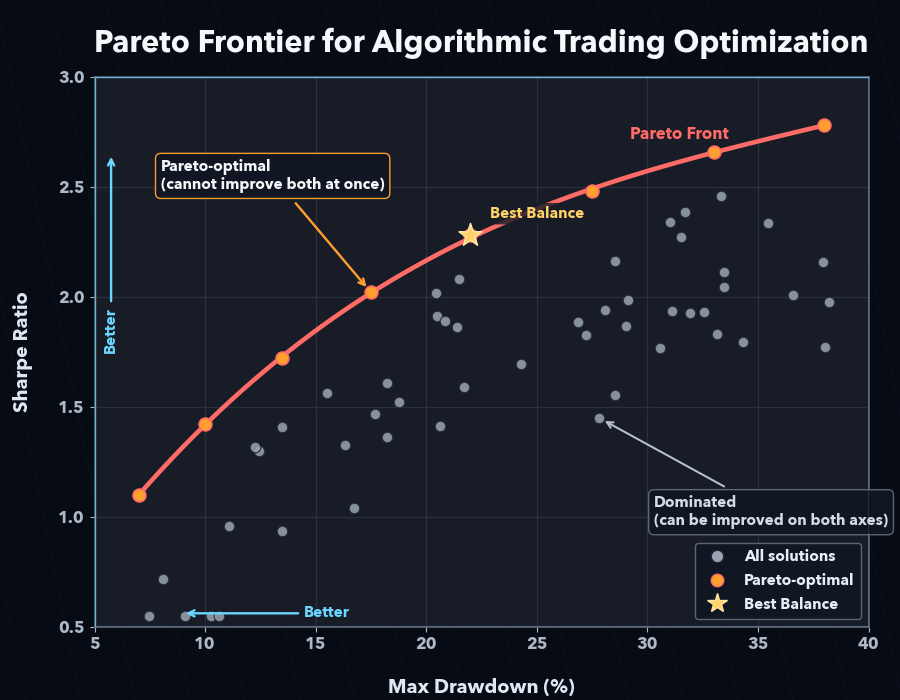
A live dashboard is shown in your terminal during optimization. Single-objective runs (--metric only) display a Current/BEST scoreboard, while multi-objective runs (two or more --objective flags) show a dedicated Pareto-front dashboard that updates after every trial.
- Multi-objective display: header (strategy, symbol, objective directions), progress bar, Current Trial (current value of each objective), and a Pareto Front table with the top 10 solutions plus the total count (
Top 10 / Total = N). --jsonsuppresses the dashboard and outputs JSON only.
Sample output (text)
For strategies without an optimizer_config, the built-in default search ranges are displayed on stderr at startup (F-404):
Search params (built-in default ranges):
  - sma_fast.length: [5, 25] step=5
  - sma_slow.length: [20, 60] step=5
  trials=200, metric=sharpe_ratio
When a strategy JSON defines optimizer_config.param_ranges, the header changes to (from strategy JSON).
Human-readable summary after optimization completes:
✅ Optimization complete
Best score (sharpe_ratio): 1.32
Best parameters: {'fast_period': 12, 'slow_period': 50}
💾 Result file: data/results/optimize_my_v1_20260415_103021.json
   Next: alpha-forge optimize apply data/results/optimize_my_v1_20260415_103021.json --to-strategy my_v1_optimized
DB saved: run_id=828cba05-7d4e-4f1a-9b2c-1a2b3c4d5e6f
The run_id is a UUID recorded in the optimization_runs table — it is not an opt_<timestamp> value.
With --save, the path to the result file (relative to report.output_path: absolute when launched via FORGE_CONFIG, cwd-relative under the default config) and the next step (alpha-forge optimize apply ...) are printed (F-401).
With --apply (no prompt when my_v1_optimized does not yet exist):
If my_v1_optimized already exists, an overwrite confirmation appears:
⚠️  'my_v1_optimized' already exists. Overwrite? [y/N]: y
✅ Best parameters saved as 'my_v1_optimized' (original 'my_v1' unchanged)
Sample output (--json)
{
  "best_metric": 1.32,
  "best_params": { "fast_period": 12, "slow_period": 50 },
  "freemium_limit_notices": [],
  "param_ranges_effective": {
    "sma_fast.length": { "min": 5, "max": 25, "step": 5 },
    "sma_slow.length": { "min": 20, "max": 60, "step": 5 }
  },
  "param_ranges_source": "default",
  "saved_path": "data/results/optimize_my_v1_20260415_103021.json"
}
| Field | Meaning |
|---|---|
param_ranges_effective |
Effective range dict actually searched (from strategy JSON or built-in default) |
param_ranges_source |
"strategy" (from JSON) or "default" (built-in) |
saved_path |
Path of the saved JSON when --save is used, relative to report.output_path. It is an absolute path when launched via FORGE_CONFIG, and a cwd-relative path under the default config (FORGE_CONFIG unset). Can be passed straight to alpha-forge optimize apply |
Common errors
| Message | Cause | Fix |
|---|---|---|
Invalid --start format (YYYY-MM-DD) |
Date format invalid | Use 2024-01-15 style |
No data available after --start <date> |
Insufficient data | Run alpha-forge data fetch <SYM> |
--max-drawdown and --objective cannot be used together. |
Both given | Choose one |
Cancelled. |
Declined overwrite confirmation for existing <strategy_id>_optimized |
Add --yes or re-confirm |
alpha-forge optimize cross-symbol
Optimize the same strategy across multiple symbols and find robust parameters via aggregation (mean / median / min).
Synopsis
Arguments and options
| Name | Kind | Default | Description |
|---|---|---|---|
SYMBOLS |
arguments (required, repeatable) | - | Space-separated list of symbols |
--strategy |
required | - | Strategy name |
--metric |
option | sharpe_ratio |
Metric to optimize |
--aggregation |
option | mean |
Score aggregation method (mean / median / min) |
--json |
flag | false | Output results as JSON |
--save |
flag | false | Save results to a file |
Sample output
Running cross-symbol optimization: SPY, QQQ, IWM x sma_v1 (target=sharpe_ratio, agg=mean)
✅ Cross-symbol optimization complete
Aggregate score (mean of sharpe_ratio): 1.20
Best parameters: {'fast_period': 15, 'slow_period': 60}
Per-symbol scores:
  - SPY: 1.32
  - QQQ: 1.18
  - IWM: 1.10
Common errors
| Message | Cause | Fix |
|---|---|---|
Warning: Failed to load data for <SYM> |
Data missing | alpha-forge data fetch <SYM> |
Error: No symbols with valid data |
Data missing for all | Fetch data, then retry |
alpha-forge optimize portfolio
Optimize the allocation weights for a single strategy applied to multiple symbols, using Optuna.
Synopsis
Arguments and options
| Name | Kind | Default | Description |
|---|---|---|---|
SYMBOLS |
arguments (required, repeatable) | - | Space-separated list of symbols |
--strategy |
required | - | Strategy name |
--metric |
option | sharpe_ratio |
Metric to optimize |
--json |
flag | false | Output results as JSON |
--save |
flag | false | Save results to a file |
Sample output
Running portfolio weight optimization: AAPL, MSFT, GOOGL x tech_basket_v1 (target=sharpe_ratio)
✅ Weight optimization complete
Best score (sharpe_ratio): 1.45
Optimal weights:
  - AAPL: 38.0%
  - MSFT: 42.0%
  - GOOGL: 20.0%
Sample output (--json)
{
  "best_weights": { "AAPL": 0.38, "MSFT": 0.42, "GOOGL": 0.20 },
  "best_metric": 1.45,
  "portfolio_metrics": { "cagr_pct": 14.2, "sharpe_ratio": 1.45, "max_drawdown_pct": -18.0 }
}
alpha-forge optimize multi-portfolio
Assign a distinct strategy to each symbol and optimize the allocation weights with Optuna.
Synopsis
Arguments and options
| Name | Kind | Default | Description |
|---|---|---|---|
SYMBOL_STRATEGY_PAIRS |
arguments (required, repeatable) | - | Pairs in SYMBOL:STRATEGY_NAME format |
--metric |
option | cagr_pct |
Metric to optimize |
--trials |
int | 200 |
Number of Optuna trials |
--save |
flag | false | Save results to a JSON file |
--json |
flag | false | Output results as JSON |
Sample output
Running multi-portfolio weight optimization: GC=F, NVDA (target=cagr_pct, trials=200)
✅ Multi-portfolio optimization complete
Best score (cagr_pct): 18.5234
Optimal weights:
  - GC=F: 55.0%
  - NVDA: 45.0%
Portfolio metrics:
  CAGR:         18.52%
  Sharpe:       1.38
  Max Drawdown: -22.10%
Common errors
| Message | Cause | Fix |
|---|---|---|
Invalid argument format: '<pair>' |
SYMBOL:STRATEGY_NAME format violation |
Use colon-separated pairs like GC=F:gc_optimized |
No valid symbol-strategy pairs found. |
All pair loads failed | Check data and strategy IDs |
alpha-forge optimize walk-forward
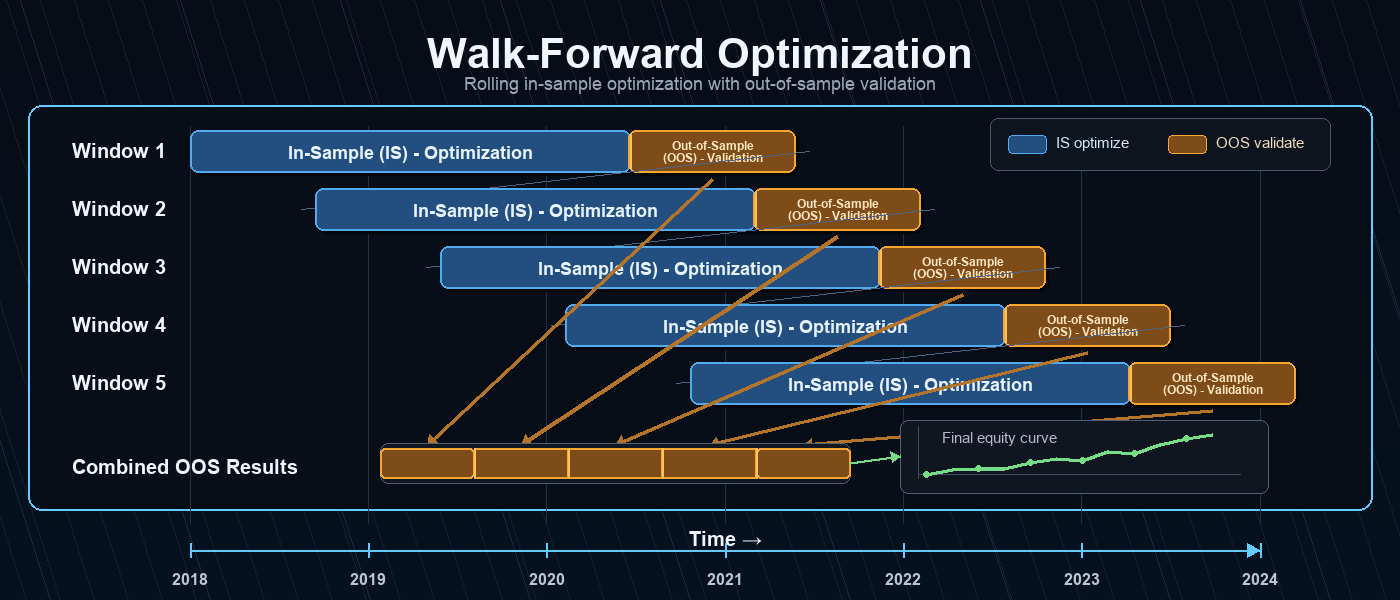
Split the time series into --windows consecutive windows and repeat in-sample optimization → out-of-sample evaluation in each window to measure overfitting resistance.
Synopsis
Arguments and options
| Name | Kind | Default | Description |
|---|---|---|---|
SYMBOL |
argument (required) | - | Symbol |
--strategy |
required | - | Strategy name |
--metric |
option | sharpe_ratio |
Metric to optimize |
--windows |
int | 5 |
Number of windows |
--min-window-trades |
int | - | Skip windows whose IS trade count is below N and exclude them from the mean. Useful for low-frequency strategies that would otherwise drop entire windows to -∞ |
--start |
option | - | Start date of the walk-forward period (YYYY-MM-DD). Same period filter as optimize run --start; all data is used if omitted |
--end |
option | - | End date of the walk-forward period (YYYY-MM-DD). All data is used if omitted. Invalid format or no data in range exits with 1, same as optimize run |
--json |
flag | false | Output results as JSON |
--save |
flag | false | Record WFT results to the DB (optimization_runs). Per-window results are stored in all_trials_json in window format, and --json returns the run_id as opt_run_id (also feeds the alpha-visualizer WFO tab) |
--goal |
option | - | Goal name (e.g. default, stocks). Reads the goals.yaml pre_filter thresholds; when set, the goal's WFT settings (including the OOS aggregation method mean / median / trimmed_mean, #947) are also applied. Even without --goal, the --json output always carries pre_filter / pre_filter_pass using default thresholds (issue #1237, contract aligned with backtest run) |
--sharpe-min |
float | --goal value or 1.0 |
Minimum Sharpe ratio for the pre_filter_pass decision |
--max-dd |
float | --goal value or 25.0 |
Max drawdown limit (%) for the pre_filter_pass decision |
Early warning for IS trade insufficiency and the [WARNING] mark
If every in-sample window evaluates in_sample_metric to -∞, AlphaForge prints an early warning to stderr indicating that signal coverage is insufficient. In addition, when the number of valid IS windows falls below half of the total, the summary row is annotated with a [WARNING] mark to flag low confidence in the results.
Pass --min-window-trades N to skip windows whose IS trade count is below N and exclude them from the mean.
Live progress dashboard (Rich)
While alpha-forge optimize walk-forward runs, AlphaForge displays a dedicated two-tier progress dashboard.
- Outer bar: overall window progress (
<completed_windows>/<n_windows>). - Inner bar: the current window's in-sample Optuna trial progress.
As each window completes, its IS / OOS scores and OOS trade count are appended to the Scoreboard table, and the best window (highest OOS) is highlighted in green. Windows with zero OOS trades or NaN/±inf OOS scores are rendered as red FAILED rows and added to the Failures counter.
╭─ AlphaForge Walk-Forward ─────────────────────────────────────────╮
│ Strategy: sma_v1  Symbol: SPY  Metric: sharpe_ratio (↑)            │
│ Windows: 5  In-sample: 70%                                         │
╰────────────────────────────────────────────────────────────────────╯
Windows       ████████████████░░░░░░░░░░  3/5  60%  0:01:24 < 0:00:55
  └ #4 IS trial ████████████░░░░░░░░░░░░ 12/30  40%  0:00:18 < 0:00:32
╭─ Windows ─────────────────────────────────────────────────────────╮
│ Win  OOS start   IS         OOS         Trades                     │
│   1  2024-04-01  1.4231     0.8912      41                         │
│   2  2024-07-01  1.2104     1.0307✓     37                         │
│   3  2024-10-01  0.9834     -0.1521     28                         │
╰────────────────────────────────────────────────────────────────────╯
Mean OOS: 0.5899   Best window: #2 (1.0307)   Failures: 0
All progress bars and dashboards are rendered on stderr. Even with --json, the dashboard is shown when stderr is a TTY, while stdout stays as pure JSON. When stderr is not a TTY (CI, pipes, redirected files), the dashboard is automatically suppressed (issue #1190) — useful when you want CI logs to stay quiet. In non-TTY environments each window completion is instead emitted as a one-line plain-text log ([Window k/N] OOS=... trades=...) on stderr, so progress is never lost.
Sample output
Running walk-forward optimization: SPY x sma_v1 (5 windows)
✅ Walk-forward complete
Window     IS Score  OOS Score  Best Params
-----------------------------------------------------------------
1            1.4523     1.1024  {'fast': 10, 'slow': 50}
2            1.6210     0.8932  {'fast': 12, 'slow': 55}
⚠️  Window 3 skipped: OOS trade count is 0 (statistically invalid)
4            1.3120     1.0521  {'fast': 14, 'slow': 60}
5            1.5240     0.9810  {'fast': 11, 'slow': 50}
Average OOS sharpe_ratio: 0.987 (4/5 valid windows)
When all windows are invalid:
Additional fields in --json output
In addition to per-window fields, the --json output includes summary fields describing IS validity.
| Field | Type | Description |
|---|---|---|
is_total_trades |
int (per-window) | IS-period trade count |
is_valid_windows |
int | Number of valid IS windows |
all_is_invalid |
bool | true when every IS window evaluated to -∞ (insufficient signals) |
skip_reason |
string | null (per-window) | Reason for skipping (see below) |
skip_reason lets exploration agents distinguish why a window was invalidated.
| Value | Meaning |
|---|---|
null |
Valid window |
"is_trades_insufficient" |
IS trade count below --min-window-trades (frequency issue) |
"oos_metric_invalid" |
OOS metric was ±∞ or NaN (signal-quality issue) |
"oos_trades_zero" |
OOS-period trade count was 0 (no signal) |
"oos_trades_insufficient" |
OOS-period trade count was at least 1 but below min_oos_trades (only when min_oos_trades > 1; statistically invalid, #319) |
The --json output includes pre_filter (sharpe_min / max_dd_max / min_trades / goal) and pre_filter_pass (whether the aggregated OOS Sharpe is at or above sharpe_min) by default (issue #1237). Previously the verdict was added only with --goal; it now appears even without --goal using default thresholds (Sharpe 1.0 / MaxDD 25.0) so the presence and naming of the pass/fail decision match backtest run / backtest monte-carlo. Override the thresholds with --goal (or --sharpe-min / --max-dd). The OOS aggregation method is switched via goals.yaml wft.aggregation_method (mean / median / trimmed_mean, default mean, issue #947).
alpha-forge optimize apply
Read a result JSON saved by alpha-forge optimize run and apply best_params to the strategy, saving as <id>_optimized.
Synopsis
Arguments and options
| Name | Kind | Default | Description |
|---|---|---|---|
RESULT_FILE |
argument (required, file must exist) | - | Optimization result JSON |
--to-strategy |
required | - | Target strategy name |
--yes / -y |
flag | false | Skip confirmation prompt |
Sample output
Strategy: my_v1
Parameters to apply: {'fast_period': 12, 'slow_period': 50}
Apply these parameters to the strategy? [y/N]: y
✅ Optimization parameters applied: strategy_id=my_v1_optimized
Applied parameters: {'fast_period': 12, 'slow_period': 50}
The strategy ID gets an _optimized suffix and is saved as a new strategy. The original strategy is left untouched.
alpha-forge optimize sensitivity
Sweep around an optimized parameter set and measure how much the metric changes with small perturbations. Useful for quantifying overfitting risk.
Synopsis
Arguments and options
| Name | Kind | Default | Description |
|---|---|---|---|
RESULT_FILE |
argument (required, file must exist) | - | Optimization result JSON |
--strategy |
option | from result_file |
Strategy name |
--metric |
option | from result_file |
Evaluation metric |
--steps |
int | 3 |
Steps to test around best value |
--threshold |
float | 0.8 |
Robustness threshold ratio |
--symbol |
option | from result_file |
Symbol whose data is used |
--start |
option | - | Start date of the sensitivity period (YYYY-MM-DD). Same period filter as optimize run / walk-forward; use it to evaluate the neighbourhood over the same window the parameters were optimized on |
--end |
option | - | End date of the sensitivity period (YYYY-MM-DD). All data is used if omitted |
--json |
flag | false | Output results as JSON |
--save |
flag | false | Save results to a file |
Sample output
Running sensitivity analysis: my_v1 x SPY (metric=sharpe_ratio, steps=±3)

=== Sensitivity Analysis: my_v1 ===
Best score (sharpe_ratio): 1.4523
Overall robustness score: 78.45%

Parameter                  Best Val  Robustness  Score range
----------------------------------------------------------------------
fast_period                      12       82.1%  1.20 1.32 1.42 1.45 1.40 1.31 1.18
slow_period                      50       75.3%  1.05 1.21 1.38 1.45 1.39 1.18 0.97
Common errors
| Message | Cause | Fix |
|---|---|---|
Error: --strategy is required |
Strategy name not in result file | Pass --strategy <ID> |
Error: --symbol is required |
Symbol not in result file | Pass --symbol <SYM> |
alpha-forge optimize history
List previously saved optimize_*.json files in a scoreboard. When --strategy is omitted, the most recent --limit entries across all strategies are shown (F-402).
Synopsis
# All strategies, most recent 20 (default)
alpha-forge optimize history

# Filter by strategy
alpha-forge optimize history --strategy <ID> [OPTIONS]
Options
| Name | Kind | Default | Description |
|---|---|---|---|
--strategy |
optional | - | Strategy name (omit to show all strategies in mtime-desc order) |
--limit |
int | 20 |
Max rows to display when --strategy is omitted |
--json |
flag | false | Output results as JSON |
--sort |
choice | score |
Sort order (score / date) |
Sample output (with --strategy)
=== Optimization History: my_v1 (3 records) ===

Timestamp         Symbol       Metric          Score   Key Parameters
────────────────────────────────────────────────────────────────────────────────
20260415_103021   SPY          sharpe_ratio    1.4523  fast_period=12, slow_period=50
20260410_181522   SPY          sharpe_ratio    1.3210  fast_period=14, slow_period=55
20260401_092030   SPY          sharpe_ratio    1.1850  fast_period=10, slow_period=45

Best: sharpe_ratio=1.4523  (20260415_103021)
      Parameters: {'fast_period': 12, 'slow_period': 50}
Sample output (all strategies)
Without --strategy, an extra Strategy column is added and the latest --limit entries are shown:
=== Optimization History: all strategies (12 records) ===

Timestamp         Strategy                  Symbol       Metric          Score   Key Parameters
─────────────────────────────────────────────────────────────────────────────────────────────────
20260515_120030   usdjpy_sma_v1            USDJPY=X    sharpe_ratio    1.8721  fast=10, slow=40
20260514_181522   spy_rsi_v2               SPY         sharpe_ratio    1.5210  rsi_period=14
...
When no history files are found:
alpha-forge optimize grid
Run an exhaustive Cartesian Grid Search over all parameter combinations defined in optimizer_config.param_ranges. Skips Optuna sampling and evaluates the full grid, then displays / saves the Top-K rows.
Synopsis
Arguments and options
| Name | Kind | Default | Description |
|---|---|---|---|
SYMBOL |
argument (required) | - | Symbol |
--strategy |
required | - | Strategy name |
--metric |
option | sharpe_ratio |
Metric to sort by |
--top-k |
int | 20 |
Top-K rows to show / save |
--chunk-size |
int | 100 |
Chunk size for ChunkedGridRunner |
--max-memory-mb |
float | - | RSS monitoring threshold (MB) |
--max-trials |
int | 10000 |
Confirm prompt threshold for grid size |
--save |
flag | false | Save the result DataFrame |
--save-format |
choice | csv |
Save format (csv / parquet / json) |
--apply |
flag | false | Save best parameters under a new strategy ID <strategy_id>_optimized (the original strategy is left unchanged) |
--yes / -y |
flag | false | Skip the overwrite confirmation when <strategy_id>_optimized already exists |
--start |
option | - | Period filter start date YYYY-MM-DD |
--end |
option | - | Period filter end date YYYY-MM-DD |
--min-trades |
int | optimizer_config.constraints.min_trades (if defined) |
Filter out trials below min trades. Auto-applied from strategy's optimizer_config.constraints.min_trades when omitted (CLI value takes priority if specified). Trials with total_trades=0 are always excluded regardless of this flag |
--max-drawdown |
float | - | Filter out trials above MDD |
--json |
flag | false | Output Top-K as JSON |
Zero-trade trials and ±inf metrics
Trials that produce zero trades have no real-world value and are excluded by default, even when --min-trades is omitted. Cells that evaluate to ±inf (e.g. Sharpe) are rendered as — in the Top-K table and are sorted as NaN to the end. This prevents Sharpe=∞ / total_trades=0 parameters from being selected as Top-1.
Live progress display (Rich dashboard)
While Grid Search is running, a real-time Rich dashboard is rendered to the console (the same UI pattern used by alpha-forge backtest run and alpha-forge optimize run):
- Header: strategy ID, symbol, metric, total trials, chunk size
- Progress bar: completed / total trials, elapsed time, estimated time remaining
- Scoreboard: the trial currently being processed (
Current: params + score) and the running Best (Best: trial number + score + params). Best updates are highlighted with aBEST ★marker - Footer: total number of failed trials (
Failures: N)
The dashboard is rendered on stderr. With --json, the dashboard still appears when stderr is a TTY while stdout receives only the pure Top-K JSON (for CI/pipeline use). When stderr is not a TTY (CI, pipes, redirected files), the dashboard is automatically suppressed. When trials fail mid-run, the run continues; the Current row is repainted in red while the Failures counter advances.
╭───────────────────────── AlphaForge Grid Search ─────────────────────────╮
│ Strategy: my_v1  Symbol: SPY  Metric: sharpe_ratio (↑)  Trials: 1500  Chunk: 100 │
╰──────────────────────────────────────────────────────────────────────────╯
Grid Search 実行中...  ━━━━━━━━━━━━━━━━━━━━━━━━━━━━━  234/1500 (15%)  0:00:42  0:04:33
╭───────────────────────────── Scoreboard ─────────────────────────────╮
│            Trial #   Score        Parameters                         │
│ Current        234   1.4537       fast_period=14  slow_period=55     │
│ BEST ★         198   1.6072       fast_period=12  slow_period=50     │
╰──────────────────────────────────────────────────────────────────────╯
Failures: 0
Sample output (Top-K table after completion)
On completion the Top-K is shown as a Rich framed table titled Top-N by <metric> (there is no strategy-name / symbol / metric=... header row). The columns are rank, each parameter key (<indicator_id>.<param> form), the metric column, then max_drawdown_pct / total_trades / total_return_pct (those present in the results and not the metric itself).
Grid size: 1500 trials (chunk_size=100, max_memory_mb=None)
Grid size 12000 exceeds --max-trials 10000. Continue? [y/N]: y
... (Rich dashboard streaming) ...

                         Top-20 by sharpe_ratio
┏━━━━━━┳━━━━━━━━━━━━━━━━━┳━━━━━━━━━━━━━━━━━┳━━━━━━━━━━━━━━┳━━━━━━━━━━━━━━━━━━┳━━━━━━━━━━━━━━┳━━━━━━━━━━━━━━━━━━┓
┃ rank ┃ sma_fast.length ┃ sma_slow.length ┃ sharpe_ratio ┃ max_drawdown_pct ┃ total_trades ┃ total_return_pct ┃
┡━━━━━━╇━━━━━━━━━━━━━━━━━╇━━━━━━━━━━━━━━━━━╇━━━━━━━━━━━━━━╇━━━━━━━━━━━━━━━━━━╇━━━━━━━━━━━━━━╇━━━━━━━━━━━━━━━━━━┩
│    1 │              12 │              50 │       1.4500 │         -16.8000 │           18 │          52.3000 │
│    2 │              14 │              55 │       1.4100 │         -17.2000 │           16 │          48.1000 │
└──────┴─────────────────┴─────────────────┴──────────────┴──────────────────┴──────────────┴──────────────────┘
Common errors
| Message | Cause | Fix |
|---|---|---|
optimizer_config not defined |
Strategy JSON has no optimizer_config |
Add optimizer_config.param_ranges |
param_ranges is empty |
param_ranges is an empty dict |
Define at least one parameter range |
optimizer_config.param_ranges contains unresolvable keys (exit 2) |
A param_ranges key cannot be resolved against the strategy (index forms like indicators[0].params.length are unsupported) |
Use <indicator_id>.<param> (e.g. aroon.length) / risk.<field> form |
Metric '<name>' is not present in results |
Metric typo or unsupported metric | Use a supported metric like sharpe_ratio |
No trial satisfies the constraints |
All trials filtered out by --min-trades / --max-drawdown |
Loosen constraints |
alpha-forge optimize clean
Tidy up the optimize_*.json files that accumulate under config.report.output_path (default data/results/) by age / strategy / generation and delete them. This cleanup command prevents result files from growing without bound during long-running loops such as /explore-strategies --runs 0.
Syntax
Arguments and options
| Name | Kind | Default | Description |
|---|---|---|---|
--older-than |
option | - | Delete results older than the given number of days (mtime, 30d / 30 format) |
--strategy |
option | - | Target only a specific strategy's result files. Resolved by the strategy field inside each JSON (falls back to the filename when missing) |
--keep |
int (≥1) | - | Keep the latest N files (mtime descending) per strategy and delete older ones |
--dry-run |
flag | false | List the files that would be deleted and exit without deleting |
--yes / -y |
flag | false | Skip the confirmation prompt and delete |
--json |
flag | false | Emit the result as JSON ({removed: [...], failed: [...], count, dry_run}) |
- If none of the filters (
--older-than/--strategy/--keep) are given, the command stops with exit code2to prevent accidental wholesale deletion. Multiple conditions are combined with AND. --keepretains the latest N files by mtime (modification time), not by metric.- Because this is a destructive operation, in non-interactive environments (
FORGE_NONINTERACTIVE/CI/ non-TTY) it stops with exit code2unless--yesis given.--yesis also required when running with--json.
Examples
# Delete results older than 30 days (preview first)
alpha-forge optimize clean --older-than 30d --dry-run

# Keep only the latest 5 results per strategy and delete the rest (non-interactive)
alpha-forge optimize clean --keep 5 --yes
Common behavior
- Save location: When
--saveis set, results are saved underconfig.report.output_pathasoptimize_<strategy>_<timestamp>.json. Cross-symbol results useoptimize_cross_*and portfolio results useoptimize_portfolio_*prefixes. - DB persistence:
alpha-forge optimize runalways records toSQLiteOptimizationResultRepositoryregardless of--save, returning arun_id. - Journal integration: When
config.journal.auto_recordis true, optimization runs are also recorded in the Journal. FORGE_CONFIG: The strategy / data / results locations are determined by theforge.yamlreferenced by theFORGE_CONFIGenvironment variable.- Exit codes:
0on success,1forclick.ClickException,2forclick.UsageError,1forclick.Abort. - Trial plan limit: On the Trial plan, the maximum input data date is capped at
2023-12-31, and the optimization trial count is capped at 50 trials (run/cross-symbol/portfolio/multi-portfolio/walk-forward/grid;apply/history/sensitivityare unaffected).gridrandomly samples 50 combinations using a fixed seed when the full Cartesian product exceeds 50. See Trial Limits for details.